Press Enter to search or Esc to close

FW Food Menu

Online menu and ordering platform for independent restaurants. Replace your TripAdvisor menu with a real website on your own domain. Full addon library covering photos, multi-language menus, online ordering, delivery zones, QR table service, and AI-enhanced food photography.
Subscribe Now
Download v 6.1.0
Released 17 Oct 2025
Compatibility: 3.10.x, 4.x, 5.x, 6.x
Download v 6.0.0
Released 06 Aug 2024
Compatibility: 5.x / 6.x
Top Features & Screenshots

Product Features

  • Responsive Online Menu
    Mobile friendly layouts for best performance and look on any device. Default minimalistic design is built on UIkit and can use its own library to avoid conflicts.
    Categories & sub-categories
    Unlimited number of categories and sub-categories allowed. Food, drinks menu categories designed by any criteria in any sequence.
    Meals vs Subcategories Split
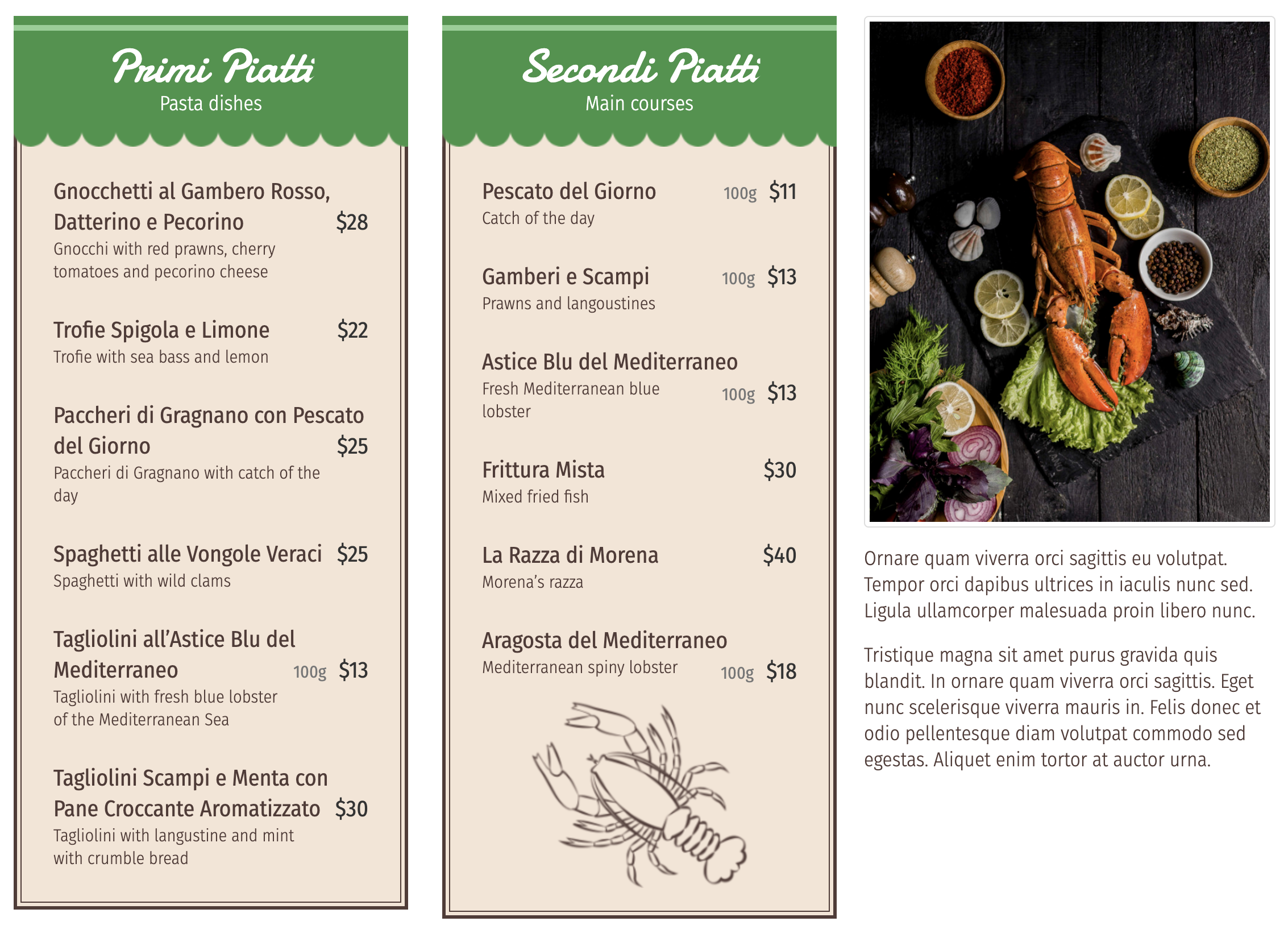
    Separate column settings for meal items and subcategory cards. Display 3 meal columns inside a 2-column subcategory layout, or any combination you need.
    Text-Only Layout
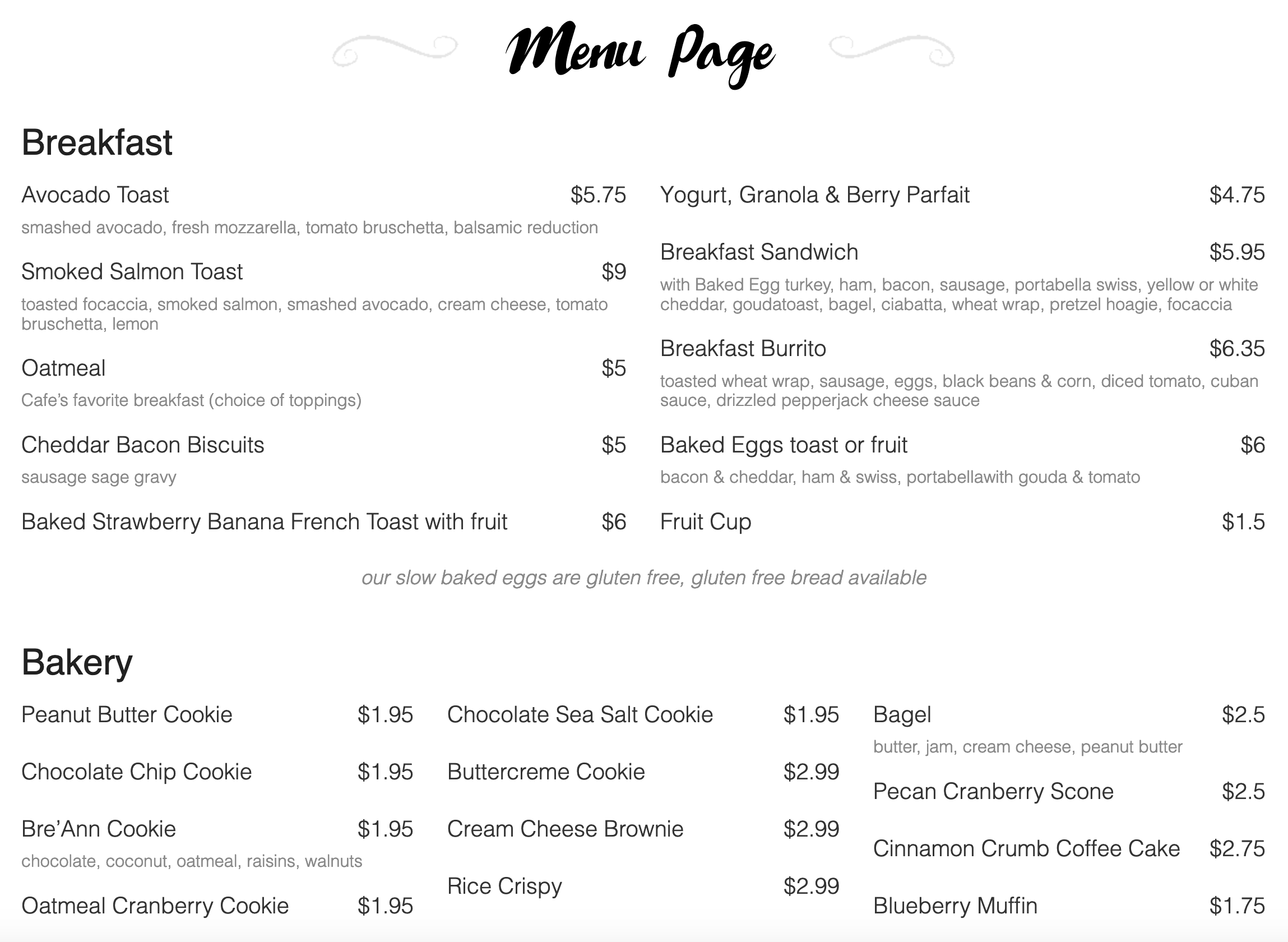
    No images, just clean typography. Category headings, meal names, descriptions, and prices. Ideal for wine lists, tapas menus, or minimalist restaurant brands.
    Per-Category Column Count
    Configure 1, 2, 3, or 4 columns per category independently. Your burger menu can run in two wide columns while the drink list uses four narrow ones.
  • Meal HTML description
    Create your menu style with HTML description for every meal. If you need to change look and feel of every item pay attention to design add-ons.
    Text and image blocks
    Use empty category HTML description to add text and image blocks in-between other categories or on a side.
    Automatic Hover Carousel
    Category images rotate automatically on mouse-over using the Owl Carousel library. Visitors see multiple angles without clicking anything.
    Unlimited Photos Per Meal
    Upload one hero image or a full gallery for every dish. No fixed limit. Build rich photo stories for your signature meals while keeping simpler items with a single shot.
    Unlimited Custom Badges
    Create any number of badges with custom names, colors, and image icons. SVG, PNG, and JPG image formats supported for the icon.
  • Horizontal Tab Navigation
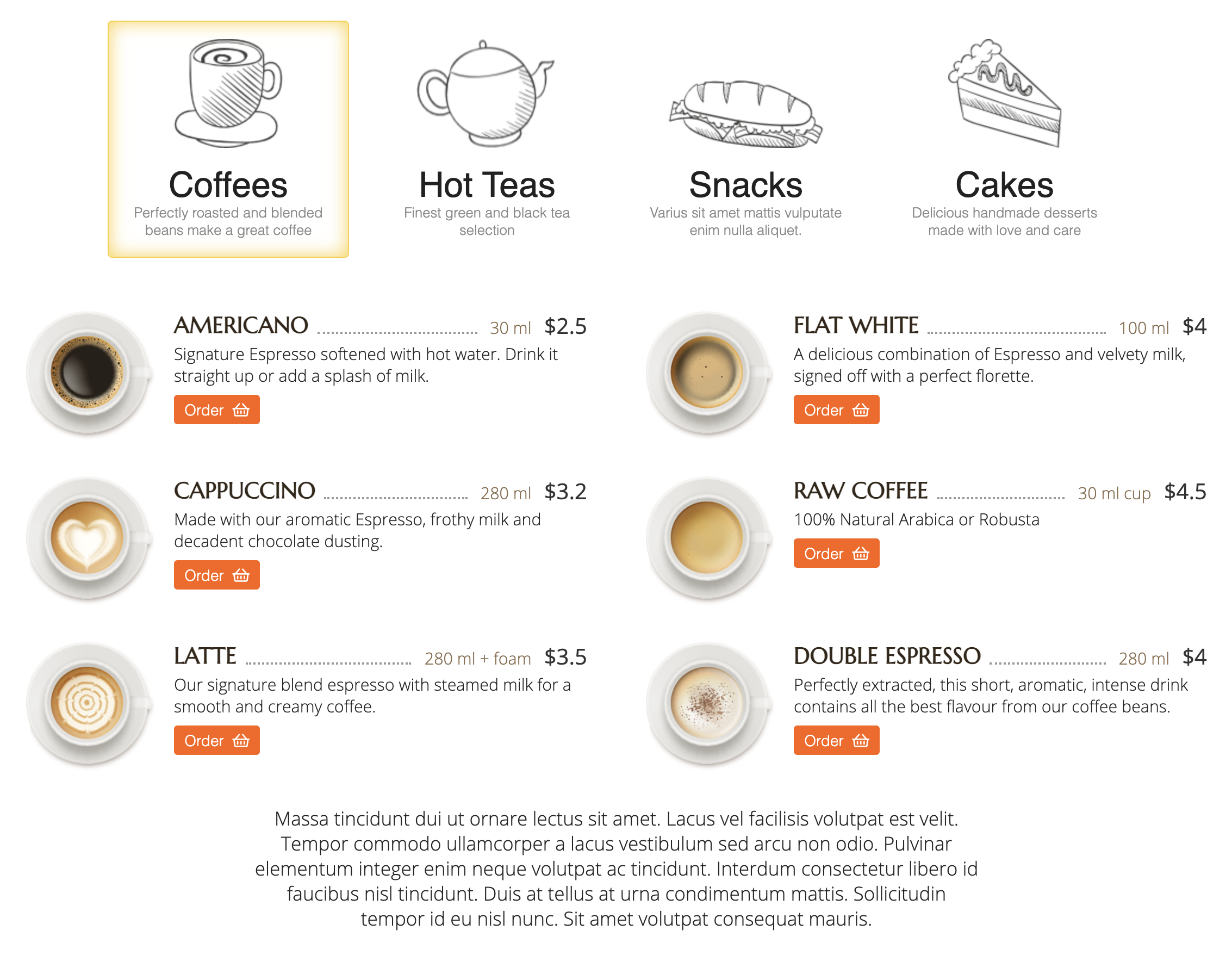
    Category names render as clickable tabs at the top of the menu. One click switches between categories with no vertical scrolling and no page reload.
    Individual category settings
    Categories has their own settings and can configured individually. It allows to make empty parent category and then have sub-category listed in 2 columns.
    Show or Hide Toggle
    Toggle tab display on or off without uninstalling. Hide tabs on single-category pages and show them where they help navigation.
    Three Alignment Options
    Position tabs left, center, or right to match your brand guidelines and template design. Global setting applies to every page.
    Dual-Mode Tracking
    Ingredients and allergens share one system with a flag that marks each as a regular ingredient or an allergen. One database, two uses.
  • Full Shopping Cart
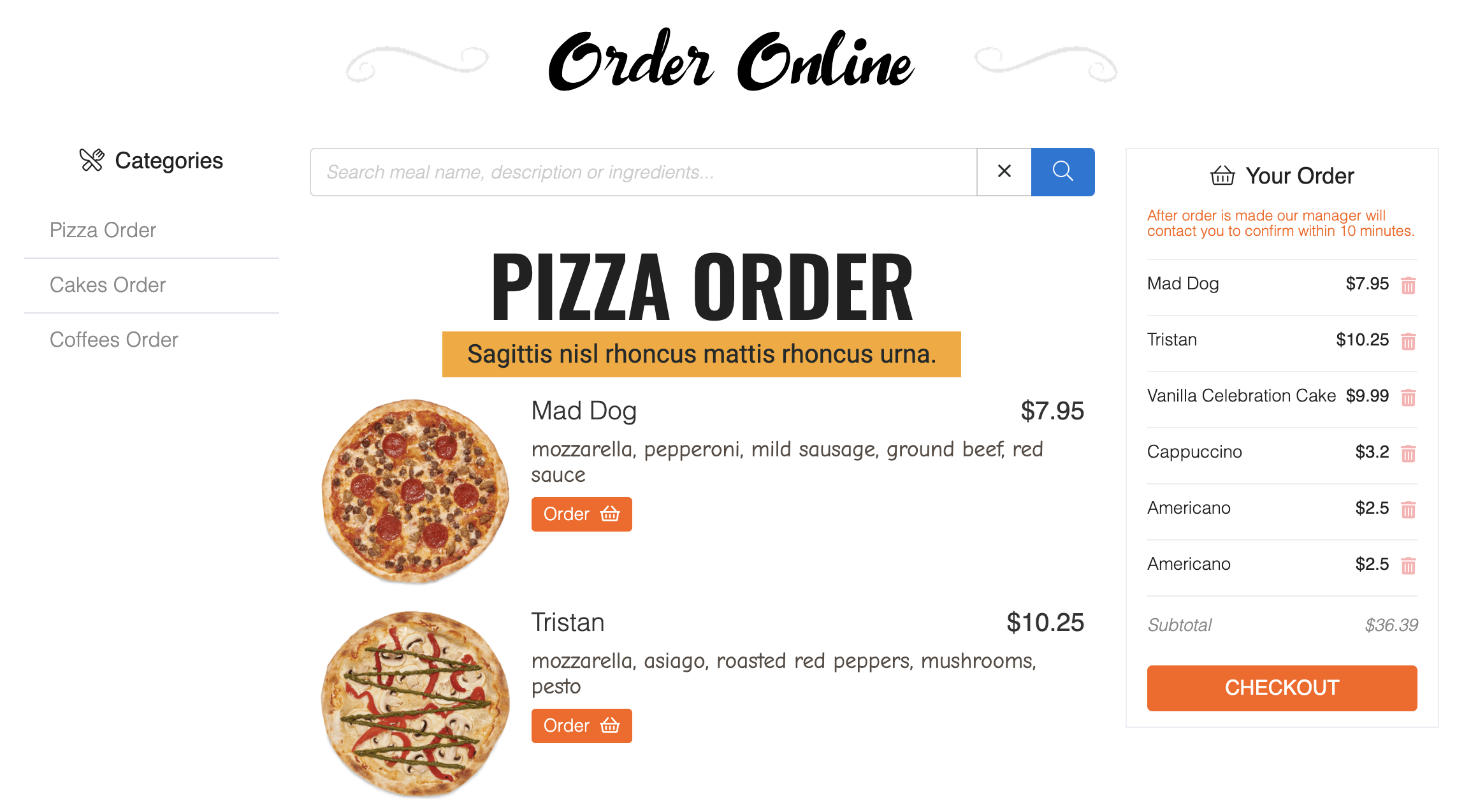
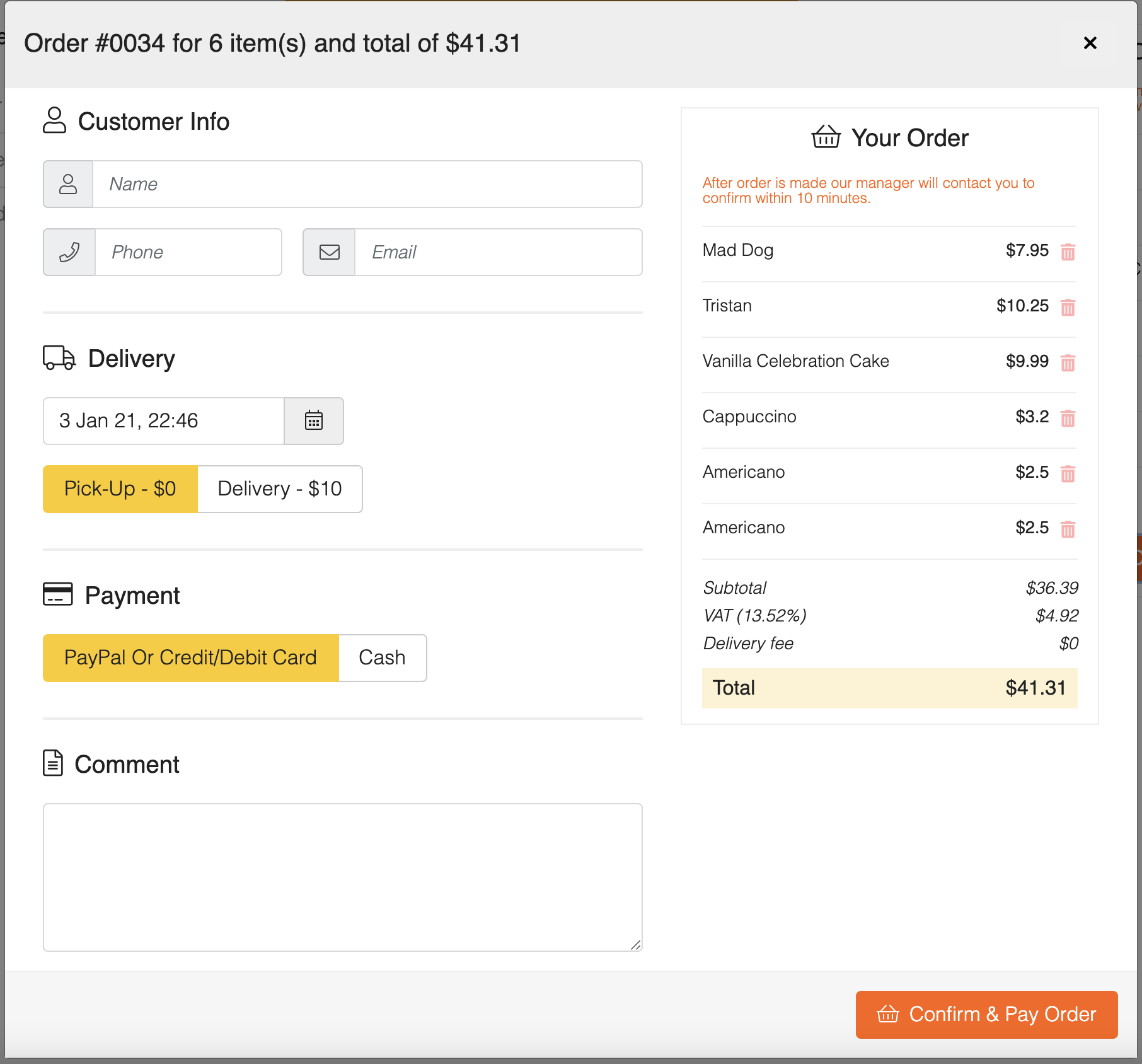
    Multi-item cart with quantity management, live totals, and session persistence. Customers browse, add, remove, and checkout without losing their order.
    Multiple Price Tiers Per Meal
    Configure unlimited price variants per dish with custom labels like Small, Medium, Large, or Personal/Family. Each tier has its own price and optional portion description.
    Tax and Delivery Calculation
    Automatic tax calculation (fixed or percentage), delivery fee integration, and real-time total updates as customers modify their order.
    Modifier Groups With Surcharges
    Create add-on groups for extras, toppings, sides, or substitutions. Each modifier carries its own surcharge that adds to the meal price when selected.
    Sticky Cart Panel
    A persistent cart sidebar shows the live order total, tax, and delivery fees while customers browse. No hunting for a hidden cart button.
  • Payment Gateway Integration
    Plug in Stripe, PayPal, or any Joomla-compatible payment gateway via the payment_gate_id field. Customers pay online and the order is confirmed automatically.
    Currency settings
    Price currency parameters for proper sign and abbreviation codes. Currency is used for Online Order add-on to show price and calculate total.
    Customer Information Capture
    Checkout collects name, email, phone, and order comments for every order. Data flows into the admin panel and triggers confirmation emails.
    Multi-Zone Delivery Mapping
    Create delivery zones by radius from your restaurant. Each zone has its own price, minimum order value, and optional full-price override.
    Customer Order Confirmation
    On new orders, the customer gets an instant text with the order ID and total. No more hoping the confirmation email reaches them.

More Features

  • Built-In Typography Hierarchy
    FWFM Text Menu
    Preset Poppins font scale: 28px bold category headers, 20px meal names, 14px prices. Readable on phones and desktops without any tweaking.
    Five Nutritional Fields
    FWFM Calories
    Track energy (calories), protein, fat, saturated fat, and carbohydrates per meal. Display any subset you want, the rest stay hidden.
    Frontend Allergen Filtering
    FWFM Ingredients & Allergens
    Customers filter the menu by allergen from the frontend to hide items containing gluten, nuts, dairy, or any flagged ingredient. Emits JSON data attributes for custom JavaScript filters too.
    Dual Checkout Modes
    FWFM Online Order Menu Design
    Works for delivery and pickup orders AND for QR-code table service through the same template. Run a pickup website by day and table ordering by night.
    Distance-Based Pricing
    FWFM Delivery
    Customer enters an address and the plugin calculates the distance to your location, picks the right zone, and shows the delivery fee instantly.
  • Conditional Display
    FWFM Calories
    The nutritional block only renders when at least one value is set. Meals without data stay clean, no empty placeholders.
    List and Detail Layouts
    FWFM Calories
    Values display in both meal list views and individual meal detail pages. Same data, two layouts, consistent presentation.
    Bulk Assignment
    FWFM Ingredients & Allergens
    Assign ingredients or allergens to multiple meals at once with the batch tool. Also supports batch removal for cleanup after menu changes.
    Auto-Create Missing Items
    FWFM Ingredients & Allergens
    Saving a meal with a new ingredient name auto-creates the ingredient record. No need to pre-populate your ingredient list before adding menu items.
    Merge Duplicates Tool
    FWFM Ingredients & Allergens
    Consolidate duplicate allergens after imports or data migration with the merge tool. Keeps the database clean as your menu grows.
  • Required or Optional Groups
    FWFM Prices & Modifiers
    Mark modifier groups as required or optional per meal. Required groups force a choice before add to cart, optional groups allow skipping.
    Special Discount Pricing
    FWFM Prices & Modifiers
    Set a promotional price alongside the regular price. The frontend displays the original with strikethrough and the discount next to it for Tuesday specials and happy hour deals.
    Drag to Reorder
    FWFM Prices & Modifiers
    Reorder prices and modifiers by dragging rows. Add or delete individual entries on the fly with no page reload.
    Group Naming for Clarity
    FWFM Prices & Modifiers
    Name modifier groups with descriptive labels like Size, Extras, or Toppings. Customers see the group heading above the choices, matching the mental model of how they order.
    Modifier and Price Variants
    FWFM Order Online
    Carries modifier groups and price tiers through to the order. Pizza toppings, portion sizes, and add-on surcharges all appear in the final order total.
    Order Status Workflow
    FWFM Order Online
    Track orders through a configurable status workflow (new, confirmed, preparing, ready, completed). Each status change triggers a customer email notification.
    Dashboard Revenue Reporting
    FWFM Order Online
    Admin dashboard shows recent orders and monthly revenue totals at a glance. Know your daily and monthly performance without opening reports.
    Modal Checkout Forms
    FWFM Online Order Menu Design
    Order forms open as modals with inline validation. Empty fields highlight in red and the form prevents submission until all required data is filled.
    Promo Module With Five Types
    FWFM Online Order Menu Design
    Highlight Meal of the Day, New, Special, Recommended, or Chef's Choice items in a dedicated promo block. Customers see specials without scrolling.
    Location Map Upload
    FWFM Online Order Menu Design
    Upload a custom map image for your restaurant location through an AJAX upload field. No Google Maps embed required.
    PDF Menu Export
    FWFM Online Order Menu Design
    Export the full menu to PDF in horizontal layout. Use it for printed handouts, emailed daily menus, or customer takeaways.
    QR Code Generation Per Table
    FWFM Table Orders
    Every table gets a unique QR code image (SVG) generated automatically. Print it, laminate it, stick it on the table, and the ordering system is ready.
    Group Dining Cart
    FWFM Table Orders
    Multiple guests at the same table can share a group cart. The whole party orders together and the kitchen gets one consolidated ticket.
    Hash-Based Table Security
    FWFM Table Orders
    Each table carries a unique hash token so guests at one table cannot see orders from another. Hotel rooms and café tables stay cleanly isolated.
    Live Table Cart View
    FWFM Table Orders
    Staff see in-progress carts and completed orders in real time, grouped by table. Filter and search by table name to find any order quickly.
    Dine In Delivery Option
    FWFM Table Orders
    The addon auto-populates a "Dine In" delivery option when active. Kitchen workflow stays consistent with pickup and delivery orders, just with a table number instead of an address.
    Table CRUD Management
    FWFM Table Orders
    Add, rename, reorder, and delete tables in the admin. Download QR codes per table. Scale from a 5-table café to a 150-room hotel.
  • Per-Category Time Windows
    FWFM Time & Hours
    Set start and end times per category, not globally. Breakfast 7-11am, lunch 11:30-2:30, dinner 5-10pm, all on the same menu page with automatic switching.
    Disabled State With Message
    FWFM Time & Hours
    Items outside their window show as grayed out with "Available from X to Y" text. Customers see what they are missing and when to come back.
    Cart-Level Validation
    FWFM Time & Hours
    For sites running the online ordering addon, the cart blocks add-to-cart on unavailable items. No more accidental breakfast orders at dinner.
    12 or 24 Hour Format
    FWFM Time & Hours
    15-minute increment time picker from 6:00 AM to 10:45 PM. Switch between 12-hour and 24-hour display to match regional conventions.
    Opening Hours Display
    FWFM Working Hours
    Shows your restaurant working hours pulled from global FW Food Menu settings. Update hours in one place and every module instance updates automatically.
    Address and Phone Block
    FWFM Working Hours
    Displays location address, phone number, and map coordinates alongside the hours. All fields read from the component configuration.
    Drop Into Any Position
    FWFM Working Hours
    Place the module in any Joomla template position: sidebar, footer, or above the menu. Custom CSS class field lets you style it to match your theme.
    Minimum Order Per Zone
    FWFM Delivery
    Enforce a minimum order sum per zone. Distant zones can require larger orders to make delivery viable. Out-of-range zones auto-hide.
    Room Service Fees
    FWFM Delivery
    For hotels and venues, add a fixed or percentage room-service fee on top of the meal price. Applies automatically when room service is the delivery mode.
    Kilometres or Miles
    FWFM Delivery
    Switch between km and mi to match regional conventions. US sites run on miles, European sites on kilometres, all through a single setting.
    Dual Channel Delivery
    FWFM Text Notifications
    Send via SMS, WhatsApp, or both through the Twilio API. Customers receive messages on whichever channel they prefer, and WhatsApp is free over Wi-Fi for international guests.
    Manager Kitchen Alerts
    FWFM Text Notifications
    Kitchen managers receive alerts with order ID, item quantity, total amount, and comments. Add multiple phone numbers separated by commas to broadcast to the whole team.
    Status Change Updates
    FWFM Text Notifications
    When an order moves from new to preparing to ready, the customer gets a status update text. No more "is my order ready yet?" calls.
    Twilio Credentials Setup
    FWFM Text Notifications
    Paste Account SID, Auth Token, and sending phone number from your Twilio account. The plugin handles the rest with built-in error handling if the Twilio API is unavailable.
  • Joomla Language Integration
    FWFM Multilingual
    Every language you install in Joomla becomes available automatically. The plugin reads from the languages table so there is no separate configuration.
    Edit Language Switcher
    FWFM Multilingual
    Every admin edit screen gets a language dropdown at the top. Switch contexts and fill in translations for meals, categories, badges, and component settings.
    Database-Stored Translations
    FWFM Multilingual
    Translations save to a dedicated translations table, not PHP language files. You manage everything from the admin panel with no server file access needed.
    Per-Language Email Templates
    FWFM Multilingual
    Translate order confirmation, status update, payment, and cancellation emails into every language. Customers receive notifications in their own language automatically.
    Badge Name Translation
    FWFM Multilingual
    Meal badges like "NEW", "SPICY", or "VEGAN" get their own language-specific names. Fallback to the first published language if the current selection is missing a value.
  • Batch Apply to Many Categories
    FWFM Columns
    Select multiple categories and apply column settings in one pass with the batch edit tool. No need to open each category individually.
    Five Image Positions
    FWFM Images
    Place meal images left, right, top, bottom, or hidden per meal or per category. Override the default on any individual item for a custom layout.
    Drag-and-Drop Bulk Upload
    FWFM Images
    AJAX multi-file upload directly from the meal edit screen. Drop a batch of photos and they all save in one pass with no page reload.
    Reorder and Replace Easily
    FWFM Images
    Drag to reorder gallery images, delete individual photos, or replace them. Supports JPG, PNG, and GIF formats at any dimension.
    Quick tools
    Use Quick Meals and Quick Categories to create menu structure in fill it with data in minutes in a text mode.
    Layout options
    Category list or Menu layout available for menu items. Every layout has additional menu item options for final tuning. Available add-ons can be tuned on/off as needed.
    Batch Assignment
    FWFM Badges
    Apply one badge across multiple meals in a single action with the batch tool. No need to open each meal to tag it individually.
    Three Display Modes
    FWFM Badges
    Choose between short abbreviation in parentheses, full colored label, or tooltip-only display. Match the badge style to your menu density.
    Badge-Based Filtering
    FWFM Badges
    Customers filter the menu by badge from the frontend. See only spicy dishes, only vegan options, or only chef's choice items.
    Print and PDF Friendly
    FWFM Text Menu
    The layout is structured for both web display and print output. Export the same menu as a PDF or email it to guests without reformatting.
    CSS Variable Theming
    FWFM Text Menu
    Colors are defined as CSS variables for black, yellow, red, and grey. Change them once to match your brand palette across the entire menu.
  • JSON-LD Structured Data
    FWFM SEO Booster
    Injects schema.org ItemList markup listing every menu item with name, description, image, and price offers. Google reads it to show rich food results.
    Open Graph Meta Tags
    FWFM SEO Booster
    Writes og:url, og:image, og:title, and og:description tags automatically. Facebook and LinkedIn previews render your menu with the right image and headline.
    Auto Meta Description
    FWFM SEO Booster
    Generates missing meta descriptions from category long descriptions (truncated to 250 characters) with short description fallback. No manual SEO per page needed.
    Auto Keyword Tags
    FWFM SEO Booster
    Builds meta keywords from category names if you have not set them manually. Helps Google understand what your menu covers.
    Multi-Price Schema Offers
    FWFM SEO Booster
    Meals with multiple price tiers (small, medium, large) emit separate Offer objects in the schema. Discount prices override the regular price in the Offer when set.
17 Add-ons

Add-ons

Free add-ons are available to everyone. Paid add-ons are unlocked by an active subscription. Use the tabs below to see what each tier includes.
  • FWFM Table Orders Professional+
    Generate a QR code for every table and let guests scan, browse, and order directly from their phones. Works for cafés, bistros, and hotel room service.
    FWFM Text Menu Free
    A fast, clean, text-only menu template without images. Perfect for printable menus, low-bandwidth sites, or restaurants that prefer a minimal typographic layout.
    FWFM Online Order Menu Design Free
    A mobile-first menu template built around online ordering. Sticky cart, modal checkout forms, promotional highlights, and location maps all come pre-styled for touch devices.

    FWFM Columns Free
    Display your menu in one, two, three, or four columns per category. Configure column counts independently for meals and subcategories, or apply a layout to multiple categories at once.

    FWFM Tab Categories Free
    Turn your menu categories into a tab navigation bar at the top of the page. Customers click tabs to jump between sections without scrolling through the entire menu.

    FWFM Prices & Modifiers Starter+
    Handle every pricing scenario restaurants actually need: portion sizes, add-ons, extras, and discounts. Each meal can carry unlimited price variants and modifier groups.

    FWFM Order Online Professional+
    Add full online ordering to your menu with cart, checkout, payment processing, and order management. Turn your website into a direct ordering channel and stop paying delivery platform commissions.

    FWFM Multilingual Professional+
    Run your menu in multiple languages from a single admin interface. Switch the editing language with a dropdown and translate meal names, descriptions, order messages, and emails.

    FWFM Text Notifications Professional+
    Send SMS and WhatsApp order alerts to customers and kitchen managers automatically. Uses Twilio for global coverage and dual-channel delivery.

    FWFM Delivery Professional+
    Set up multi-zone delivery with distance-based fees, minimum order values, and room service charges. Customers see delivery availability and cost instantly when they enter their address.

    FWFM Images Starter+
    Replace flat TripAdvisor menu photos with a rich image gallery for every dish. Upload multiple photos per meal and let visitors browse them right from the menu.

    FWFM Badges Professional+
    Add visual labels to menu items like NEW, SPICY, VEGAN, GLUTEN-FREE, or CHEF'S CHOICE. Customizable colors and icons make your specials jump off the page.

    FWFM Ingredients & Allergens Professional+
    Track ingredients and highlight allergens on menu items. Customers filter the menu to hide items containing gluten, nuts, dairy, or any allergen you define.

    FWFM Calories Professional+
    Show calorie counts and nutritional values on menu items. Display energy, protein, fat, saturated fat, and carbohydrates for health-conscious diners.

    FWFM SEO Booster Professional+
    Google-ready structured data, Open Graph tags, and automatic meta descriptions for every menu page. Helps your restaurant rank for local food searches and look sharp when shared on social.

    FWFM Time & Hours Starter+
    Show breakfast meals only in the morning and dinner items only after 5pm. Set availability windows per category and the menu hides or grays out items outside the time range.

    FWFM Working Hours Free
    Display your restaurant opening hours, address, and contact details as a sidebar module. Reads from your global FW Food Menu settings so everything stays consistent.
  • FWFM Text Menu Free
    A fast, clean, text-only menu template without images. Perfect for printable menus, low-bandwidth sites, or restaurants that prefer a minimal typographic layout.
    FWFM Online Order Menu Design Free
    A mobile-first menu template built around online ordering. Sticky cart, modal checkout forms, promotional highlights, and location maps all come pre-styled for touch devices.
    FWFM Columns Free
    Display your menu in one, two, three, or four columns per category. Configure column counts independently for meals and subcategories, or apply a layout to multiple categories at once.
    FWFM Tab Categories Free
    Turn your menu categories into a tab navigation bar at the top of the page. Customers click tabs to jump between sections without scrolling through the entire menu.
    FWFM Working Hours Free
    Display your restaurant opening hours, address, and contact details as a sidebar module. Reads from your global FW Food Menu settings so everything stays consistent.
  • FWFM Images Starter+
    Replace flat TripAdvisor menu photos with a rich image gallery for every dish. Upload multiple photos per meal and let visitors browse them right from the menu.
    FWFM Prices & Modifiers Starter+
    Handle every pricing scenario restaurants actually need: portion sizes, add-ons, extras, and discounts. Each meal can carry unlimited price variants and modifier groups.
    FWFM Time & Hours Starter+
    Show breakfast meals only in the morning and dinner items only after 5pm. Set availability windows per category and the menu hides or grays out items outside the time range.
  • FWFM Badges Professional+
    Add visual labels to menu items like NEW, SPICY, VEGAN, GLUTEN-FREE, or CHEF'S CHOICE. Customizable colors and icons make your specials jump off the page.
    FWFM Calories Professional+
    Show calorie counts and nutritional values on menu items. Display energy, protein, fat, saturated fat, and carbohydrates for health-conscious diners.
    FWFM Delivery Professional+
    Set up multi-zone delivery with distance-based fees, minimum order values, and room service charges. Customers see delivery availability and cost instantly when they enter their address.
    FWFM Images Starter+
    Replace flat TripAdvisor menu photos with a rich image gallery for every dish. Upload multiple photos per meal and let visitors browse them right from the menu.
    FWFM Ingredients & Allergens Professional+
    Track ingredients and highlight allergens on menu items. Customers filter the menu to hide items containing gluten, nuts, dairy, or any allergen you define.
    FWFM Multilingual Professional+
    Run your menu in multiple languages from a single admin interface. Switch the editing language with a dropdown and translate meal names, descriptions, order messages, and emails.
    FWFM Order Online Professional+
    Add full online ordering to your menu with cart, checkout, payment processing, and order management. Turn your website into a direct ordering channel and stop paying delivery platform commissions.
    FWFM Prices & Modifiers Starter+
    Handle every pricing scenario restaurants actually need: portion sizes, add-ons, extras, and discounts. Each meal can carry unlimited price variants and modifier groups.
    FWFM SEO Booster Professional+
    Google-ready structured data, Open Graph tags, and automatic meta descriptions for every menu page. Helps your restaurant rank for local food searches and look sharp when shared on social.
    FWFM Table Orders Professional+
    Generate a QR code for every table and let guests scan, browse, and order directly from their phones. Works for cafés, bistros, and hotel room service.
    FWFM Text Notifications Professional+
    Send SMS and WhatsApp order alerts to customers and kitchen managers automatically. Uses Twilio for global coverage and dual-channel delivery.
    FWFM Time & Hours Starter+
    Show breakfast meals only in the morning and dinner items only after 5pm. Set availability windows per category and the menu hides or grays out items outside the time range.
14 Services

Services

Product specific services are listed in this section. Every service can be customized individually for a client, based on the needs and budget. Our manager will ALWAYS get in touch with you and confirm the scope, BEFORE payment is made.
Theme Integration
Your product pages should look like they belong on your website, not like a third-party add-on. We match colors, fonts, layout, and spacing so everyth
Term: 2 days
Price: from $149 USD
3 packages available
Website Speed Boost
Your website is slow and losing visitors? We audit every bottleneck, optimize images, caching, and database, and deliver a before/after speed report w
Term: 2 days
Price: from $149 USD
3 packages available
Custom Feature Development
Need a feature that does not exist yet? We build it as a private addon for your CMS extension or as a module for your custom platform. Clean, document
Term: 10 days
Price: $499 USD
Website Maintenance
Annual website maintenance: monthly updates, security scans, backup verification, uptime monitoring, and emergency fix allowance. Your site stays secu
Price: from $249 USD/yr
2 packages available
Emergency Fix & Recovery
Something on your website is broken? We diagnose and fix the issue, from minor display glitches to critical site failures. One issue per order.
Term: 1 days
Price: from $99 USD
3 packages available
Menu Photo Enhancement
Turn your phone snapshots into menu-ready dish photos with AI enhancement. We fix lighting, clean up backgrounds, correct colour, and resize every ima
Term: 2 days
Price: from $49 USD
3 packages available
Data Import & Migration
Have data in spreadsheets, another CMS, or an old system? We import it into your website cleanly. Every record mapped, verified, and ready to use.
Term: 2 days
Price: from $149 USD
3 packages available
QR Table Ordering Setup
Let customers order at their table by scanning a QR code. We configure FW Food Menu with Table Orders, generate unique codes for every table, and hand
Term: 3 days
Price: $299 USD
Hotel Room Service Menu Setup
In-room dining without the phone call. We set up FW Food Menu with per-room QR codes, multi-language support, time-based categories, and a hotel-speci
Term: 5 days
Price: $599 USD
Joomla & WordPress Plugin Setup
Need a Joomla extension or WordPress plugin installed and configured on your website? We handle the install, the setup, and the verification. From a s
Term: 1 days
Price: from $129 USD
3 packages available
DoorDash/UberEats Escape Package
Move off DoorDash and UberEats by building your own direct ordering site. Full cart, payment, delivery, and notifications on your domain. For restaura
Term: 7 days
Price: $599 USD
Restaurant Website Quickstart
No website yet? We build a complete restaurant website in about a week: menu, design, contact page, working hours, photos, and online ordering. Ready
Term: 5 days
Price: $499 USD
Online Ordering Setup
Accept orders directly on your website with full cart, payment processing, delivery zones, and notifications. Built for restaurants with an actual del
Term: 3 days
Price: $299 USD
Menu Digitization
Replace your TripAdvisor menu with a real website in a couple of days. We enter every dish, organize categories, set prices, and publish a mobile-frie
Term: 2 days
Price: from $129 USD
2 packages available
Multilingual Content

Languages

Any Interface Translation

The product comes with native English interface translation. Any additional language activated on your website can be installed via Translations section in Admin.

Multilingual Content

For multilingual websites, use FWFM Multilingual add-on. It allows translating all content stored in FW Food Menu database into any number of additional languages.

Pricing

Subscription Plans

EVERY subscription includes free updates for ALL add-ons, while active.
After subscription expires, the product and all its add-ons remain functional and can be used further.
Standard
Explore the full product with free add-ons. Build your first listings and see if it fits your workflow.
Free
forever
  • Update period
  • Add-ons
    5
  • Websites
  • Technical Support
  • Lifetime usage
Starter
Independent restaurant owners replacing a TripAdvisor menu with their own website. Core menu essentials.
$49USD
$4.08 per month billed annually
  • Update period
    1 y
  • Add-ons
    12
  • Websites
    1
  • Support response
    48h
  • Lifetime usage
Agency
Multi-location restaurants and small hotels. Fast-track support, free Menu Photo Enhancement on subscription.
$299USD
$24.92 per month billed annually
Renews at 15% off
  • Update period
    1 y
  • Add-ons
    22
  • Websites
    5
  • Support response
    24h
  • Lifetime usage
  • Free setup service
After your first year
Website Maintenance
Annual website maintenance: monthly updates, security scans, backup verification, uptime monitoring, and emergency fix allowance. Your site stays secure and current.
FAQ

Frequently Asked Questions

Extended answers to the questions our customers ask via Ticket Support, while using our product. Don't hesitate to ask yours, in case you don't find the information you need below.
  • Is FW Food Menu a free plugin?

    Yes, FW Food Menu is a free plugin with a comprehensive set of features suitable for most food websites.

  • How to install add-ons?

    Go to Admin panel -> FW Food Menu -> Dashboard. Make sure to verify your website to connect it with your fastw3b.com account and download free and purchased add-ons.

  • Why do I need to verify my website?

    Verification is required for the following reasons:

    1. To install plugin and add-on updates.
    2. To get support in Client Section at fastw3b.com.
    3. To be able to install/update free and purchased add-ons.
    4. To buy new add-ons from Admin -> FW Food Menu -> Add-ons section.
  • What are add-ons?

    Add-ons are specific plugins that work only with FW Food Menu plugin and extend its functionality in various ways. Add-on can be another layout with shortcode to use, a new set of parameters to extend existing plugin functions or even a design for plugin elements.

  • Why would I need an add-on?

    While FW Food Menu is fully seld-sufficient solution, add-ons may add features your website needs. The main plugin has a functionality that is critical for it to work. All other features come as add-ons to allow customers decide which configuration they prefer on their website. Add-on is the simplest way to add new features and design to FW Food Menu.

  • How to get an add-on?

    There are 2 ways to get add-ons:

    1. Go to Admin -> FW Food Menu -> Add-ons and get add-ons from there.
    2. Go to FW Food Menu official page on fastw3b.com, scroll to Add-ons section and get them from there.

    All add-ons you have available will be listed in Admin -> FW Food Menu -> Dashboard -> Add-ons section.

Reviews

12k+ clients love our product

We love our clients, and do our best to release regular updates with new features, improvements and bug fixes. We are proud of our clients, who provide us with a constant feedback, and help us improve our product and serve their needs even better.

If you can dream it, Fastw3b will design it. It is almost a year since I started working with  Fastw3b. In fact, having started on the Joomla journey (three months prior) and with no development experience, Fastw3b was the perfect first date.

After the initial – dancing around – trying to understand each other, we quickly established a relationship based on frankness and directness and this was probably the single most important trait that I respect them for. It would have been easier to repeat the “customer is king” mantra and get paid for the job. Not with Fastw3b. It seemed as if they genuinely were as interested and excited about the project as I was. It was as if I was working with my own inhouse team, rather than distant consultants.

If you are new to Joomla or indeed to development and are looking for a professional yet empathetic partner, I highly recommend Fastw3b. They deliver on time, are willing to own-up to errors and fix them, and best of all are as invested in your project as you.

Hoosen Essof - crowdfunding platform distributor, South Africa

The criteria for any successful project is for it to be on time, within budget and meets business and customer requirements. In order to achieve this you need a highly skilled team who are knowledgeable efficient in what they do and prepared to go the extra mile to ensure that the required work is completed to the highest quality. It is for this reason that I partner with Fastw3b as I can rely on them to always deliver a successful project. 

The strongest skill of Fastw3b is their ability to develop and deliver innovative technical solutions whilst always ensuring a high level of customer service.

I believe it is the willingness of Fastw3b to collaborate with a client during the project initiation phase by providing suggestions and advice on how to best solve a problem to ensure that a quality product and service is delivered.

Rajeev Singh - property portal owner, Australia

FW Food Menu Changelog

Version 6.1.0 (17 Oct 2025)

Updates:
Joomla! v.6.0 compatibility

Version 6.0.5 (09 Sep 2025)

Bug Fixes:
order time calculation fixes

Version 6.0.4 (13 Dec 2024)

New Features:
Table order support
Updates:
Joomla! 5 admin dark theme fixes

Version 6.0.3 (08 Nov 2024)

Updates:
support of room service delivery type

Version 6.0.2 (17 Sep 2024)

Bug Fixes:
fixed loading delivery options when Order in a restaurant is switched off in Order Online design

Version 6.0.1 (07 Sep 2024)

Bug Fixes:
small fixes in admin design

Version 6.0.0 (05 Aug 2024)

New Features:
In Categories list added selected design display Batch Categories - Added option to Copy a category, added checkbox "Include meals", added a radio button to select Copy as Published (by default) or Unpublished, added Design change In Categories list added Meals Columns parameter display
Updates:
UIkit uk prefix in css classes was replaced to fwk, in scripts to UIkit class was added the fwk prefix to avoid conflicts with UIkit used in templates and others extensions Show Name in Category edit must be yes by default after it is created via Quick Categories. In Categories admin displayed all sub-categories tree after parent category is selected Changed Subcategories Layout param radio to dropdown and added default value in Category edit Make ordering drag&drop for admin Meals, Categories, Badges working only for 3 dots icon - not the whole row Meals admin when category is selected meals from subcategories are also listed
Bug Fixes:
Clicking on Publish/Unpublish Meal list item in admin doesn't work. Admin Dark theme fixes

Version 5.6.12 (13 Apr 2024)

Bug Fixes:
fixed problem with WordPress integration regarding moving downloaded files and addons to the WP uploads folder fixed problem with WordPress integration regarding moving downloaded files and addons to the WP uploads folder

Version 5.6.11 (12 Mar 2024)

Updates:
in admin restoring nested opened tabs after the page reloading update admin icons file version to display new admin icons updated order online email templates (for new install or for empty templates)

Version 5.6.10 (07 Mar 2024)

New Features:
add parameter to swich on/off price currency displaying

Version 5.6.9 (20 Feb 2024)

New Features:
batch operations for order online addon

Version 5.6.8 (12 Feb 2024)

New Features:
admin shortcut module for quick access to the component
Updates:
rearranging fields in settings

Version 5.6.7 (31 Jan 2024)

Updates:
set new Mobile Menu as default design

Version 5.6.6 (30 Dec 2023)

New Features:
added time formt 12h/24h added Joomla! menu item Design parameter

Version 5.6.5 (29 Nov 2023)

Bug Fixes:
using overriden language constants from admin language file

Version 5.6.4 (28 Nov 2023)

Updates:
updates in the dark admin theme
Bug Fixes:
admin settings fixes fixed search in overriden language constants

Version 5.6.3 (27 Nov 2023)

Bug Fixes:
fixed SQL error for the fresh install fixed displaying checked checkboxes in admin

Version 5.6.2 (25 Nov 2023)

Updates:
returned back possibility to switch off loading UIKit framework files in the component settings when YooTheme Joomla! template is used
Bug Fixes:
fixed it is impossible to remove "Title as link" in Meal arrangement options Joomla! v.3 admin checkboxes width fix fixed loading design css for standalone modules

Version 5.6.1 (13 Nov 2023)

Updates:
Joomla! v.5.x compatibility Add an update notification lightbox prior to installing an update Dark Admin theme
Bug Fixes:
Fatal error when copying meals from category to category via batch operations

Version 5.6.0 (18 Jul 2023)

Updates:
Admin Dashboard new design

Version 5.5.3 (09 Jul 2023)

Bug Fixes:
fixed notification popup design added coffee design addon to the package

Version 5.5.2 (05 Jul 2023)

Bug Fixes:
improved verification routine fixed css section

Version 5.5.1 (28 Jun 2023)

Bug Fixes:
fixed error storing meal - incorrect integer value for has_vat field

Version 5.5.0 (14 Jun 2023)

Updates:
all templates moved to design addons

Version 5.4.0 (10 May 2023)

Updates:
Full admin design update

Version 5.3.0 (14 Feb 2023)

Updates:
Better website verification

Version 5.2.3 (18 Jan 2023)

Bug Fixes:
fixed escaping fron-end links when Joomla! SEF mode is off

Version 5.2.2 (06 Jan 2023)

Bug Fixes:
fixed removing of prices of the source meal with meal copying

Version 5.2.1 (05 Jan 2023)

Updates:
removed 'copy' prefix for copied categories and meals

Version 5.2.0 (05 Jan 2023)

New Features:
added meal copying to the category in the batch
Bug Fixes:
fixed error after categories copying, publishing, deleting

Version 5.1.1 (12 Sep 2022)

Bug Fixes:
added a check for an active subscription with an inactive site

Version 5.0.1 (29 Jul 2022)

Bug Fixes:
unable to get to the FW dashboard

Version 4.9.0 (07 Dec 2021)

Updates:
Translation system update and corrections to work with a new Overrides system.

Version 4.8.5 (24 Nov 2021)

Bug Fixes:
Translation algorithm update to remove email placeholders from translated content.

Version 4.8.4 (14 Oct 2021)

New Features:
Renamed Translations into Languages in admin section. Added language file status to track if it matches the original or was modified. Added Request button to generate installed language which doesn't have a language pack for the latest product version. Added Language button statuses to indicate what is happening when the button is clicked. The Wizard shows if there are language packs available for installation.
Updates:
Removed email notification when requested language file is ready for download.
Bug Fixes:
Active category on mobile menu layout is now scrolled to be visible. Show empty categories if published.

Version 4.8.3 (08 Oct 2021)

Updates:
Modal windows optimization for old versions of Bootstrap in admin section.
Bug Fixes:
Wizard CSS styles fix.

Version 4.8.2 (07 Oct 2021)

Bug Fixes:
Critical bug fixed "500 JHtml draggablelist not found" for Joomla 3.x.

Version 4.8.1 (06 Oct 2021)

Bug Fixes:
Meal badges SVG Chrome fix - CSS style for masking SVG.

Version 4.8.0 (06 Oct 2021)

New Features:
Meals list drag & drop ordering in admin section. Categories list drag & drop ordering in admin section. New language translation concept. Location settings in admin now has Phone field that is shown in FWFM Working hours module. Add-ons in admin section will always show up in the same places, when installed.
Updates:
Show empty categories on the website view. Scroll active category to be visible on tablet/mobile view navigation. Tables design update in admin section. All admin section filter dropdowns update list upon option selection.

Version 4.7.2 (23 Sep 2021)

Bug Fixes:
Quick Meals import didn't import price and label correctly after recent FWFM Price & Modifiers update.

Version 4.7.1 (22 Sep 2021)

Bug Fixes:
Call to undefined method fwfmGlobalParams::toString() bug fixed.

Version 4.7.0 (21 Sep 2021)

New Features:
New intuitive lightweight admin design. Demo data installation for a clean website.
Updates:
Admin tabs will now re-open after saving parameters or any other actions on the tabs. Site CSS updated to add new styles for the next level FWFM Meal Badges add-on. Manual add-ons configuration parameter Add-ons layout settings is set to Hide by default.

Version 4.6.1 (01 Sep 2021)

Updates:
Checkout design update for FWFM Order Online add-on. Side categories responsive CSS update.
Bug Fixes:
Usability bug fixes.

Version 4.6.0 (31 Aug 2021)

New Features:
New admin Location & Delivery Settings. New design colors for easy design adjustments. Integration with new FWFM Prices & Extras add-on modifiers. Integration with new FWFM Time & Hours add-on. Integration with new FWFM Delivery add-on.
Bug Fixes:
Lots of bug fixing and code cleanup. Online order optimization.

Version 4.5.0 (05 Aug 2021)

New Features:
New Admin -> Orders section with a detailed order info and fully responsive layout. New Admin -> Meals filter to sort by published/unpublished state.
Updates:
Update to site menu meals layout for better responsive experience and Online Order filtering options. Improved responsive columns output for menu categories for site layouts. Admin Wizard notifications badge color update to make it more noticeable. Admin layout responsive styles corrections to look nice on any device. Grouped Admin add-ons parameters into 2 main sections Meals Layout and Category Layout.
Bug Fixes:
Admin ->CSS Styles editors fix to allow easy selection of existing CSS styles and copying them over to Custom CSS for modifications. CSS styles corrections for FWFM Promo add-on.

Version 4.4.1 (15 Jul 2021)

Bug Fixes:
Admin styles update. Categories filter bar layout corrections. Missing language translations fix.

Version 4.4.0 (13 Jul 2021)

New Features:
Redesigned Admin panel to use available space more efficiently. Fully responsive Admin panel. Wizard assistant to help with key steps for straightforward configuration and management process.
Updates:
Better add-ons interaction and data exchange. Admin CSS Styles update to make design CSS tabs editable for easier text copying. Renamed "Save" button to "Save Custom CSS" to make more obvious the fact that only Custom CSS can be edited and stored in the database.

Version 4.3.7 (11 Mar 2021)

Updates:
Admin Add-ons filter layout update. Meal price currency correction to show symbol in a input group the right way. FWFM Order Online add-on checkout button styles.

Version 4.3.4 (10 Mar 2021)

Bug Fixes:
FWFM Order Online new tables fix that were ignored in a previous release.

Version 4.3.3 (07 Mar 2021)

New Features:
Admin Add-ons design renovation. New add-ons item designs and filters. Designs are grouped in a separate section. FWFM Order Online add-on bottom cart styles.
Updates:
File upload security review and updates.

Version 4.3.2 (02 Mar 2021)

New Features:
FWFM Order Online styling for new design of order update notifications.
Updates:
Admin CSS styling update.
Bug Fixes:
FWFM Order Online bugfix when storing order date.

Version 4.3.1 (27 Feb 2021)

Updates:
FWFM Columns styles update for global non-breaking categories columns.

Version 4.3.0 (26 Feb 2021)

New Features:
New bootstrap 4.6 alert toasts in Administration panel Global wrapper for FWFM Columns to let arrange top categories in vertical columns with Allow column breaking option set to Deny.
Updates:
More Joomla! 4 compatibility

Version 4.2.0 (22 Feb 2021)

New Features:
Date format admin settings to choose preferred date format in all FW Food Menu layouts and add-ons.

Version 4.1.0 (19 Feb 2021)

Updates:
Bootsrap upgrade to version 4.6 FWFM Order Online styles update and mobile version review FWFM Order Basket styles clean up, new cart design and responsive styles update

Version 4.0.0 (08 Feb 2021)

New Features:
Joomla! 4.0 compatibility. All add-ons MUST be updated in order to work with FW Food Menu v4.0!
Updates:
Full context help review and update.

Version 3.0.1 (13 Jan 2021)

New Features:
When selecting categories in Admin parameters now you will see a category id next to it.
Updates:
FWFM Categories List will now show all categories even with turned off titles by default. Multilingual function update allowing variations of the same language. Also affected FWFM Meal badges and FWFM Multilingual. Data Management in Admin backup update to collect all new data. FWFM Admin: category Design tab cards CSS to put them together as one list. FWFM Category PDF: update in component layout and CSS in main component.
Bug Fixes:
Critical bugfix: new menu in admin was producing a fatal error. Works now.

Version 3.0.0 (24 Dec 2020)

New Features:
Totally new Translations concept that allow to install 109 language interface translations depending on your website languages used. Integration with a new FWFM Meals Promo module. Integration with a new FWFM SEO Booster add-on that adds meta tags and Google structured data. Quick Categories: allow adding short description parameter. Quick Melas now allow to import labels for a price like "2.50 | 30 ml". Tob/bottom description position for sub-categories. Admin Dashboard Services section above Add-ons shows related to FW Food Menu services for easy order. Admin Categories list now shows Subcategories column to indicate all categories that it contains. Admin Categories list now shows Columns column representing a column setting for a category. Category alignment parameter for a category with left/right/center values to align category title and short description. Align meal parameter with left/right/center values define meal title, price and description alignment inside its box. New parameter Categories in a row for Categories layout. Previously it was always 3 items. Category layout now has Meals Total parameter with Show by default that represents number of published meals in a category. Category layout now has View Menu parameter, defining if View Menu button is shown. Category layout now has a Short Description parameter that controls its visibility. Category layout Image Title parameter controls its visibility and position. New Short Description parameter in a category Design tab to control it's visibility.
Updates:
When a new meal is created it is published by default. Quick Categories & Meals: items are published after import. Were unpublished before. Quick Categories & Meals: import progress indicator with a counter. Optimize Meals layout structure and blocks for more flexible design and presentation.
Bug Fixes:
Fixed few issues that could ignore redefined in designs category layouts. Add Badges menu item in Admin main menu when FWFM Meal Badges installed. Prices were not copying with the meals. They do now.

Version 2.7.0 (17 Sep 2020)

New Features:
- Totally reworked context help in Admin section with detailed description in every section and add-on references for functionality added by add-ons. - Every parameter in admin and add-on now has its translation and hint. - All list tables have column hints. - All language constants are unified and synced.

Version 2.6.1 (10 Sep 2020)

Bug Fixes:
Show empty categories on a front-end.

Version 2.6.0 (28 Jul 2020)

New Features:
New Badges section for new FWFM Meal Badges add-on. Advanced "Add-ons menu settings" parameter in admin settings to simplify add-ons configuration on menu item page. A category title image if FWFM Images plugin enabled.
Updates:
In admin Settings all Add-ons parameters moved to Add-ons tab for clarity. Add-ons page in admin Add-ons section to present full information about add-on with Version and Subscription option. Full Import/Export review to make sure all data get stored and processed. Clean up for menu item layout options and grouping parameters by add-ons.
Bug Fixes:
Admin Dashboard component update button bug fixed.

Version 2.5.0 (18 Jun 2020)

New Features:
Admin Dashboard: add-ons section will now show documentation and demo links when available. You will be able to upgrade your component and add-ons just from admin Dashboard. Admin Translations: copying constants to Overrides option. Also an icon will appear if a constant has an override which means ignoring any value set in language file.
Updates:
Admin Dashboard: component section separated from add-ons list. Admin Dashboard: install all and update all buttons will appear in add-ons section header if available. Admin general: language file wording update.

Version 2.4.0 (14 May 2020)

New Features:
Price ending zero parameter that allows to show/hide ending zeros in pricing decimal part.

Version 2.3.2 (15 Apr 2020)

Bug Fixes:
A typo in SQL query that resulted in inability to verify account in Admin panel.

Version 2.3.1 (09 Apr 2020)

Bug Fixes:
Update link was not rendered properly giving error at automatic Joomla! update.

Version 2.3.0 (08 Apr 2020)

Updates:
Add-ons badges to help you see most popular, new, recommended and add-ons that have updates available. Add-on view page that provides detailed information on add-ons which is being constantly updated.

Version 2.2.0 (20 Mar 2020)

New Features:
New Orders section in Admin. Requires FWFM Order Online add-on to activate. Added individual class fwfm-menu-item-[meal-id] to meal container on front-end for CSS styling.
Updates:
Code update to make add-ons work smooth via standard Joomla! update system. Removed limit to show empty categories and sub-categories. Now if you want to hide empty just keep them unpublished.

Version 2.1.2 (13 Mar 2020)

Updates:
Special update to make extension add-ons work with Joomla! native update system and show updates available if logged in into Fastw3b account with client Access Code.

Version 2.1.1 (11 Mar 2020)

Bug Fixes:
Removed limit to show empty categories to help adding text blocks inside a menu.

Version 2.1.0 (03 Feb 2020)

New Features:
Font Size parameter in component global Settings. As all CSS for FW Food menu is using "rem" which is relative size unit. Increasing decreasing font size help adjust sizing for FW Food Menu design. Batch Operations in Meals now allow to move selected meals into a different category. Moved Add-ons section to second top in menu to make it more obvious. Also added deals and shop filter links to help identify available for purchase add-ons. Category list in Admin now has a link to meals in that category that opens Meals section with meals filtered by this category.
Updates:
Backup allows now to process selected categories. Also Images and PDF backup is available is respective add-ons are installed.

Version 2.0.1 (09 Jan 2020)

Bug Fixes:
Layout fixes that caused error when configured to show on front-end.

Version 2.0.0 (11 Dec 2019)

New Features:
New concept: free extension + addo-ns. From now on our main extension is forever free. Functionality and design can be extended by installing different add-ons which can be free and paid. Browse Add-ons section to see all available features and designs. Fastw3b account verification moved on top of side menu. As linking account is critical for downloading purchased add-ons we made it more obvious and easier to find. Categories have individual settings and keep them wherever they are shown on the front-end. Global settings are inherited by parent an then child categories, but can be changed at any level. Default extension design is now pure minimalistic Bootstrap layouts for categories and menu pages. It can be extended or redefined with installed designs or via CSS Styles section. Designs are now separate add-ons, which can be turned on and off. CSS Styles section now shows CSS files of installed designs in separate read only tabs. Quick Categories button in admin list of categories allow to create quickly menu category tree in a simple text mode. Quick Meals allows to add quickly all meals to a category with price, name and description. Other parameters should be configured individually. Promo Plugin now have the icons next to a meal name. Parameter can be set to text badges which will add text badges instead of icons under the name. Color & Background Plugin now allows to set whole category or individual meal background color, text color or background image. New global settings to load Bootstrap v.4 and Font Awesome 5 we use. In case your template already have these libraries installed you can turn them off.
Updates:
Category List layout on front-end now has meals counter for each category. Category List menu item option allows to select multiple categories now rather than one parent category as it was before. This helps to load every category with its own columns settings rather than only parent category configuration. Data Management backups are now downloadable just right after they were created with a download link rather than go via FTP to backups folder. Categories list update in Admin section: search field that looks up category name and description. Categories list update in Admin section: parent category filter to narrow down category tree branches if it is too big. Categories list update in Admin section: state filter to browse through published and unpublished categories separately. Images plugin: Display image parameter was merged with Meal image position as Hide parameter. Promo plugin: Promo filter for menu item is available if plugin is installed and adds a special layout to show meals grouped by promo option on the same page. Promo plugin: in Meals list in Admin section Promo column got Set as Recommended button to set a recommended meal with one click just from the list. Promo plugin: Promo layout is a separate page now with layout defined in menu item and design configured in categories items are shown from. Prices & Discounts plugin: Size field was duplicating Label functionality and was removed. When category is displayed on front-end and Page Heading is set to be shown it would be a category name if other is not set in a Page Heading parameter in a menu item. Cascading Layout plugin: now loads different categories with AJAX to show every category exactly as it was designed. PDF Download Plugin: parameters are now grouped on a meal edit page and are only visible if plugin is installed and enabled. PDF Download Plugin: a special column is added to show if PDF was uploaded for a category.

FW Food Menu WordPress Changelog

Version 6.0.0 (06 Aug 2024)

New Features:
In Categories list added selected design display Batch Categories - Added option to Copy a category, added checkbox "Include meals", added a radio button to select Copy as Published (by default) or Unpublished, added Design change In Categories list added Meals Columns parameter display
Updates:
UIkit uk prefix in css classes was replaced to fwk, in scripts to UIkit class was added the fwk prefix to avoid conflicts with UIkit used in templates and others extensions Show Name in Category edit must be yes by default after it is created via Quick Categories. In Categories admin displayed all sub-categories tree after parent category is selected Changed Subcategories Layout param radio to dropdown and added default value in Category edit Make ordering drag&drop for admin Meals, Categories, Badges working only for 3 dots icon - not the whole row Meals admin when category is selected meals from subcategories are also listed
Bug Fixes:
Clicking on Publish/Unpublish Meal list item in admin doesn't work. Admin Dark theme fixes

Version 5.5.6 (10 May 2024)

Bug Fixes:
Loading en-GB language constants for missed translations on non en-GB languages Loading en-GB language constants for missed translations on non en-GB languages

Version 5.5.5 (18 Apr 2024)

Bug Fixes:
fixed applying activation code after this component update via WP

Version 5.5.4 (13 Apr 2024)

Bug Fixes:
fixed problem with WordPress integration regarding moving downloaded files and addons to the WP uploads folder

Version 5.5.3 (09 Jul 2023)

Bug Fixes:
fixed notifications popup design

Version 5.5.2 (05 Jul 2023)

Bug Fixes:
improved verification routine fixed css section

Version 5.5.1 (03 Jul 2023)

Updates:
see Joomla version

Version 5.0.1 (29 Jul 2022)

Bug Fixes:
unable to get to the FW dashboard

Version 4.8.4 (14 Oct 2021)

New Features:
Renamed Translations into Languages in admin section. Added language file status to track if it matches the original or was modified. Added Request button to generate installed language which doesn't have a language pack for the latest product version. Added Language button statuses to indicate what is happening when the button is clicked. The Wizard shows if there are language packs available for installation.
Updates:
Removed email notification when requested language file is ready for download.
Bug Fixes:
Active category on mobile menu layout is now scrolled to be visible. Show empty categories if published.

Version 4.8.2 (07 Oct 2021)

Bug Fixes:
Critical bug fixed "500 JHtml draggablelist not found".

Version 4.8.0 (06 Oct 2021)

New Features:
Meals list drag & drop ordering in admin section. Categories list drag & drop ordering in admin section. New language translation concept. Location settings in admin now has Phone field that is shown in FWFM Working hours module. Add-ons in admin section will always show up in the same places, when installed.
Updates:
Show empty categories on the website view. Scroll active category to be visible on tablet/mobile view navigation. Tables design update in admin section. All admin section filter dropdowns update list upon option selection.

Version 4.7.1 (22 Sep 2021)

New Features:
New intuitive lightweight admin design. Demo data installation for a clean website.
Updates:
Admin tabs will now re-open after saving parameters or any other actions on the tabs. Site CSS updated to add new styles for the next level FWFM Meal Badges add-on. Manual add-ons configuration parameter Add-ons layout settings is set to Hide by default.
Bug Fixes:
Call to undefined method fwfmGlobalParams::toString() bug fixed.

Version 4.7.0 (22 Sep 2021)

New Features:
New intuitive lightweight admin design. Demo data installation for a clean website.
Updates:
Admin tabs will now re-open after saving parameters or any other actions on the tabs. Site CSS updated to add new styles for the next level FWFM Meal Badges add-on. Manual add-ons configuration parameter Add-ons layout settings is set to Hide by default.

Version 4.6.1 (01 Sep 2021)

Updates:
Checkout design update for FWFM Order Online add-on. Side categories responsive CSS update.
Bug Fixes:
Usability bug fixes.

Version 4.6.0 (31 Aug 2021)

New Features:
New admin Location & Delivery Settings. New design colors for easy design adjustments. Integration with new FWFM Prices & Extras add-on modifiers. Integration with new FWFM Time & Hours add-on. Integration with new FWFM Delivery add-on.
Bug Fixes:
Lots of bug fixing and code cleanup. Online order optimization.

Version 4.5.0 (05 Aug 2021)

New Features:
New Admin -> Orders section with a detailed order info and fully responsive layout. New Admin -> Meals filter to sort by published/unpublished state.
Updates:
Update to site menu meals layout for better responsive experience and Online Order filtering options. Improved responsive columns output for menu categories for site layouts. Admin Wizard notifications badge color update to make it more noticeable. Admin layout responsive styles corrections to look nice on any device. Grouped Admin add-ons parameters into 2 main sections Meals Layout and Category Layout.
Bug Fixes:
Admin ->CSS Styles editors fix to allow easy selection of existing CSS styles and copying them over to Custom CSS for modifications. CSS styles corrections for FWFM Promo add-on.

Version 4.4.1 (15 Jul 2021)

Bug Fixes:
Admin styles update. Categories filter bar layout corrections. Missing language translations fix.

Version 4.4.0 (13 Jul 2021)

New Features:
Redesigned Admin panel to use available space more efficiently. Fully responsive Admin panel. Wizard assistant to help with key steps for straightforward configuration and management process.
Updates:
Better add-ons interaction and data exchange. Admin CSS Styles update to make design CSS tabs editable for easier text copying. Renamed "Save" button to "Save Custom CSS" to make more obvious the fact that only Custom CSS can be edited and stored in the database.

Version 4.3.8 (20 Apr 2021)

Bug Fixes:
A rare bug with folders case changed after installation discovered and fixed.

Version 4.3.7 (11 Mar 2021)

Updates:
Admin Add-ons filter layout update. Meal price currency correction to show symbol in a input group the right way. FWFM Order Online add-on checkout button styles.

Version 4.3.6 (10 Mar 2021)

Bug Fixes:
FWFM Order Online new tables fix that were ignored in a previous release.

Version 4.3.5 (09 Mar 2021)

Updates:
Layout update for FWFM Promo add-on.

Version 4.3.4 (08 Mar 2021)

Updates:
Synced folder to match WP page. Requires fresh installation. Folder changed from fw-foodmenu to fw-food-menu. Make sure you delete old version to install a new one.

Version 4.3.2 (03 Mar 2021)

New Features:
FWFM Order Online styling for new design of order update notifications.
Updates:
FWFM Columns styles update for global non-breaking categories columns. Admin CSS styling update.
Bug Fixes:
FWFM Order Online bugfix when storing order date.

Version 4.3.0 (26 Feb 2021)

New Features:
New bootstrap 4.6 alert toasts in Administration panel. Global wrapper for FWFM Columns to let arrange top categories in vertical columns with Allow column breaking option set to Deny.

Version 4.0.0 (10 Feb 2021)

New Features:
The first FW Food Menu Wordpress release! Explore documentation section for all details about the product and shortcodes with parameters available.

Download FW Food Menu

FW Food Menu

FW Food Menu

Free
Online menu and ordering platform for independent restaurants. Replace your TripAdvisor menu with a real website on your own domain. Full addon library covering photos, multi-language menus, online ordering, delivery zones, QR table service, and AI-enhanced food photography.
Please read the document to get familiar with our service model and rules before you agree. Thanks!
  • Client Login

    Restore password
  • New Registration

or
Make sure @fastw3b.com email domain is white-listed in your email client to restore password, verify registration, get order confirmations, etc.