
FW Gallery
Product Features
-
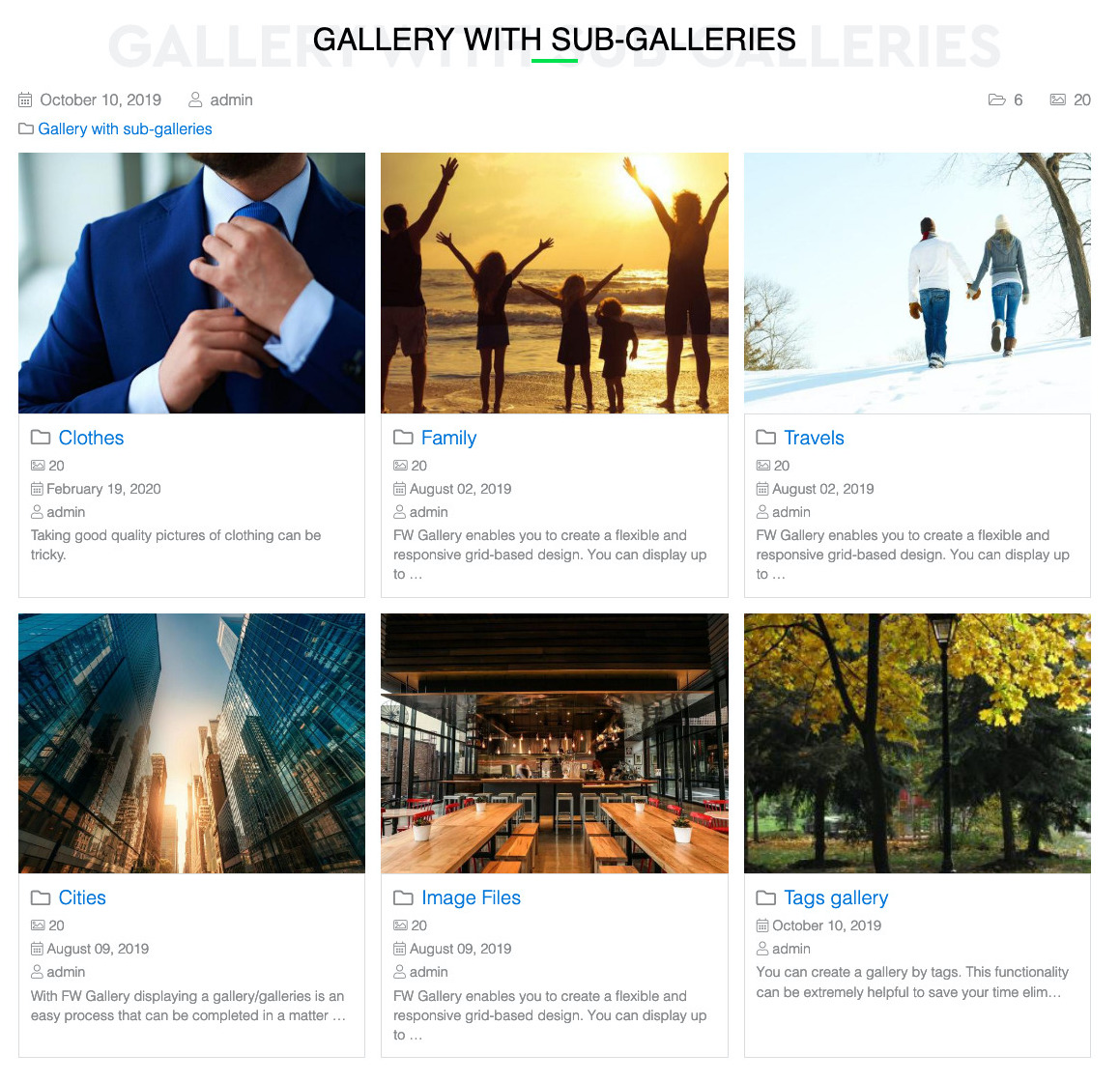 Responsive Photo GalleryMobile friendly layouts for best performance and look on any device.Multi-level Galleries HierarchyUnlimited levels of galleries to build required folders tree.Gallery Creation and EditUsers can create their own galleries with parent-child hierarchy when the feature is enabled. Each creator manages their own namespace.Galleries list viewTop level gallery view with all galleries included as a sub-folder. No images in this view.Gallery display settingsConfigure galleries grid, number per page and ordering. Show/hide empty galleries
 -
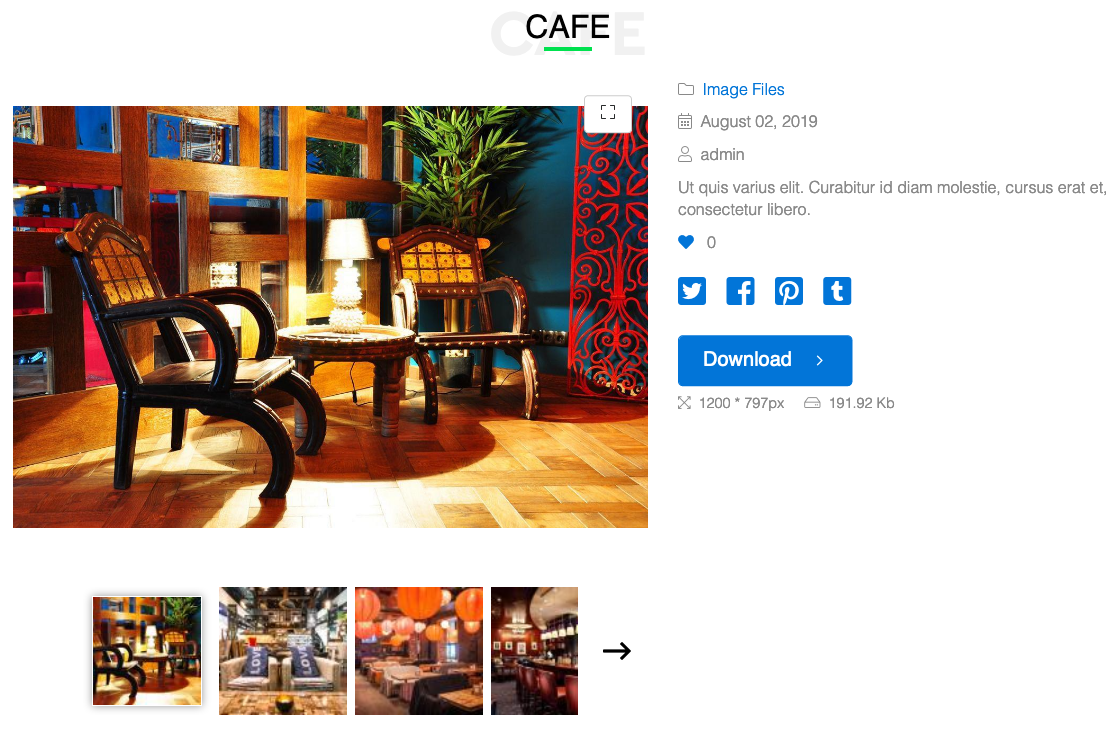 Item viewSingle photo layout with its display settings and options.Item detailsSet image name, owner, upload date, description, copyright note. Choose what is shown.EXIF and IPTC ParsingReads camera metadata (EXIF) and news/stock photo tags (IPTC) on upload. Title, caption, copyright holder, artist, and shoot date fill in automatically from the file.Item display settingsConfigure images display grid, number per page and ordering.Social Share ButtonsA button group with Facebook, Twitter, LinkedIn, and other social networks appears below file listings and detail pages. One click to share.
 -
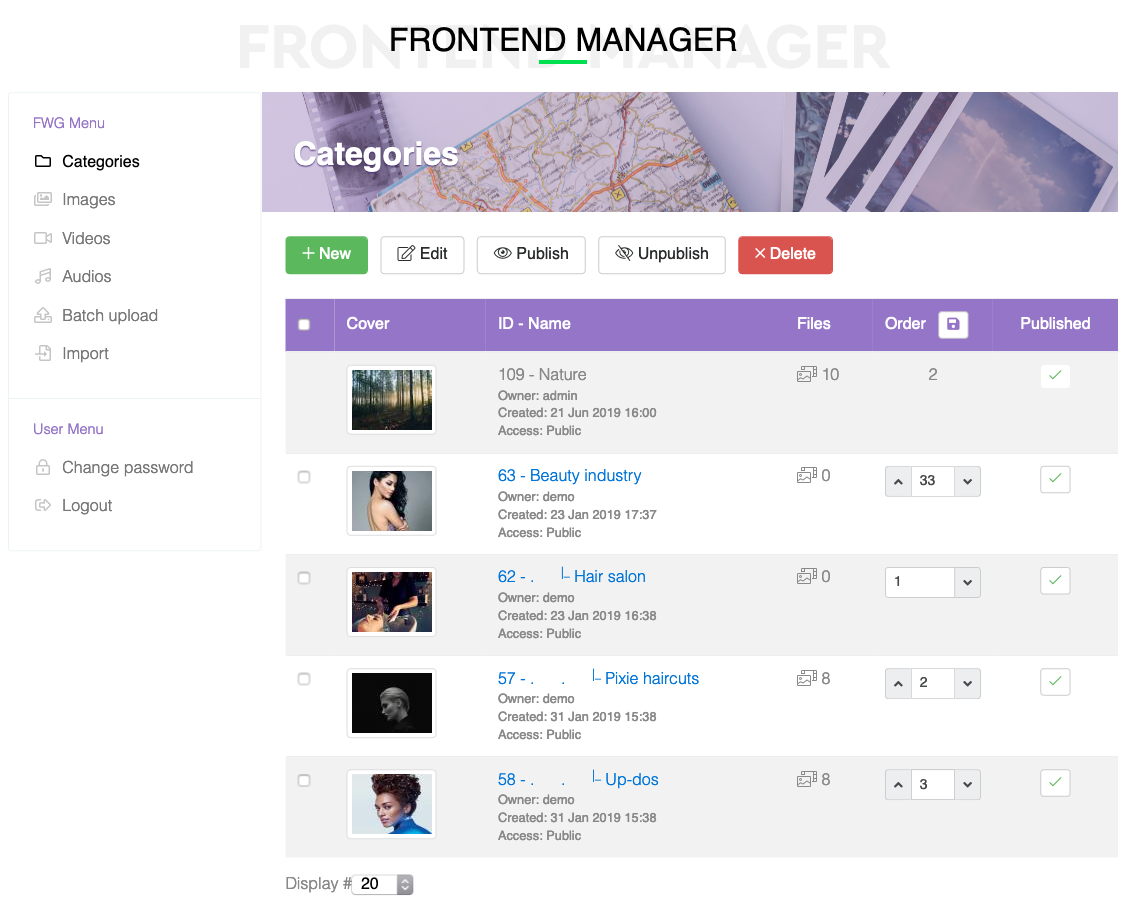 Quick categoriesCreate category tree with subcategories in a text window in minutes.Batch operationsMove files, change owner, access level, copyright or add tags to selected files in one go.Batch Multi-File UploadA batch uploader respects Joomla server limits (post_max_size, upload_max_filesize) and processes multiple files per upload. Integrates with Files Import for OAuth-based Facebook, Picasa, and Instagram imports.Images Batch UploadFast and handy files management with batch upload feature.Self-Service UploadLogged-in users get a dedicated management interface on the frontend with tabs for images, videos, audio, batch upload, and bulk import.
 -
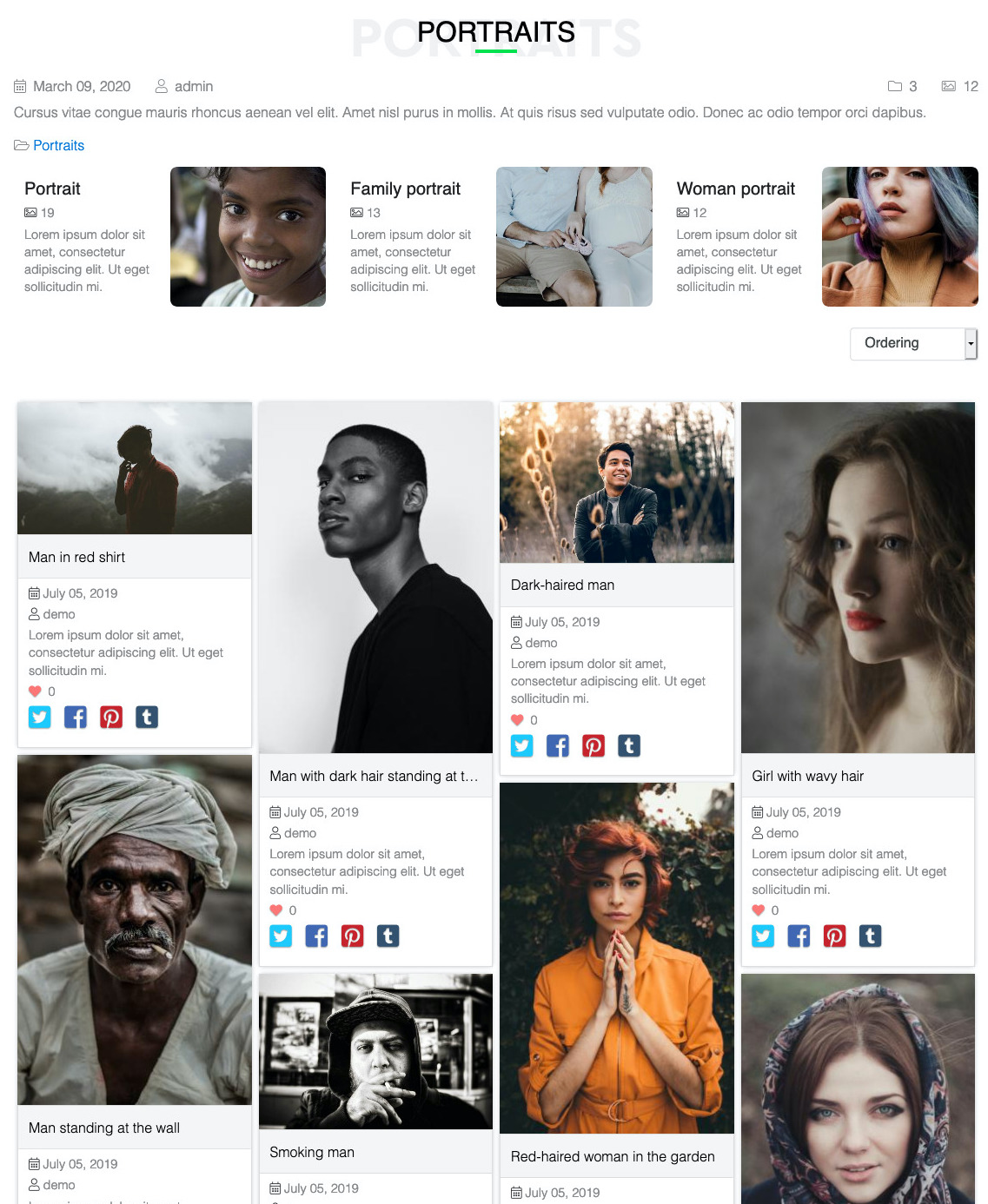 Single gallery viewA gallery with any number of sub-galleries and images included in a current.Gallery detailsSet gallery name, owner, create date and description. Choose what is shown.CSS Grid MasonryBrick-like layout with variable column and row spans. Different images get different sizes for a natural, curated feel.Watermark protectionProtect images from unauthorized usage on other websites or media.AJAX Lazy LoadingSlides load on-demand via AJAX, so 500-image galleries run without memory issues. Customize max slides, effects, and ordering per gallery.
 -
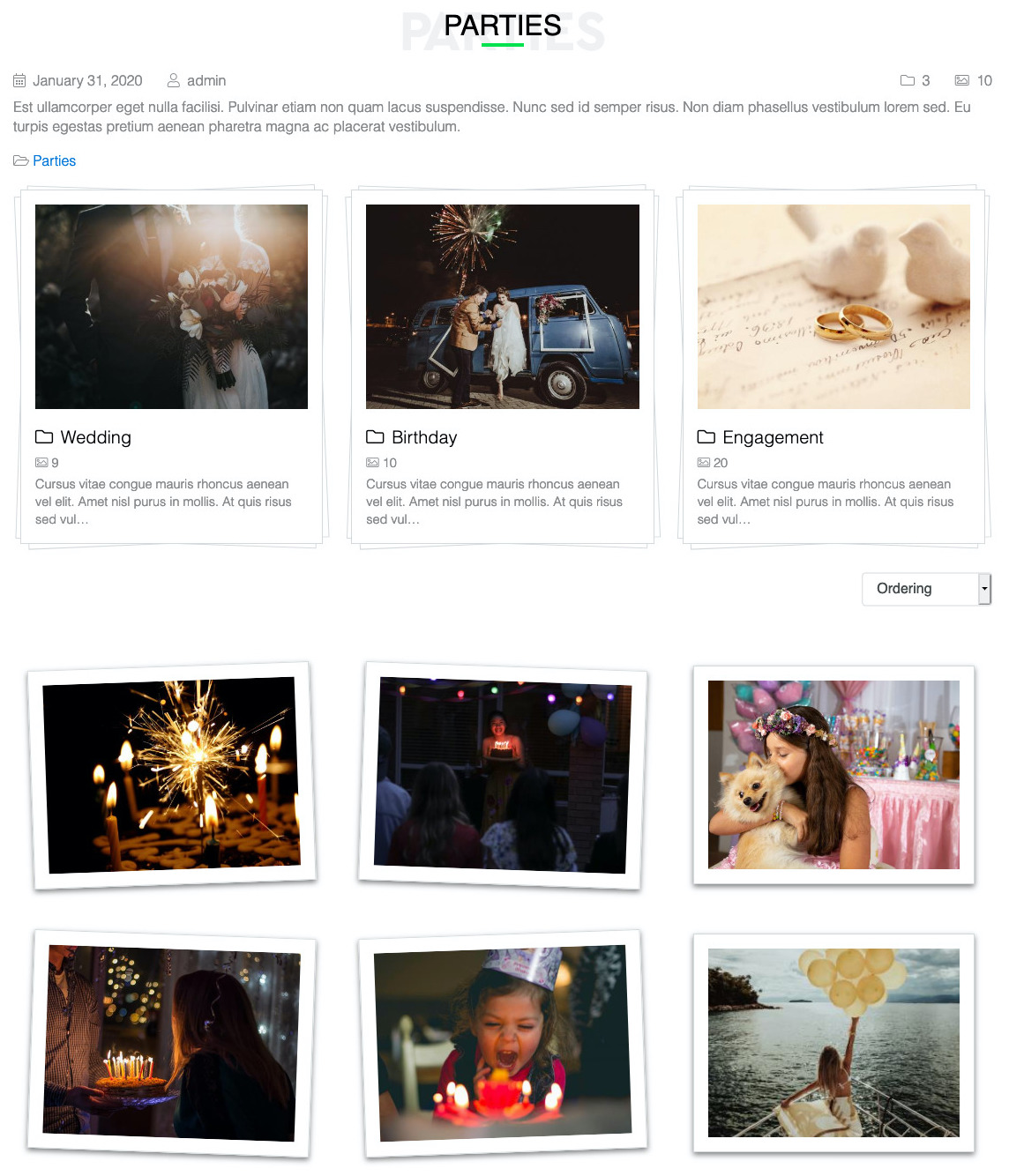 Tilted Polaroid FramesEvery image rotates between -2 and 2.4 degrees with alternating directions. Feels hand-placed, not computer-generated.Soft Drop ShadowsWarm paper-like shadows create subtle depth on a neutral background. No harsh effects.Refined MinimalismGenerous whitespace and decorative header bars. The layout does less so your photography does more.Hover Lift EffectHovering an image lifts it with an elevation animation. Small interaction that adds a sense of touch.Animated Text RevealsText fades in with configurable transition delays for a choreographed reveal effect.
 -
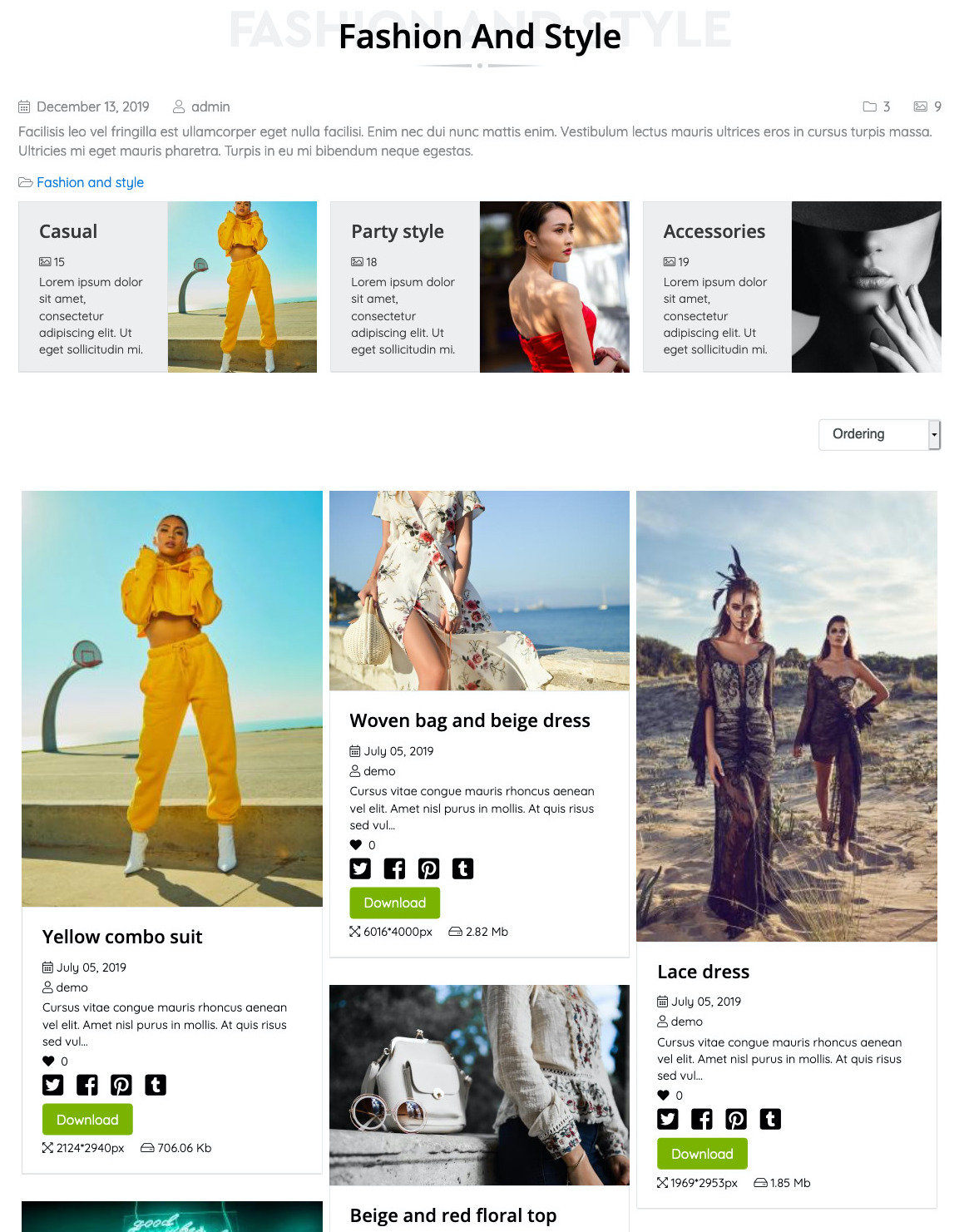 Default gallery imageSelect default preview image among the images in a gallery.Images rotateRotate manually images if camera rotation is not rendered correctly.YouTube and Vimeo EmbedsPaste a YouTube or Vimeo URL and the plugin fetches the thumbnail and metadata via the platform API. No re-uploading videos you already host externally.MP4 Self-Hosted UploadUpload MP4 videos directly to your server for full control over hosting and branding. Duration and dimensions captured automatically on upload.Four Audio FormatsUpload and play MP3, WAV, OGG, and AAC files with a unified player. Covers compressed and uncompressed formats for musicians and podcasters alike.
Add-ons
-
 Free
Upload MP4 videos or embed YouTube and Vimeo clips in your gallery. Responsive player, automatic thumbnails, and hover-to-preview for videographers and motion designers.
Free
Upload MP4 videos or embed YouTube and Vimeo clips in your gallery. Responsive player, automatic thumbnails, and hover-to-preview for videographers and motion designers. Free
Add MP3, WAV, OGG, and AAC audio files to your gallery with a built-in player. For musicians, podcasters, and sound designers hosting portfolios on their own site.
Free
Add MP3, WAV, OGG, and AAC audio files to your gallery with a built-in player. For musicians, podcasters, and sound designers hosting portfolios on their own site. Free
Add social share buttons to every gallery and file page. Writes Open Graph and Twitter Card meta tags so shared links render with clean preview images.
Free
Add social share buttons to every gallery and file page. Writes Open Graph and Twitter Card meta tags so shared links render with clean preview images. Free
Display subcategories as tabs in a cascading masonry layout. Each tab can use its own design template for a fully customized portfolio browsing experience.
Free
Display subcategories as tabs in a cascading masonry layout. Each tab can use its own design template for a fully customized portfolio browsing experience. Free
Frontend search module with file-type counters and smart redirect handling. Drop it in a sidebar and visitors filter your portfolio by images, videos, or audio instantly.
Free
Frontend search module with file-type counters and smart redirect handling. Drop it in a sidebar and visitors filter your portfolio by images, videos, or audio instantly. Free
Pin every file to a location on Google Maps. Visitors browse your portfolio by geography, perfect for travel photographers, event coverage, and location-based projects.
Free
Pin every file to a location on Google Maps. Visitors browse your portfolio by geography, perfect for travel photographers, event coverage, and location-based projects. Free
Integrate FW Gallery files, categories, and tags into Joomla's built-in Smart Search. Visitors searching your site find portfolio content alongside articles and pages.
Free
Integrate FW Gallery files, categories, and tags into Joomla's built-in Smart Search. Visitors searching your site find portfolio content alongside articles and pages. Professional+
Automatically read EXIF, IPTC, XMP, and ID3 metadata from every upload. Photographer credits, shot dates, copyright, audio tags, and video dimensions get filled in without touching the file edit screen.
Professional+
Automatically read EXIF, IPTC, XMP, and ID3 metadata from every upload. Photographer credits, shot dates, copyright, audio tags, and video dimensions get filled in without touching the file edit screen. Professional+
Import photos in bulk from a local folder, Facebook albums, Google Picasa, or Instagram. No manual uploading, no dragging files one by one.
Professional+
Import photos in bulk from a local folder, Facebook albums, Google Picasa, or Instagram. No manual uploading, no dragging files one by one. Starter+
Auto-generates clean URLs, Open Graph tags, JSON-LD structured data, and meta descriptions for every gallery and file. Your portfolio gets discovered in image search without manual SEO work.
Starter+
Auto-generates clean URLs, Open Graph tags, JSON-LD structured data, and meta descriptions for every gallery and file. Your portfolio gets discovered in image search without manual SEO work. Free
Embed any FW Gallery on any Joomla page, module position, or custom layout. Show a single file with text wrap, a grid of recent work, or a full category anywhere on your site.
Free
Embed any FW Gallery on any Joomla page, module position, or custom layout. Show a single file with text wrap, a grid of recent work, or a full category anywhere on your site. Starter+
Display newest, most popular, or random files in a sidebar or footer module. Three layout modes (vertical, horizontal, slider) with full metadata control.
Starter+
Display newest, most popular, or random files in a sidebar or footer module. Three layout modes (vertical, horizontal, slider) with full metadata control. Professional+
Transform any gallery into a full-screen slideshow with thumbnails, auto-play, keyboard navigation, and touch swipe support. Perfect for immersive portfolio presentations.
Professional+
Transform any gallery into a full-screen slideshow with thumbnails, auto-play, keyboard navigation, and touch swipe support. Perfect for immersive portfolio presentations. Free
A clean, structured grid layout for portfolios that want clarity over flourish. Multiple grid engines, configurable columns, and subtle hover animations.
Free
A clean, structured grid layout for portfolios that want clarity over flourish. Multiple grid engines, configurable columns, and subtle hover animations. Starter+
Tag files across galleries and give visitors a second way to browse your portfolio. Click a tag to see every image, video, and audio file that shares it regardless of which gallery they live in.
Starter+
Tag files across galleries and give visitors a second way to browse your portfolio. Click a tag to see every image, video, and audio file that shares it regardless of which gallery they live in. Professional+
Let visitors rate your work with stars, mark favorites with hearts, or approve with thumbs. Build social proof on your portfolio and give clients a way to flag the shots they love.
Professional+
Let visitors rate your work with stars, mark favorites with hearts, or approve with thumbs. Build social proof on your portfolio and give clients a way to flag the shots they love. Professional+
Let logged-in users upload and manage their own photos, videos, and audio directly from the website. A full portfolio management interface without needing Joomla admin access.
Professional+
Let logged-in users upload and manage their own photos, videos, and audio directly from the website. A full portfolio management interface without needing Joomla admin access. Starter+
Pin your best work to the top of every gallery with one click. Featured files stay visible regardless of upload date so your portfolio always leads with impact.
Starter+
Pin your best work to the top of every gallery with one click. Featured files stay visible regardless of upload date so your portfolio always leads with impact. Free
A dramatic, cinematic design template with dark overlays, sliding info panels, and animated reveals. For creative agencies and bold design-forward portfolios.
Free
A dramatic, cinematic design template with dark overlays, sliding info panels, and animated reveals. For creative agencies and bold design-forward portfolios. Free
A refined, minimal design template with sophisticated typography and understated details. Built for high-end photographers, luxury brands, and design studios.
Free
A refined, minimal design template with sophisticated typography and understated details. Built for high-end photographers, luxury brands, and design studios. Free
A masonry-style design template inspired by Pinterest. Variable column spans and adaptive row heights create an organic, brick-like layout that adapts to any image proportion.
Free
A masonry-style design template inspired by Pinterest. Variable column spans and adaptive row heights create an organic, brick-like layout that adapts to any image proportion. Free
A playful, nostalgic template that mimics instant film photography. Randomly rotated frames, soft drop shadows, and hover lifts give portfolios a personal, handmade feel.
Free
A playful, nostalgic template that mimics instant film photography. Randomly rotated frames, soft drop shadows, and hover lifts give portfolios a personal, handmade feel. -
Free
Upload MP4 videos or embed YouTube and Vimeo clips in your gallery. Responsive player, automatic thumbnails, and hover-to-preview for videographers and motion designers.
Free
Add MP3, WAV, OGG, and AAC audio files to your gallery with a built-in player. For musicians, podcasters, and sound designers hosting portfolios on their own site.
Free
Add social share buttons to every gallery and file page. Writes Open Graph and Twitter Card meta tags so shared links render with clean preview images.
Free
Display subcategories as tabs in a cascading masonry layout. Each tab can use its own design template for a fully customized portfolio browsing experience.
Free
Frontend search module with file-type counters and smart redirect handling. Drop it in a sidebar and visitors filter your portfolio by images, videos, or audio instantly.
Free
Pin every file to a location on Google Maps. Visitors browse your portfolio by geography, perfect for travel photographers, event coverage, and location-based projects.
Free
Integrate FW Gallery files, categories, and tags into Joomla's built-in Smart Search. Visitors searching your site find portfolio content alongside articles and pages.
Free
Embed any FW Gallery on any Joomla page, module position, or custom layout. Show a single file with text wrap, a grid of recent work, or a full category anywhere on your site.
Free
A clean, structured grid layout for portfolios that want clarity over flourish. Multiple grid engines, configurable columns, and subtle hover animations.
Free
A dramatic, cinematic design template with dark overlays, sliding info panels, and animated reveals. For creative agencies and bold design-forward portfolios.
Free
A refined, minimal design template with sophisticated typography and understated details. Built for high-end photographers, luxury brands, and design studios.
Free
A masonry-style design template inspired by Pinterest. Variable column spans and adaptive row heights create an organic, brick-like layout that adapts to any image proportion.
Free
A playful, nostalgic template that mimics instant film photography. Randomly rotated frames, soft drop shadows, and hover lifts give portfolios a personal, handmade feel.
-
Starter+
Pin your best work to the top of every gallery with one click. Featured files stay visible regardless of upload date so your portfolio always leads with impact.
Starter+
Display newest, most popular, or random files in a sidebar or footer module. Three layout modes (vertical, horizontal, slider) with full metadata control.
Starter+
Auto-generates clean URLs, Open Graph tags, JSON-LD structured data, and meta descriptions for every gallery and file. Your portfolio gets discovered in image search without manual SEO work.
Starter+
Tag files across galleries and give visitors a second way to browse your portfolio. Click a tag to see every image, video, and audio file that shares it regardless of which gallery they live in.
-
Starter+
Pin your best work to the top of every gallery with one click. Featured files stay visible regardless of upload date so your portfolio always leads with impact.
Professional+
Automatically read EXIF, IPTC, XMP, and ID3 metadata from every upload. Photographer credits, shot dates, copyright, audio tags, and video dimensions get filled in without touching the file edit screen.
Professional+
Import photos in bulk from a local folder, Facebook albums, Google Picasa, or Instagram. No manual uploading, no dragging files one by one.
Professional+
Let logged-in users upload and manage their own photos, videos, and audio directly from the website. A full portfolio management interface without needing Joomla admin access.
Starter+
Display newest, most popular, or random files in a sidebar or footer module. Three layout modes (vertical, horizontal, slider) with full metadata control.
Starter+
Auto-generates clean URLs, Open Graph tags, JSON-LD structured data, and meta descriptions for every gallery and file. Your portfolio gets discovered in image search without manual SEO work.
Professional+
Transform any gallery into a full-screen slideshow with thumbnails, auto-play, keyboard navigation, and touch swipe support. Perfect for immersive portfolio presentations.
Starter+
Tag files across galleries and give visitors a second way to browse your portfolio. Click a tag to see every image, video, and audio file that shares it regardless of which gallery they live in.
Professional+
Let visitors rate your work with stars, mark favorites with hearts, or approve with thumbs. Build social proof on your portfolio and give clients a way to flag the shots they love.
Services
 Theme Integration
 Languages


Subscription Plans
After subscription expires, the product and all its add-ons remain functional and can be used further.
-
Update period1 y
-
Update period1 mo
-
Update periodLifetime
-
Add-ons23
-
Websites1
-
Support response48h
-
Lifetime usage
-
Update period1 y
-
Update period1 mo
-
Update periodLifetime
-
Add-ons35
-
Websites3
-
Support response48h
-
Lifetime usage
-
Update period1 y
-
Update period1 mo
-
Update periodLifetime
-
Add-ons35
-
Websites5
-
Support response24h
-
Lifetime usage
Frequently Asked Questions
-
Is FW Gallery a free plugin?
Yes, FW Gallery is a free plugin with a comprehensive set of features suitable for most gallery websites.
-
How to install add-ons?
Go to Admin panel -> FW Gallery -> Dashboard. Make sure to verify your website to connect it with your fastw3b.com account and download free and purchased add-ons.
-
Why do I need to verify my website?
Verification is required for the following reasons:
- To install plugin and add-on updates.
- To get support in Client Section at fastw3b.com.
- To be able to install/update free and purchased add-ons.
- To buy new add-ons from Admin -> FW Gallery -> Add-ons section.
-
What are add-ons?
Add-ons are specific plugins that work only with FW Gallery plugin and extend its functionality in various ways. Add-on can be another layout with shortcode to use, a new set of parameters to extend existing plugin functions or even a design for plugin elements.
-
Why would I need an add-on?
While FW Gallery is fully seld-sufficient solution, add-ons may add features your website needs. The main plugin has a functionality that is critical for it to work. All other features come as add-ons to allow customers decide which configuration they prefer on their website. Add-on is the simplest way to add new features and design to FW Gallery.
-
How to get an add-on?
There are 2 ways to get add-ons:
- Go to Admin -> FW Gallery -> Add-ons and get add-ons from there.
- Go to FW Gallery official page on fastw3b.com, scroll to Add-ons section and get them from there.
All add-ons you have available will be listed in Admin -> FW Gallery -> Dashboard -> Add-ons section.
12k+ clients love our product
If you can dream it, Fastw3b will design it. It is almost a year since I started working with Fastw3b. In fact, having started on the Joomla journey (three months prior) and with no development experience, Fastw3b was the perfect first date.
After the initial – dancing around – trying to understand each other, we quickly established a relationship based on frankness and directness and this was probably the single most important trait that I respect them for. It would have been easier to repeat the “customer is king” mantra and get paid for the job. Not with Fastw3b. It seemed as if they genuinely were as interested and excited about the project as I was. It was as if I was working with my own inhouse team, rather than distant consultants.
If you are new to Joomla or indeed to development and are looking for a professional yet empathetic partner, I highly recommend Fastw3b. They deliver on time, are willing to own-up to errors and fix them, and best of all are as invested in your project as you.

Simple, quick and easy
Functionality. It presents picture albums with captions and nothing else. Exactly what I need for a non-commercial, private family website.
Ease of use. The absence of commercial and social media features makes it very easy to set up and use.
Support. Didn't need it. That is perfect support.
Documentation. It is simple and the documentation is simple.

FW Gallery Changelog
Version 8.2.0 (24 Mar 2026)
Version 8.1.1 (22 Jan 2026)
Version 8.1.0 (17 Oct 2025)
Version 8.0.5 (07 Oct 2025)
Version 8.0.4 (09 May 2025)
Version 8.0.3 (23 Apr 2025)
Version 8.0.2 (28 Mar 2025)
Version 8.0.1 (06 Mar 2025)
Version 8.0.0 (21 Jun 2024)
Version 7.5.5 (16 Apr 2024)
Version 7.5.4 (29 Nov 2023)
Version 7.5.3 (28 Nov 2023)
Version 7.5.2 (06 Nov 2023)
Version 7.5.1 (18 Oct 2023)
Version 7.5.0 (18 Jul 2023)
Version 7.4.3 (09 Jul 2023)
Version 7.4.2 (05 Jul 2023)
Version 7.4.1 (27 Jun 2023)
Version 7.4.0 (26 Jun 2023)
Version 7.3.1 (08 May 2023)
Version 7.3.0 (02 May 2023)
Version 7.2.1 (21 Mar 2023)
Version 7.2.0 (14 Feb 2023)
Version 7.1.9 (20 Jan 2023)
Version 7.1.8 (20 Jan 2023)
Version 7.1.7 (18 Jan 2023)
Version 7.1.6 (16 Jan 2023)
Version 7.1.5 (02 Jan 2023)
Version 7.1.4 (21 Dec 2022)
Version 7.1.3 (14 Oct 2022)
Version 7.1.2 (13 Sep 2022)
Version 7.1.1 (12 Sep 2022)
Version 7.0.1 (29 Jul 2022)
Version 6.7.2 (20 Sep 2021)
Version 6.7.1 (10 Sep 2021)
Version 6.7.0 (08 Sep 2021)
Version 6.6.4 (19 Jul 2021)
Version 6.6.3 (17 Jul 2021)
Version 6.6.2 (13 Jul 2021)
Version 6.6.1 (02 Jul 2021)
Version 6.6.0 (16 Jun 2021)
Version 6.5.0 (09 Jun 2021)
Version 6.4.1 (08 Jun 2021)
Version 6.4.0 (07 Jun 2021)
Version 6.2.0 (10 May 2021)
Version 6.1.1 (29 Mar 2021)
Version 6.1.0 (24 Mar 2021)
Version 6.0.0 (23 Mar 2021)
Version 5.13.0 (15 Feb 2021)
Version 5.12.2 (19 Jan 2021)
Version 5.12.1 (18 Dec 2020)
Version 5.12.0 (28 Oct 2020)
Version 5.11.1 (01 Oct 2020)
Version 5.11.0 (28 Sep 2020)
Version 5.10.1 (15 Sep 2020)
Version 5.10.0 (14 Sep 2020)
Version 5.9.0 (01 Jul 2020)
Version 5.8.1 (22 Jun 2020)
Version 5.8.0 (18 Jun 2020)
Version 5.7.0 (04 Jun 2020)
Version 5.6.2 (07 May 2020)
Version 5.6.1 (15 Apr 2020)
Version 5.6.0 (14 Apr 2020)
Version 5.5.1 (09 Apr 2020)
Version 5.5.0 (08 Apr 2020)
Version 5.4.6 (02 Apr 2020)
Version 5.4.5 (18 Mar 2020)
Version 5.4.3 (13 Mar 2020)
Version 5.4.2 (10 Mar 2020)
Version 5.4.1 (06 Mar 2020)
Version 5.4.0 (03 Feb 2020)
Version 5.3.0 (29 Dec 2019)
Version 5.2.4 (18 Oct 2019)
Version 5.2.3 (11 Oct 2019)
Version 5.2.0 (02 Oct 2019)
Version 5.1.0 (21 Aug 2019)
Version 5.0.5 (06 Aug 2019)
Version 5.0.4 (02 Aug 2019)
Version 5.0.3 (29 Jul 2019)
Version 5.0.2 (27 Jul 2019)
Version 5.0.1 (25 Jul 2019)
Version 5.0.0 (24 Jul 2019)
Version 4.4.4 (18 Apr 2019)
Version 4.4.3 (26 Feb 2019)
Version 4.4.2 (04 Jan 2019)
Version 4.4.1 (19 Dec 2018)
Version 4.4.0 (06 Dec 2018)
Version 4.3.2 (26 Jun 2018)
Version 4.0.3 (18 May 2017)
Version 4.0.2 (31 Mar 2017)
FW Gallery WordPress Changelog
Version 8.0.0 (21 Jun 2024)
Version 7.4.9 (10 May 2024)
Version 7.4.8 (18 Apr 2024)
Version 7.4.7 (16 Apr 2024)
Version 7.4.6 (21 Feb 2024)
Version 7.4.5 (16 Feb 2024)
Version 7.4.4 (26 Dec 2023)
Version 7.4.3 (09 Jul 2023)
Version 7.4.2 (05 Jul 2023)
Version 7.0.1 (29 Jul 2022)
Version 6.6.3 (17 Jul 2021)
Version 6.6.2 (13 Jul 2021)
Version 6.6.1 (12 Jul 2021)
Download FW Gallery

