
FW Real Estate
Product Features
-
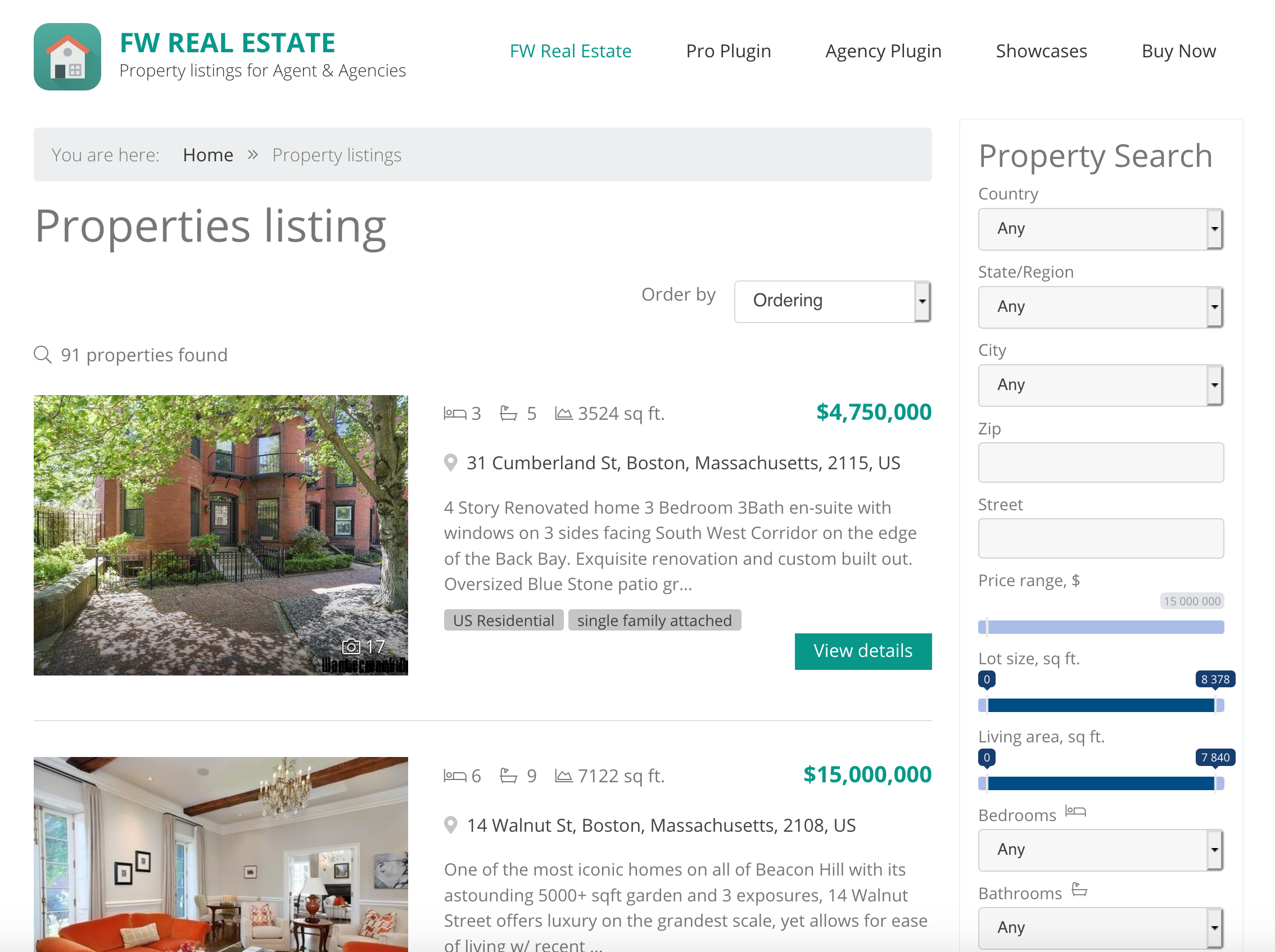 Responsive Property ListingsMobile friendly layouts for best performance and look on any device.List viewList property listings layout with numerous display options.Card-Based Grid LayoutProperties display as equal-size photo cards in a responsive grid. Photos take center stage with essential details below. Far more visually engaging than traditional text-heavy list layouts.Visual Featured BadgeProminent Featured badge overlaid on property cards in listings. Visitors instantly spot highlighted properties without reading descriptions.Customizable Status BadgesCreate unlimited status labels with custom names and colors. Sold, New, Under Offer, Price Reduced, Investment, or any custom status your market needs.
 -
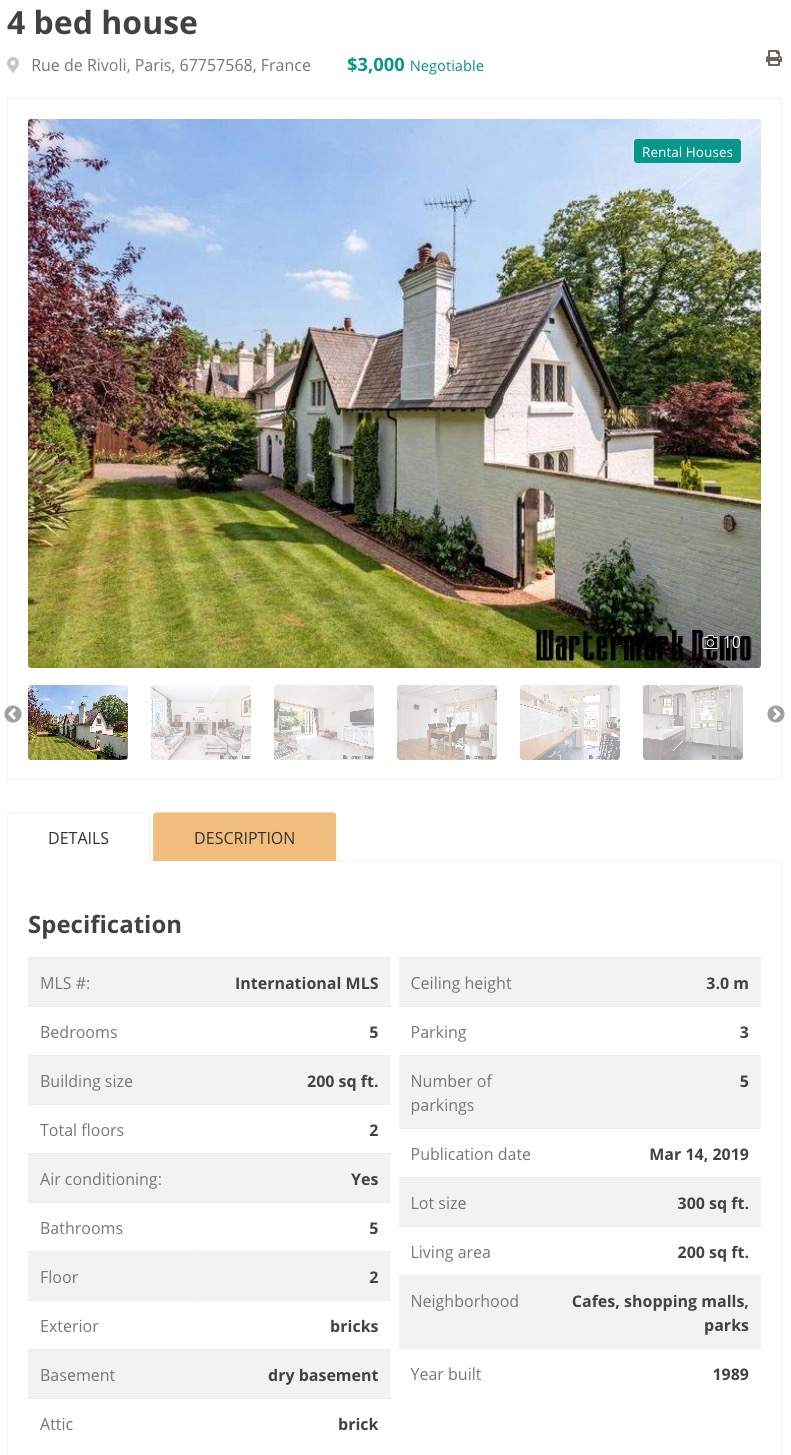 Image galleryHi-quality images resized for optimal use with originals kept.360-Degree Tour EmbeddingEmbed interactive panoramic tours and virtual walkthroughs on property detail pages. Works with Matterport, Kuula, iStaging, Zillow 3D Home or any provider that allows iframe embedding.Multi-Source Video EmbeddingEmbed videos from YouTube, Vimeo, or direct file upload (MP4, FLV). Also supports remote hosting via URL for videos on your own CDN.Unlimited Floor Plan UploadUpload unlimited floor plan images per property with custom titles like Ground Floor, Master Suite, or Basement. No limits on number, perfect for multi-level homes and commercial properties.Interactive Payment CalculatorReal-time mortgage payment estimates update as visitors adjust loan amount, down payment, interest rate, and term. Include property taxes, hazard insurance, and PMI for complete monthly cost picture.
 -
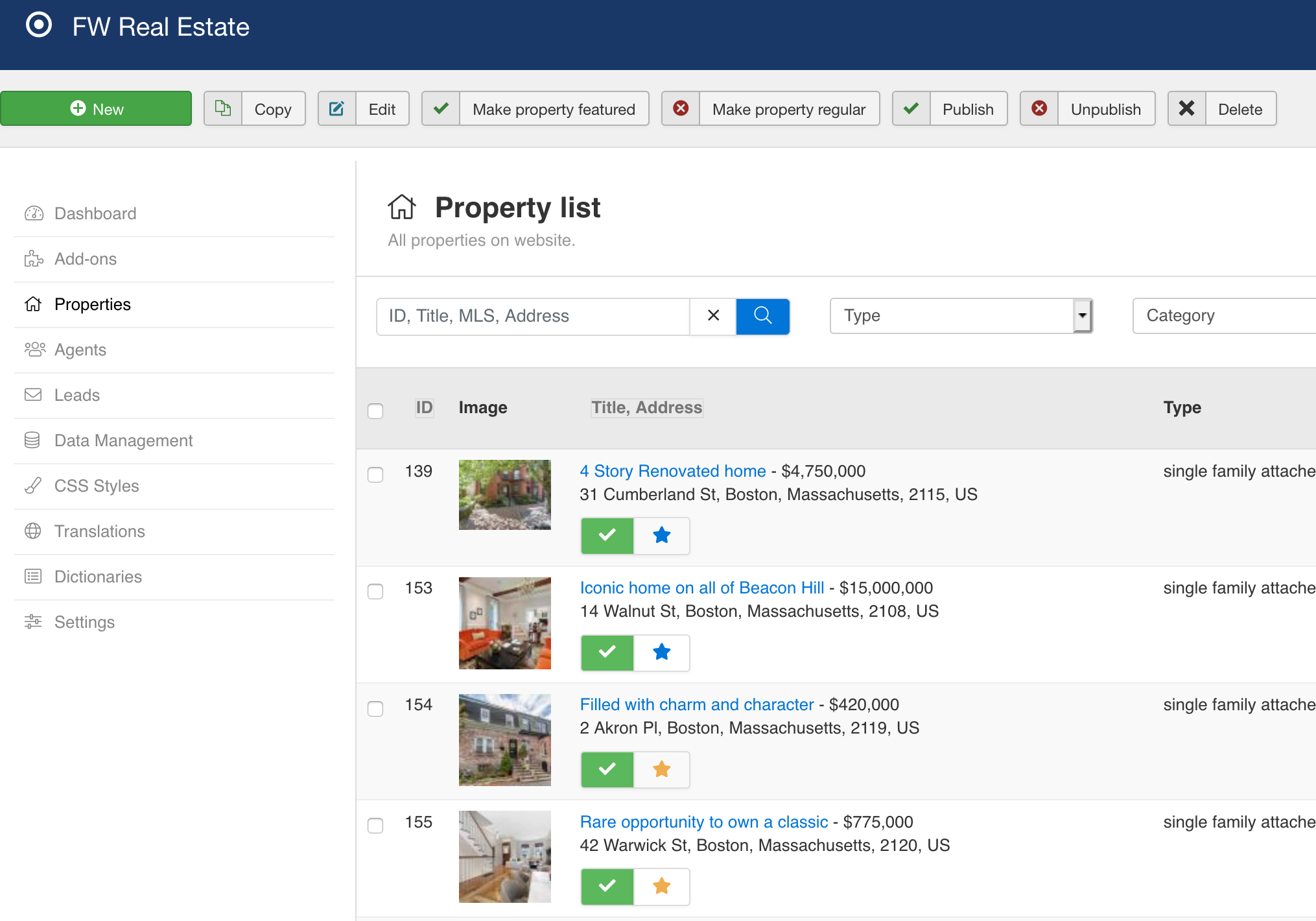 Batch uploadFast and handy files management with batch upload feature.Translation managerAdjust language interface translations to your needs or create translation for a new language.Admin Approval WorkflowAgent-submitted properties go to the standard admin queue for review. Optional email notifications alert admins to new submissions for quick approval.Complete Property Edit FormFull FW Real Estate edit form in the frontend. Category, type, pricing, location, metadata, gallery, all fields available to agents with the same controls as admins.Unified Lead InboxAll inquiries save to FW Real Estate Messages section in admin. Each message shows visitor contact info, property details, and submission date in one central view.
 -
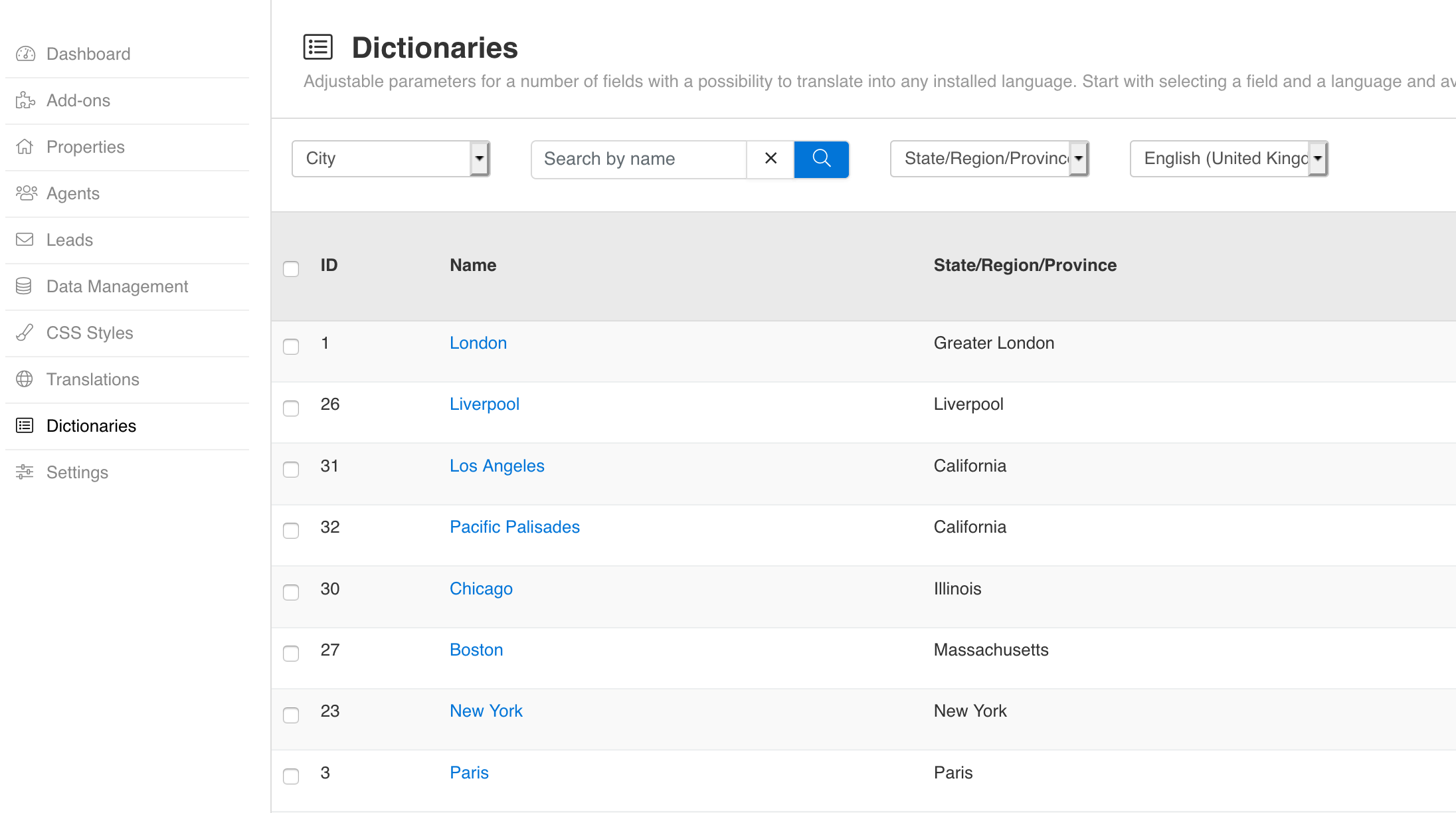 Dictionaries (customizable fields)10 special fields that can be edited, translated in any language and adjusted to your needs.Unlimited Field CreationBuild as many custom fields as your market demands. No quantity limits. Perfect for luxury homes, vacation rentals, commercial properties, or any specialized real estate niche.Structured Amenities DataComprehensive amenities checklist (pool, garage, air conditioning, balcony). Structured data instead of text descriptions lets visitors filter properties by specific features.Four Input TypesChoose from text input, dropdown select, multi-checkbox lists, and yes/no boolean toggles. Select and checkbox types support unlimited predefined options with translatable labels.Groups and Tabs OrganizationGroup related fields into logical sections and organize groups into tabs. Control display position with three zones: before details, after details, or additional sections.
Add-ons
-
 Free
Add a powerful property search form to any page on your real estate website with configurable fields, flexible layouts, and smart filtering.
Free
Add a powerful property search form to any page on your real estate website with configurable fields, flexible layouts, and smart filtering. Free
Show off property photos with visually stunning grid layouts. Display listings as attractive card-based grids instead of traditional lists.
Free
Show off property photos with visually stunning grid layouts. Display listings as attractive card-based grids instead of traditional lists. Starter+
Display properties on interactive maps for location-driven property discovery. Let buyers search by distance, verify neighborhoods instantly, and explore listings geographically with Google Maps or Mapbox integration.
Starter+
Display properties on interactive maps for location-driven property discovery. Let buyers search by distance, verify neighborhoods instantly, and explore listings geographically with Google Maps or Mapbox integration. Professional+
Embed property listings anywhere. Display full property browsing experience with search in any module position, article, or custom page.
Professional+
Embed property listings anywhere. Display full property browsing experience with search in any module position, article, or custom page. Free
Capture buyer inquiries on every property with built-in contact forms. All inquiries save to your admin Messages inbox and trigger an instant email notification.
Free
Capture buyer inquiries on every property with built-in contact forms. All inquiries save to your admin Messages inbox and trigger an instant email notification. Starter+
Create unlimited custom fields to capture any property data your market demands. Organize fields into groups and tabs, manage access by user role, and display them automatically on your property pages without coding.
Starter+
Create unlimited custom fields to capture any property data your market demands. Organize fields into groups and tabs, manage access by user role, and display them automatically on your property pages without coding. Starter+
Visual status badges that tell buyers the market position of every property in seconds. Mark sold, new, price-reduced, and custom statuses with colored labels on listing cards.
Starter+
Visual status badges that tell buyers the market position of every property in seconds. Mark sold, new, price-reduced, and custom statuses with colored labels on listing cards. Professional+
Expand global reach by showing prices in any currency. Automatic daily exchange rates from the European Central Bank let international buyers see properties in their preferred denomination.
Professional+
Expand global reach by showing prices in any currency. Automatic daily exchange rates from the European Central Bank let international buyers see properties in their preferred denomination. Professional+
Let your agents manage their own listings while you maintain complete control. Property Manager combines self-service flexibility with admin oversight, eliminating the bottleneck between agent submissions and live listings.
Professional+
Let your agents manage their own listings while you maintain complete control. Property Manager combines self-service flexibility with admin oversight, eliminating the bottleneck between agent submissions and live listings. Professional+
Display architectural layouts on property pages. Upload multiple floor plans with titles so buyers can explore room configurations before viewing.
Professional+
Display architectural layouts on property pages. Upload multiple floor plans with titles so buyers can explore room configurations before viewing. Starter+
Connect property buyers with the right agent. Assign agents to properties, showcase professional profiles, and route inquiries directly to your team with automatic email notifications and an agent directory.
Starter+
Connect property buyers with the right agent. Assign agents to properties, showcase professional profiles, and route inquiries directly to your team with automatic email notifications and an agent directory. Professional+
Boost search visibility for every property listing with automatic SEO title generation and Google rich snippets. Customizable templates, structured data, and agent profile optimization.
Professional+
Boost search visibility for every property listing with automatic SEO title generation and Google rich snippets. Customizable templates, structured data, and agent profile optimization. Professional+
Schedule open house viewings on property pages. Add dates and times so buyers know when they can visit without contacting the agent.
Professional+
Schedule open house viewings on property pages. Add dates and times so buyers know when they can visit without contacting the agent. Professional+
Keep buyers engaged with smart search alerts. Saved searches drive return traffic through automatic email notifications when new properties match visitor preferences.
Professional+
Keep buyers engaged with smart search alerts. Saved searches drive return traffic through automatic email notifications when new properties match visitor preferences. Professional+
Add investment-focused fields to properties. Track amenities, financial metrics, and rental income with structured data that buyers can search.
Professional+
Add investment-focused fields to properties. Track amenities, financial metrics, and rental income with structured data that buyers can search. Professional+
Pin your best properties to the top. Mark any property as featured and it automatically appears first in all listings with a prominent badge.
Professional+
Pin your best properties to the top. Mark any property as featured and it automatically appears first in all listings with a prominent badge. Starter+
Help buyers find their next home faster. Favorites let visitors save and compare properties with a single click, turning browsers into committed shoppers.
Starter+
Help buyers find their next home faster. Favorites let visitors save and compare properties with a single click, turning browsers into committed shoppers. Starter+
Help buyers decide faster with side-by-side comparison tables. Add up to 3 properties and see prices, features, and amenities aligned in one view.
Starter+
Help buyers decide faster with side-by-side comparison tables. Add up to 3 properties and see prices, features, and amenities aligned in one view. Professional+
Turn property viewers into qualified leads by delivering personalized PDF brochures directly to prospects. Capture contact details, automate email delivery, and track all requests in your Messages inbox.
Professional+
Turn property viewers into qualified leads by delivering personalized PDF brochures directly to prospects. Capture contact details, automate email delivery, and track all requests in your Messages inbox. Free
Embed property walkthrough videos from YouTube, Vimeo, remote files, or uploaded MP4. Each property features one video with optional custom cover images.
Free
Embed property walkthrough videos from YouTube, Vimeo, remote files, or uploaded MP4. Each property features one video with optional custom cover images. Free
Interactive 360-degree property tours that keep buyers engaged. Embed virtual walkthroughs from Matterport, Kuula, iStaging, or any embed-compatible tour service.
Free
Interactive 360-degree property tours that keep buyers engaged. Embed virtual walkthroughs from Matterport, Kuula, iStaging, or any embed-compatible tour service. Starter+
Turn property pages into viral content. Visitors share listings on Facebook, Twitter, LinkedIn, and email with one click, driving organic traffic through their networks.
Starter+
Turn property pages into viral content. Visitors share listings on Facebook, Twitter, LinkedIn, and email with one click, driving organic traffic through their networks. Starter+
Showcase properties in any module position. Display newest, most popular, or random listings with vertical, horizontal, or slideshow layouts.
Starter+
Showcase properties in any module position. Display newest, most popular, or random listings with vertical, horizontal, or slideshow layouts. Professional+
Help buyers understand affordability instantly. Interactive mortgage calculator with amortization schedule estimates monthly payments.
Professional+
Help buyers understand affordability instantly. Interactive mortgage calculator with amortization schedule estimates monthly payments. Starter+
Showcase your agent team everywhere. Display agent profiles in any module position with flexible layouts and smart filtering.
Starter+
Showcase your agent team everywhere. Display agent profiles in any module position with flexible layouts and smart filtering. Free
The free official design template for FW Real Estate. Complete styled layouts for listings, property details, agent profiles, and all plugin features out of the box.
Free
The free official design template for FW Real Estate. Complete styled layouts for listings, property details, agent profiles, and all plugin features out of the box. -
Free
Add a powerful property search form to any page on your real estate website with configurable fields, flexible layouts, and smart filtering.
Free
Show off property photos with visually stunning grid layouts. Display listings as attractive card-based grids instead of traditional lists.
Free
Capture buyer inquiries on every property with built-in contact forms. All inquiries save to your admin Messages inbox and trigger an instant email notification.
Free
Embed property walkthrough videos from YouTube, Vimeo, remote files, or uploaded MP4. Each property features one video with optional custom cover images.
Free
Interactive 360-degree property tours that keep buyers engaged. Embed virtual walkthroughs from Matterport, Kuula, iStaging, or any embed-compatible tour service.
Free
The free official design template for FW Real Estate. Complete styled layouts for listings, property details, agent profiles, and all plugin features out of the box.
-
Starter+
Showcase your agent team everywhere. Display agent profiles in any module position with flexible layouts and smart filtering.
Starter+
Connect property buyers with the right agent. Assign agents to properties, showcase professional profiles, and route inquiries directly to your team with automatic email notifications and an agent directory.
Starter+
Help buyers decide faster with side-by-side comparison tables. Add up to 3 properties and see prices, features, and amenities aligned in one view.
Starter+
Create unlimited custom fields to capture any property data your market demands. Organize fields into groups and tabs, manage access by user role, and display them automatically on your property pages without coding.
Starter+
Help buyers find their next home faster. Favorites let visitors save and compare properties with a single click, turning browsers into committed shoppers.
Starter+
Showcase properties in any module position. Display newest, most popular, or random listings with vertical, horizontal, or slideshow layouts.
Starter+
Display properties on interactive maps for location-driven property discovery. Let buyers search by distance, verify neighborhoods instantly, and explore listings geographically with Google Maps or Mapbox integration.
Starter+
Turn property pages into viral content. Visitors share listings on Facebook, Twitter, LinkedIn, and email with one click, driving organic traffic through their networks.
Starter+
Visual status badges that tell buyers the market position of every property in seconds. Mark sold, new, price-reduced, and custom statuses with colored labels on listing cards.
-
Starter+
Showcase your agent team everywhere. Display agent profiles in any module position with flexible layouts and smart filtering.
Starter+
Connect property buyers with the right agent. Assign agents to properties, showcase professional profiles, and route inquiries directly to your team with automatic email notifications and an agent directory.
Starter+
Help buyers decide faster with side-by-side comparison tables. Add up to 3 properties and see prices, features, and amenities aligned in one view.
Starter+
Create unlimited custom fields to capture any property data your market demands. Organize fields into groups and tabs, manage access by user role, and display them automatically on your property pages without coding.
Professional+
Add investment-focused fields to properties. Track amenities, financial metrics, and rental income with structured data that buyers can search.
Starter+
Help buyers find their next home faster. Favorites let visitors save and compare properties with a single click, turning browsers into committed shoppers.
Professional+
Pin your best properties to the top. Mark any property as featured and it automatically appears first in all listings with a prominent badge.
Professional+
Display architectural layouts on property pages. Upload multiple floor plans with titles so buyers can explore room configurations before viewing.
Starter+
Showcase properties in any module position. Display newest, most popular, or random listings with vertical, horizontal, or slideshow layouts.
Professional+
Embed property listings anywhere. Display full property browsing experience with search in any module position, article, or custom page.
Starter+
Display properties on interactive maps for location-driven property discovery. Let buyers search by distance, verify neighborhoods instantly, and explore listings geographically with Google Maps or Mapbox integration.
Professional+
Help buyers understand affordability instantly. Interactive mortgage calculator with amortization schedule estimates monthly payments.
Professional+
Expand global reach by showing prices in any currency. Automatic daily exchange rates from the European Central Bank let international buyers see properties in their preferred denomination.
Professional+
Schedule open house viewings on property pages. Add dates and times so buyers know when they can visit without contacting the agent.
Professional+
Turn property viewers into qualified leads by delivering personalized PDF brochures directly to prospects. Capture contact details, automate email delivery, and track all requests in your Messages inbox.
Professional+
Let your agents manage their own listings while you maintain complete control. Property Manager combines self-service flexibility with admin oversight, eliminating the bottleneck between agent submissions and live listings.
Professional+
Keep buyers engaged with smart search alerts. Saved searches drive return traffic through automatic email notifications when new properties match visitor preferences.
Professional+
Boost search visibility for every property listing with automatic SEO title generation and Google rich snippets. Customizable templates, structured data, and agent profile optimization.
Starter+
Turn property pages into viral content. Visitors share listings on Facebook, Twitter, LinkedIn, and email with one click, driving organic traffic through their networks.
Starter+
Visual status badges that tell buyers the market position of every property in seconds. Mark sold, new, price-reduced, and custom statuses with colored labels on listing cards.
Services
 Theme Integration
 Languages


Subscription Plans
After subscription expires, the product and all its add-ons remain functional and can be used further.
-
Update period∞
-
Add-ons6
-
Websites∞
-
Technical Support
-
Lifetime usage
-
Update period1 y
-
Update period1 mo
-
Update periodLifetime
-
Add-ons18
-
Websites1
-
Support response48h
-
Lifetime usage
-
Update period1 y
-
Update period1 mo
-
Update periodLifetime
-
Add-ons34
-
Websites3
-
Support response48h
-
Lifetime usage
-
Update period1 y
-
Update period1 mo
-
Update periodLifetime
-
Add-ons34
-
Websites5
-
Support response24h
-
Lifetime usage
-
Free setup service
Frequently Asked Questions
-
Is FW Real Estate a free plugin?
Yes, FW Real Estate is a free plugin with a comprehensive set of features suitable for most property websites.
-
How to install add-ons?
Go to Admin panel -> FW Real Estate -> Dashboard. Make sure to verify your website to connect it with your fastw3b.com account and download free and purchased add-ons.
-
Why do I need to verify my website?
Verification is required for the following reasons:
- To install plugin and add-on updates.
- To get support in Client Section at fastw3b.com.
- To be able to install/update free and purchased add-ons.
- To buy new add-ons from Admin -> FW Real Estate -> Add-ons section.
-
What are add-ons?
Add-ons are specific plugins that work only with FW Real Estate plugin and extend its functionality in various ways. Add-on can be another layout with shortcode to use, a new set of parameters to extend existing plugin functions or even a design for plugin elements.
-
Why would I need an add-on?
While FW Real Estate is fully seld-sufficient solution, add-ons may add features your website needs. The main plugin has a functionality that is critical for it to work. All other features come as add-ons to allow customers decide which configuration they prefer on their website. Add-on is the simplest way to add new features and design to FW Real Estate.
-
How to get an add-on?
There are 2 ways to get add-ons:
- Go to Admin -> FW Real Estate -> Add-ons and get add-ons from there.
- Go to FW Real Estate official page on fastw3b.com, scroll to Add-ons section and get them from there.
All add-ons you have available will be listed in Admin -> FW Real Estate -> Dashboard -> Add-ons section.
12k+ clients love our product
If you can dream it, Fastw3b will design it. It is almost a year since I started working with Fastw3b. In fact, having started on the Joomla journey (three months prior) and with no development experience, Fastw3b was the perfect first date.
After the initial – dancing around – trying to understand each other, we quickly established a relationship based on frankness and directness and this was probably the single most important trait that I respect them for. It would have been easier to repeat the “customer is king” mantra and get paid for the job. Not with Fastw3b. It seemed as if they genuinely were as interested and excited about the project as I was. It was as if I was working with my own inhouse team, rather than distant consultants.
If you are new to Joomla or indeed to development and are looking for a professional yet empathetic partner, I highly recommend Fastw3b. They deliver on time, are willing to own-up to errors and fix them, and best of all are as invested in your project as you.

Solid extension with great support
Functionality. This extension had every function available that my client requested and a lot more too.
Ease of use. Even a beginner could configure it right out of the box.
Support. If I could score them 110 here I would. The support has been fantastic, even though I am on the other side of the world.
Documentation. Documentation is a little thin, but the support makes up for it.
Value for money. Yup. Definitely worth it. Going to have them install IDX integration next.

FW Real Estate Changelog
Version 6.1.2 (30 Mar 2026)
Version 6.1.1 (24 Mar 2026)
Version 6.1.0 (17 Oct 2025)
Version 6.0.11 (26 Feb 2025)
Version 6.0.10 (25 Feb 2025)
Version 6.0.9 (15 Feb 2025)
Version 6.0.8 (20 Dec 2024)
Version 6.0.7 (09 Sep 2024)
Version 6.0.6 (23 Aug 2024)
Version 6.0.5 (23 Aug 2024)
Version 6.0.4 (20 Aug 2024)
Version 6.0.3 (19 Aug 2024)
Version 6.0.2 (15 Aug 2024)
Version 6.0.1 (29 Jul 2024)
Version 6.0.0 (20 Jun 2024)
Version 5.7.21 (15 May 2024)
Version 5.7.20 (01 Apr 2024)
Version 5.7.19 (15 Mar 2024)
Version 5.7.18 (11 Mar 2024)
Version 5.7.17 (08 Mar 2024)
Version 5.7.16 (09 Feb 2024)
Version 5.7.15 (29 Jan 2024)
Version 5.7.14 (24 Jan 2024)
Version 5.7.13 (23 Jan 2024)
Version 5.7.12 (17 Jan 2024)
Version 5.7.11 (26 Dec 2023)
Version 5.7.10 (21 Dec 2023)
Version 5.7.9 (12 Dec 2023)
Version 5.7.8 (07 Dec 2023)
Version 5.7.7 (05 Dec 2023)
Version 5.7.6 (29 Nov 2023)
Version 5.7.5 (28 Nov 2023)
Version 5.7.4 (21 Nov 2023)
Version 5.7.3 (03 Nov 2023)
Version 5.7.2 (14 Sep 2023)
Version 5.7.1 (11 Sep 2023)
Version 5.7.0 (18 Jul 2023)
Version 5.6.4 (09 Jul 2023)
Version 5.6.3 (05 Jul 2023)
Version 5.6.2 (29 Jun 2023)
Version 5.6.1 (27 Jun 2023)
Version 5.6.0 (26 Jun 2023)
Version 5.5.0 (17 Apr 2023)
Version 5.4.4 (22 Mar 2023)
Version 5.4.3 (21 Mar 2023)
Version 5.4.2 (01 Mar 2023)
Version 5.4.1 (19 Feb 2023)
Version 5.4.0 (14 Feb 2023)
Version 5.3.3 (23 Jan 2023)
Version 5.3.2 (20 Jan 2023)
Version 5.3.1 (18 Jan 2023)
Version 5.3.0 (05 Jan 2023)
Version 5.2.6 (02 Jan 2023)
Version 5.2.5 (13 Dec 2022)
Version 5.2.4 (17 Oct 2022)
Version 5.2.3 (14 Sep 2022)
Version 5.2.2 (13 Sep 2022)
Version 5.2.1 (12 Sep 2022)
Version 5.1.1 (29 Jul 2022)
Version 5.0.3 (16 Feb 2022)
Version 5.0.2 (15 Feb 2022)
Version 5.0.1 (15 Feb 2022)
Version 5.0.0 (13 Feb 2022)
Version 4.4.1 (26 Nov 2021)
Version 4.4.0 (19 Oct 2021)
Version 4.3.1 (17 Sep 2021)
Version 4.3.0 (09 Sep 2021)
Version 4.2.3 (16 Jul 2021)
Version 4.2.2 (28 Jun 2021)
Version 4.2.1 (25 Jun 2021)
Version 4.2.0 (24 Jun 2021)
Version 4.1.2 (24 Jun 2021)
Version 4.1.1 (24 Jun 2021)
Version 4.1.0 (22 Jun 2021)
Version 4.0.0 (22 Jun 2021)
Version 3.11.1 (27 Dec 2020)
Version 3.11.0 (24 Dec 2020)
Version 3.10.1 (18 Dec 2020)
Version 3.10.1 (18 Dec 2020)
Version 3.10.1 (17 Dec 2020)
Version 3.10.0 (15 Oct 2020)
Version 3.9.9 (13 Oct 2020)
Version 3.9.8 (13 Oct 2020)
Version 3.9.7 (08 Oct 2020)
Version 3.9.6 (01 Sep 2020)
Version 3.9.6 (01 Sep 2020)
Version 3.9.5 (28 Aug 2020)
Version 3.9.4 (07 Aug 2020)
Version 3.9.3 (03 Aug 2020)
Version 3.9.2 (24 Jul 2020)
Version 3.9.1 (23 Jul 2020)
Version 3.9.0 (19 Jul 2020)
Version 3.8.2 (13 Jul 2020)
Version 3.8.1 (13 Jul 2020)
Version 3.8.0 (10 Jul 2020)
Version 3.7.1 (17 Jun 2020)
Version 3.7.0 (13 Jun 2020)
Version 3.6.0 (10 May 2020)
Version 3.5.2 (15 Apr 2020)
Version 3.5.1 (09 Apr 2020)
Version 3.5.0 (08 Apr 2020)
Version 3.4.2 (13 Mar 2020)
Version 3.4.1 (04 Mar 2020)
Version 3.4.0 (27 Feb 2020)
Version 3.3.0 (08 Feb 2020)
Version 3.2.1 (09 Dec 2019)
Version 3.2.0 (18 Nov 2019)
Version 3.0.0 (28 Oct 2019)
Download FW Real Estate

