
FW Food Menu
Product Features
-
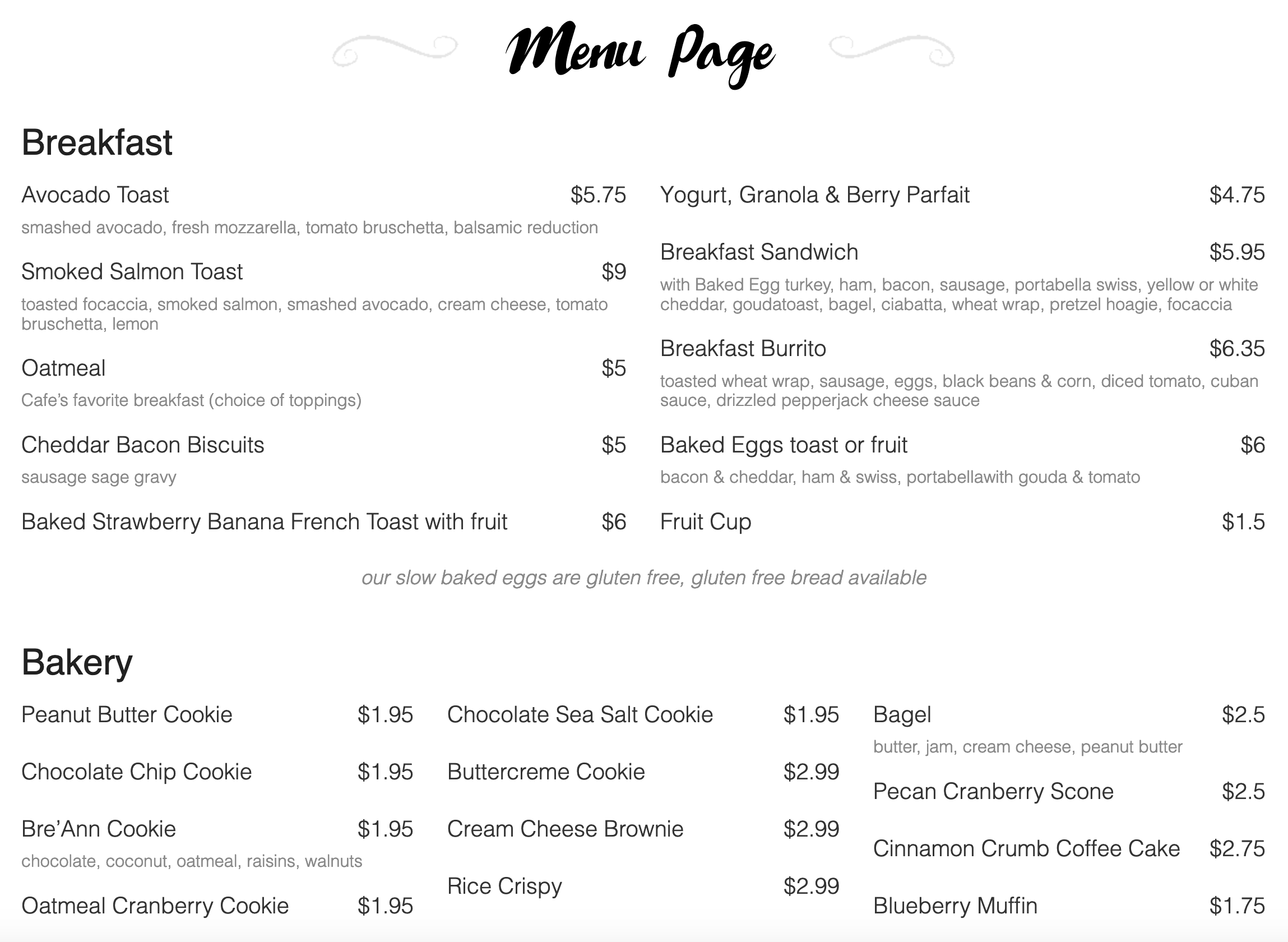 Responsive Online MenuMobile friendly layouts for best performance and look on any device. Default minimalistic design is built on UIkit and can use its own library to avoid conflicts.Categories & sub-categoriesUnlimited number of categories and sub-categories allowed. Food, drinks menu categories designed by any criteria in any sequence.Meals vs Subcategories SplitSeparate column settings for meal items and subcategory cards. Display 3 meal columns inside a 2-column subcategory layout, or any combination you need.Text-Only LayoutNo images, just clean typography. Category headings, meal names, descriptions, and prices. Ideal for wine lists, tapas menus, or minimalist restaurant brands.Per-Category Column CountConfigure 1, 2, 3, or 4 columns per category independently. Your burger menu can run in two wide columns while the drink list uses four narrow ones.
 -
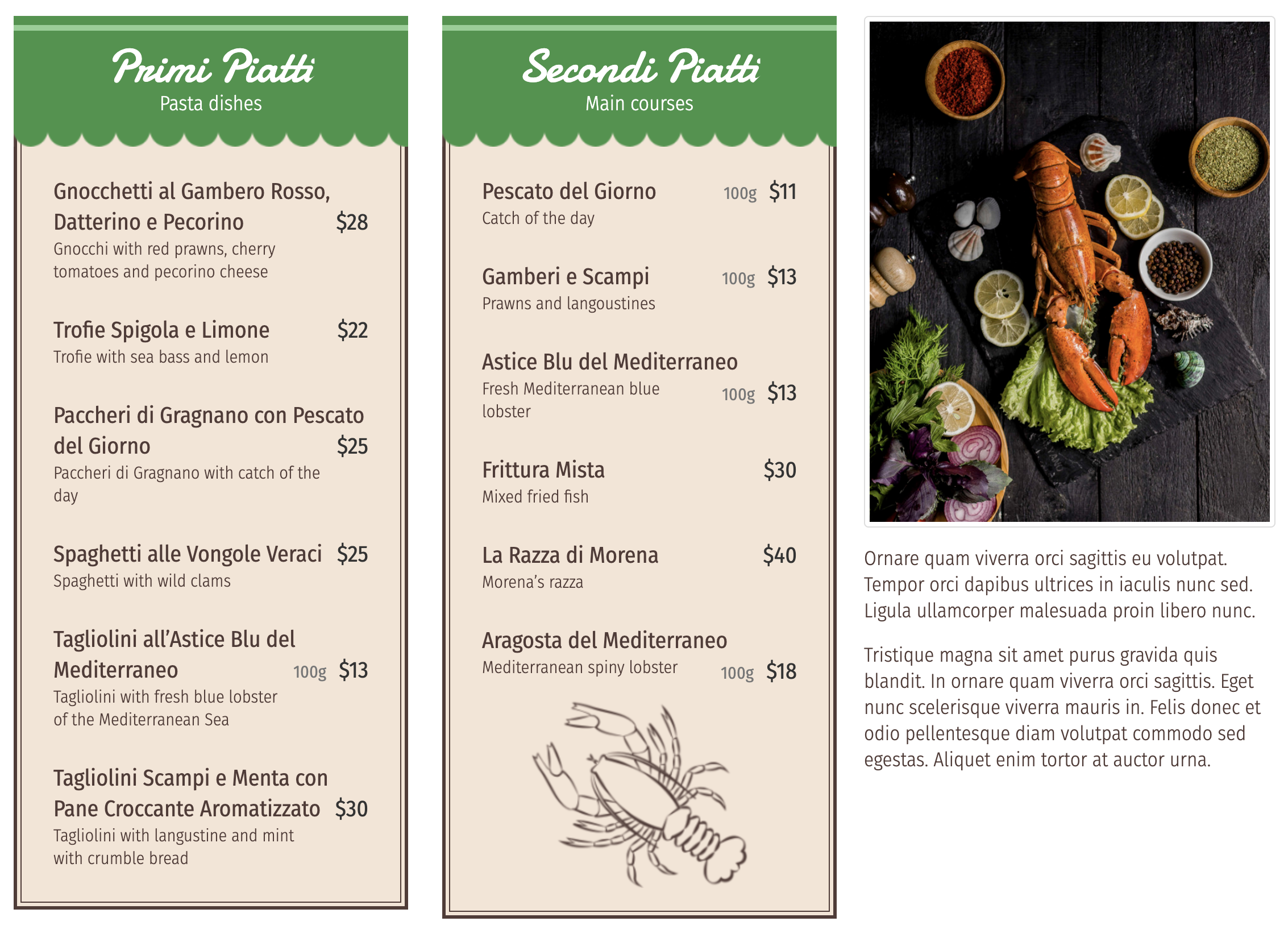 Meal HTML descriptionCreate your menu style with HTML description for every meal. If you need to change look and feel of every item pay attention to design add-ons.Text and image blocksUse empty category HTML description to add text and image blocks in-between other categories or on a side.Automatic Hover CarouselCategory images rotate automatically on mouse-over using the Owl Carousel library. Visitors see multiple angles without clicking anything.Unlimited Photos Per MealUpload one hero image or a full gallery for every dish. No fixed limit. Build rich photo stories for your signature meals while keeping simpler items with a single shot.Unlimited Custom BadgesCreate any number of badges with custom names, colors, and image icons. SVG, PNG, and JPG image formats supported for the icon.
 -
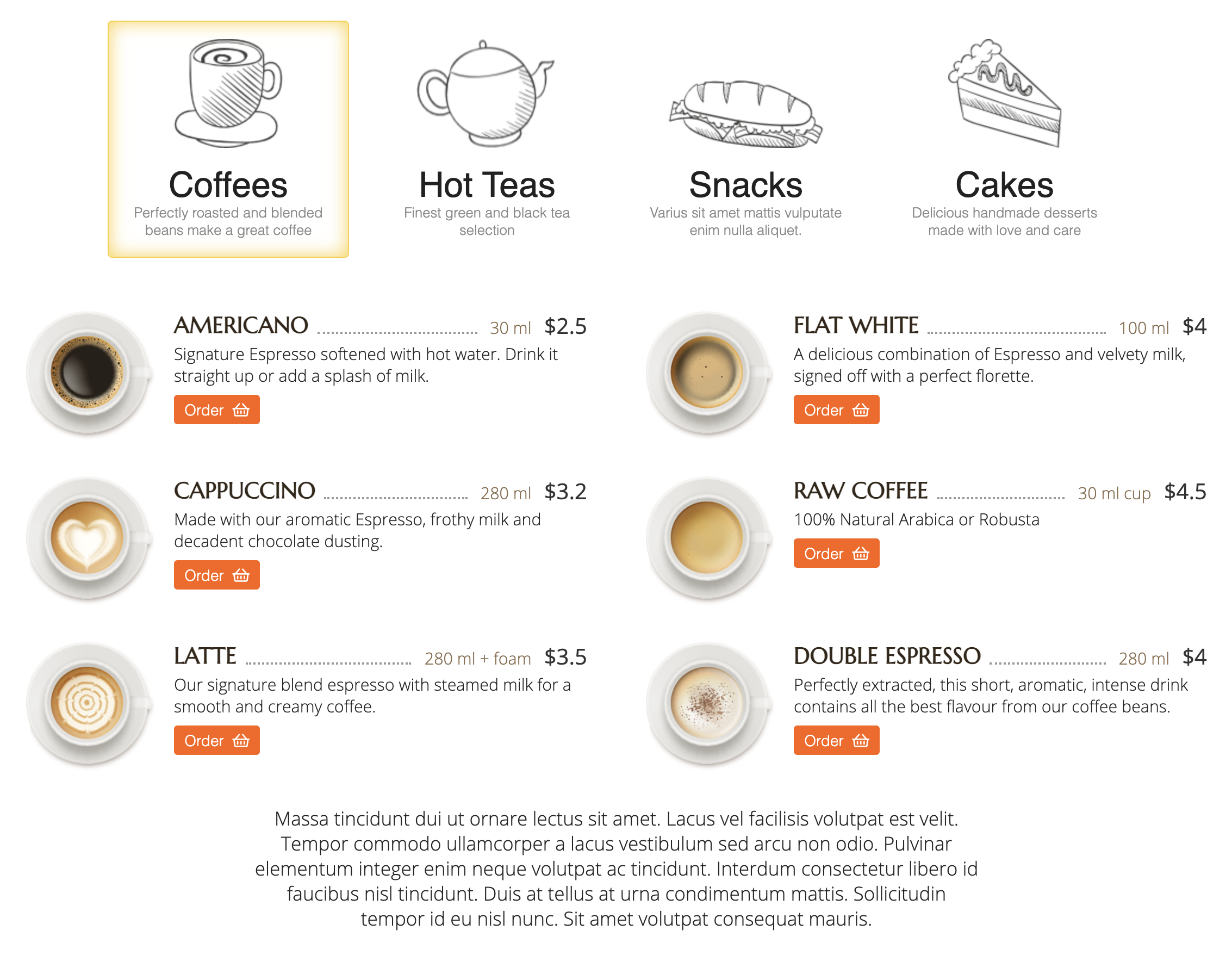 Horizontal Tab NavigationCategory names render as clickable tabs at the top of the menu. One click switches between categories with no vertical scrolling and no page reload.Individual category settingsCategories has their own settings and can configured individually. It allows to make empty parent category and then have sub-category listed in 2 columns.Show or Hide ToggleToggle tab display on or off without uninstalling. Hide tabs on single-category pages and show them where they help navigation.Three Alignment OptionsPosition tabs left, center, or right to match your brand guidelines and template design. Global setting applies to every page.Dual-Mode TrackingIngredients and allergens share one system with a flag that marks each as a regular ingredient or an allergen. One database, two uses.
 -
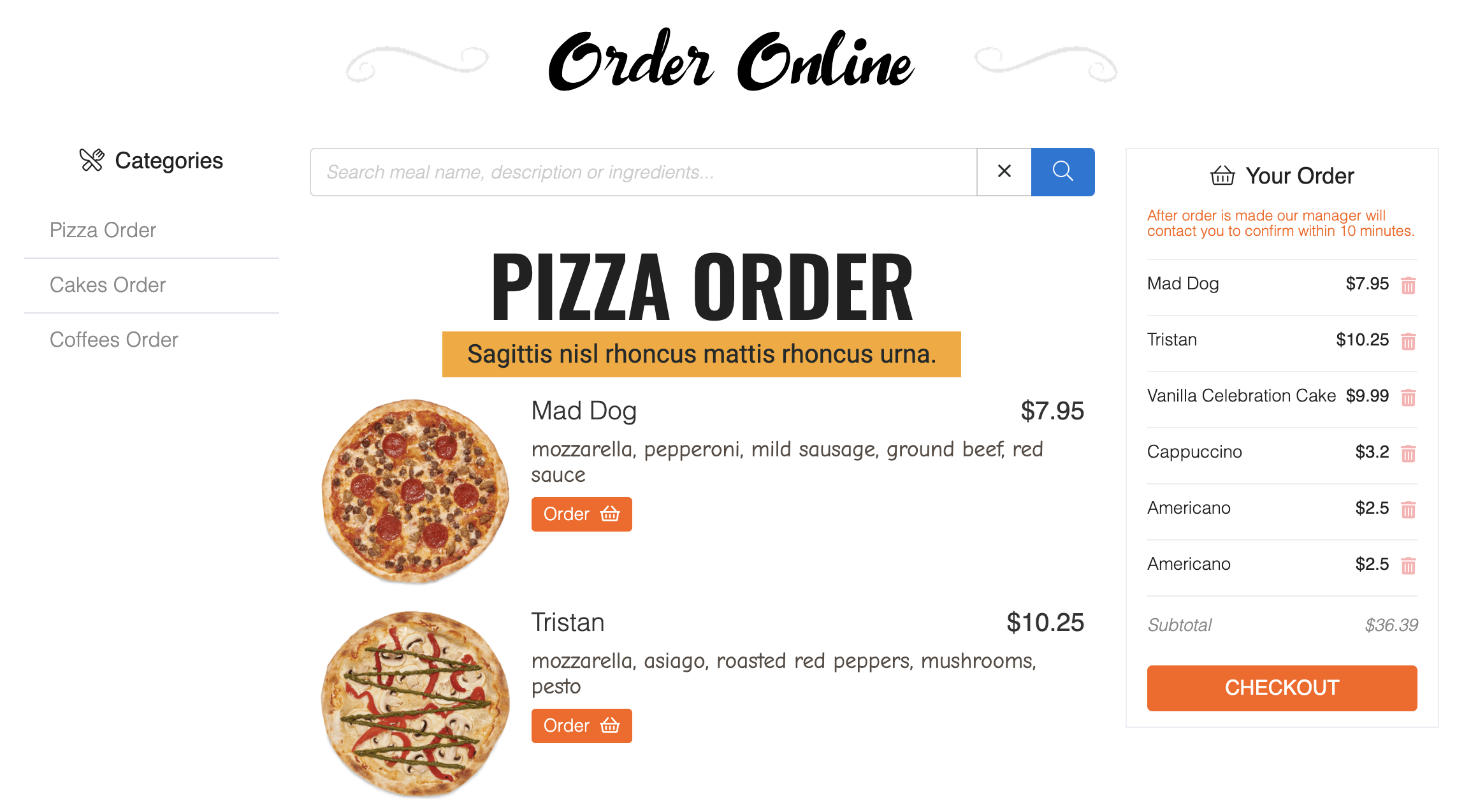 Full Shopping CartMulti-item cart with quantity management, live totals, and session persistence. Customers browse, add, remove, and checkout without losing their order.Multiple Price Tiers Per MealConfigure unlimited price variants per dish with custom labels like Small, Medium, Large, or Personal/Family. Each tier has its own price and optional portion description.Tax and Delivery CalculationAutomatic tax calculation (fixed or percentage), delivery fee integration, and real-time total updates as customers modify their order.Modifier Groups With SurchargesCreate add-on groups for extras, toppings, sides, or substitutions. Each modifier carries its own surcharge that adds to the meal price when selected.Sticky Cart PanelA persistent cart sidebar shows the live order total, tax, and delivery fees while customers browse. No hunting for a hidden cart button.
 -
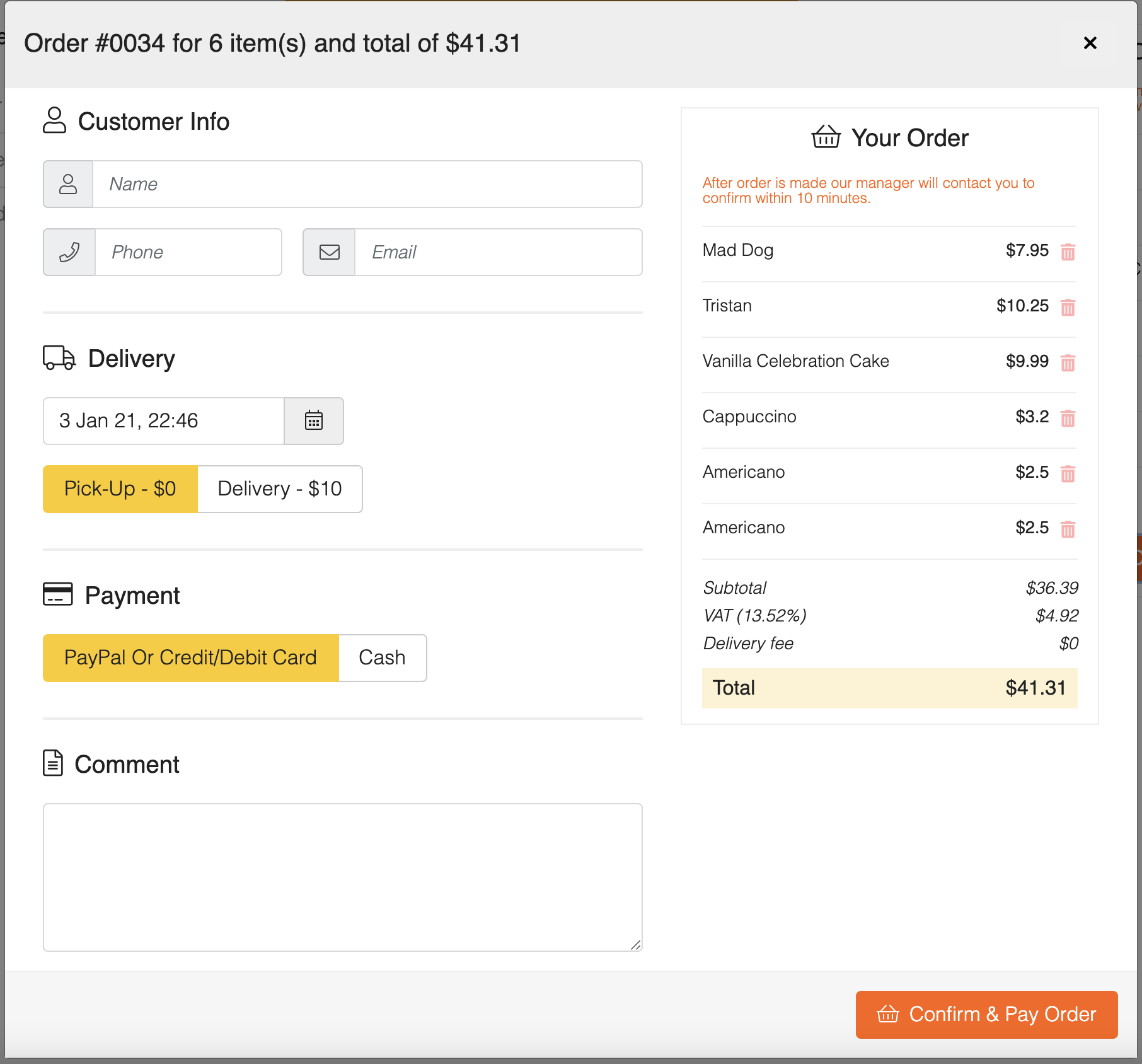 Payment Gateway IntegrationPlug in Stripe, PayPal, or any Joomla-compatible payment gateway via the payment_gate_id field. Customers pay online and the order is confirmed automatically.Currency settingsPrice currency parameters for proper sign and abbreviation codes. Currency is used for Online Order add-on to show price and calculate total.Customer Information CaptureCheckout collects name, email, phone, and order comments for every order. Data flows into the admin panel and triggers confirmation emails.Multi-Zone Delivery MappingCreate delivery zones by radius from your restaurant. Each zone has its own price, minimum order value, and optional full-price override.Customer Order ConfirmationOn new orders, the customer gets an instant text with the order ID and total. No more hoping the confirmation email reaches them.
Add-ons
-
 Professional+
Generate a QR code for every table and let guests scan, browse, and order directly from their phones. Works for cafés, bistros, and hotel room service.
Professional+
Generate a QR code for every table and let guests scan, browse, and order directly from their phones. Works for cafés, bistros, and hotel room service. Free
A fast, clean, text-only menu template without images. Perfect for printable menus, low-bandwidth sites, or restaurants that prefer a minimal typographic layout.
Free
A fast, clean, text-only menu template without images. Perfect for printable menus, low-bandwidth sites, or restaurants that prefer a minimal typographic layout. Free
A mobile-first menu template built around online ordering. Sticky cart, modal checkout forms, promotional highlights, and location maps all come pre-styled for touch devices.
Free
A mobile-first menu template built around online ordering. Sticky cart, modal checkout forms, promotional highlights, and location maps all come pre-styled for touch devices. Free
Display your menu in one, two, three, or four columns per category. Configure column counts independently for meals and subcategories, or apply a layout to multiple categories at once.
Free
Display your menu in one, two, three, or four columns per category. Configure column counts independently for meals and subcategories, or apply a layout to multiple categories at once. Free
Turn your menu categories into a tab navigation bar at the top of the page. Customers click tabs to jump between sections without scrolling through the entire menu.
Free
Turn your menu categories into a tab navigation bar at the top of the page. Customers click tabs to jump between sections without scrolling through the entire menu. Starter+
Handle every pricing scenario restaurants actually need: portion sizes, add-ons, extras, and discounts. Each meal can carry unlimited price variants and modifier groups.
Starter+
Handle every pricing scenario restaurants actually need: portion sizes, add-ons, extras, and discounts. Each meal can carry unlimited price variants and modifier groups. Professional+
Add full online ordering to your menu with cart, checkout, payment processing, and order management. Turn your website into a direct ordering channel and stop paying delivery platform commissions.
Professional+
Add full online ordering to your menu with cart, checkout, payment processing, and order management. Turn your website into a direct ordering channel and stop paying delivery platform commissions. Professional+
Run your menu in multiple languages from a single admin interface. Switch the editing language with a dropdown and translate meal names, descriptions, order messages, and emails.
Professional+
Run your menu in multiple languages from a single admin interface. Switch the editing language with a dropdown and translate meal names, descriptions, order messages, and emails. Professional+
Send SMS and WhatsApp order alerts to customers and kitchen managers automatically. Uses Twilio for global coverage and dual-channel delivery.
Professional+
Send SMS and WhatsApp order alerts to customers and kitchen managers automatically. Uses Twilio for global coverage and dual-channel delivery. Professional+
Set up multi-zone delivery with distance-based fees, minimum order values, and room service charges. Customers see delivery availability and cost instantly when they enter their address.
Professional+
Set up multi-zone delivery with distance-based fees, minimum order values, and room service charges. Customers see delivery availability and cost instantly when they enter their address. Starter+
Replace flat TripAdvisor menu photos with a rich image gallery for every dish. Upload multiple photos per meal and let visitors browse them right from the menu.
Starter+
Replace flat TripAdvisor menu photos with a rich image gallery for every dish. Upload multiple photos per meal and let visitors browse them right from the menu. Professional+
Add visual labels to menu items like NEW, SPICY, VEGAN, GLUTEN-FREE, or CHEF'S CHOICE. Customizable colors and icons make your specials jump off the page.
Professional+
Add visual labels to menu items like NEW, SPICY, VEGAN, GLUTEN-FREE, or CHEF'S CHOICE. Customizable colors and icons make your specials jump off the page. Professional+
Track ingredients and highlight allergens on menu items. Customers filter the menu to hide items containing gluten, nuts, dairy, or any allergen you define.
Professional+
Track ingredients and highlight allergens on menu items. Customers filter the menu to hide items containing gluten, nuts, dairy, or any allergen you define. Professional+
Show calorie counts and nutritional values on menu items. Display energy, protein, fat, saturated fat, and carbohydrates for health-conscious diners.
Professional+
Show calorie counts and nutritional values on menu items. Display energy, protein, fat, saturated fat, and carbohydrates for health-conscious diners. Professional+
Google-ready structured data, Open Graph tags, and automatic meta descriptions for every menu page. Helps your restaurant rank for local food searches and look sharp when shared on social.
Professional+
Google-ready structured data, Open Graph tags, and automatic meta descriptions for every menu page. Helps your restaurant rank for local food searches and look sharp when shared on social. Starter+
Show breakfast meals only in the morning and dinner items only after 5pm. Set availability windows per category and the menu hides or grays out items outside the time range.
Starter+
Show breakfast meals only in the morning and dinner items only after 5pm. Set availability windows per category and the menu hides or grays out items outside the time range. Free
Display your restaurant opening hours, address, and contact details as a sidebar module. Reads from your global FW Food Menu settings so everything stays consistent.
Free
Display your restaurant opening hours, address, and contact details as a sidebar module. Reads from your global FW Food Menu settings so everything stays consistent. -
Free
A fast, clean, text-only menu template without images. Perfect for printable menus, low-bandwidth sites, or restaurants that prefer a minimal typographic layout.
Free
A mobile-first menu template built around online ordering. Sticky cart, modal checkout forms, promotional highlights, and location maps all come pre-styled for touch devices.
Free
Display your menu in one, two, three, or four columns per category. Configure column counts independently for meals and subcategories, or apply a layout to multiple categories at once.
Free
Turn your menu categories into a tab navigation bar at the top of the page. Customers click tabs to jump between sections without scrolling through the entire menu.
Free
Display your restaurant opening hours, address, and contact details as a sidebar module. Reads from your global FW Food Menu settings so everything stays consistent.
-
Starter+
Replace flat TripAdvisor menu photos with a rich image gallery for every dish. Upload multiple photos per meal and let visitors browse them right from the menu.
Starter+
Handle every pricing scenario restaurants actually need: portion sizes, add-ons, extras, and discounts. Each meal can carry unlimited price variants and modifier groups.
Starter+
Show breakfast meals only in the morning and dinner items only after 5pm. Set availability windows per category and the menu hides or grays out items outside the time range.
-
Professional+
Add visual labels to menu items like NEW, SPICY, VEGAN, GLUTEN-FREE, or CHEF'S CHOICE. Customizable colors and icons make your specials jump off the page.
Professional+
Show calorie counts and nutritional values on menu items. Display energy, protein, fat, saturated fat, and carbohydrates for health-conscious diners.
Professional+
Set up multi-zone delivery with distance-based fees, minimum order values, and room service charges. Customers see delivery availability and cost instantly when they enter their address.
Starter+
Replace flat TripAdvisor menu photos with a rich image gallery for every dish. Upload multiple photos per meal and let visitors browse them right from the menu.
Professional+
Track ingredients and highlight allergens on menu items. Customers filter the menu to hide items containing gluten, nuts, dairy, or any allergen you define.
Professional+
Run your menu in multiple languages from a single admin interface. Switch the editing language with a dropdown and translate meal names, descriptions, order messages, and emails.
Professional+
Add full online ordering to your menu with cart, checkout, payment processing, and order management. Turn your website into a direct ordering channel and stop paying delivery platform commissions.
Starter+
Handle every pricing scenario restaurants actually need: portion sizes, add-ons, extras, and discounts. Each meal can carry unlimited price variants and modifier groups.
Professional+
Google-ready structured data, Open Graph tags, and automatic meta descriptions for every menu page. Helps your restaurant rank for local food searches and look sharp when shared on social.
Professional+
Generate a QR code for every table and let guests scan, browse, and order directly from their phones. Works for cafés, bistros, and hotel room service.
Professional+
Send SMS and WhatsApp order alerts to customers and kitchen managers automatically. Uses Twilio for global coverage and dual-channel delivery.
Starter+
Show breakfast meals only in the morning and dinner items only after 5pm. Set availability windows per category and the menu hides or grays out items outside the time range.
Services
 Theme Integration
 Languages


Subscription Plans
After subscription expires, the product and all its add-ons remain functional and can be used further.
-
Update period1 y
-
Update period1 mo
-
Update periodLifetime
-
Add-ons12
-
Websites1
-
Support response48h
-
Lifetime usage
-
Update period1 y
-
Update period1 mo
-
Update periodLifetime
-
Add-ons22
-
Websites3
-
Support response48h
-
Lifetime usage
-
Update period1 y
-
Update period1 mo
-
Update periodLifetime
-
Add-ons22
-
Websites5
-
Support response24h
-
Lifetime usage
-
Free setup service
Frequently Asked Questions
-
Is FW Food Menu a free plugin?
Yes, FW Food Menu is a free plugin with a comprehensive set of features suitable for most food websites.
-
How to install add-ons?
Go to Admin panel -> FW Food Menu -> Dashboard. Make sure to verify your website to connect it with your fastw3b.com account and download free and purchased add-ons.
-
Why do I need to verify my website?
Verification is required for the following reasons:
- To install plugin and add-on updates.
- To get support in Client Section at fastw3b.com.
- To be able to install/update free and purchased add-ons.
- To buy new add-ons from Admin -> FW Food Menu -> Add-ons section.
-
What are add-ons?
Add-ons are specific plugins that work only with FW Food Menu plugin and extend its functionality in various ways. Add-on can be another layout with shortcode to use, a new set of parameters to extend existing plugin functions or even a design for plugin elements.
-
Why would I need an add-on?
While FW Food Menu is fully seld-sufficient solution, add-ons may add features your website needs. The main plugin has a functionality that is critical for it to work. All other features come as add-ons to allow customers decide which configuration they prefer on their website. Add-on is the simplest way to add new features and design to FW Food Menu.
-
How to get an add-on?
There are 2 ways to get add-ons:
- Go to Admin -> FW Food Menu -> Add-ons and get add-ons from there.
- Go to FW Food Menu official page on fastw3b.com, scroll to Add-ons section and get them from there.
All add-ons you have available will be listed in Admin -> FW Food Menu -> Dashboard -> Add-ons section.
12k+ clients love our product
If you can dream it, Fastw3b will design it. It is almost a year since I started working with Fastw3b. In fact, having started on the Joomla journey (three months prior) and with no development experience, Fastw3b was the perfect first date.
After the initial – dancing around – trying to understand each other, we quickly established a relationship based on frankness and directness and this was probably the single most important trait that I respect them for. It would have been easier to repeat the “customer is king” mantra and get paid for the job. Not with Fastw3b. It seemed as if they genuinely were as interested and excited about the project as I was. It was as if I was working with my own inhouse team, rather than distant consultants.
If you are new to Joomla or indeed to development and are looking for a professional yet empathetic partner, I highly recommend Fastw3b. They deliver on time, are willing to own-up to errors and fix them, and best of all are as invested in your project as you.

The criteria for any successful project is for it to be on time, within budget and meets business and customer requirements. In order to achieve this you need a highly skilled team who are knowledgeable efficient in what they do and prepared to go the extra mile to ensure that the required work is completed to the highest quality. It is for this reason that I partner with Fastw3b as I can rely on them to always deliver a successful project.
The strongest skill of Fastw3b is their ability to develop and deliver innovative technical solutions whilst always ensuring a high level of customer service.
I believe it is the willingness of Fastw3b to collaborate with a client during the project initiation phase by providing suggestions and advice on how to best solve a problem to ensure that a quality product and service is delivered.

FW Food Menu Changelog
Version 6.1.0 (17 Oct 2025)
Version 6.0.5 (09 Sep 2025)
Version 6.0.4 (13 Dec 2024)
Version 6.0.3 (08 Nov 2024)
Version 6.0.2 (17 Sep 2024)
Version 6.0.1 (07 Sep 2024)
Version 6.0.0 (05 Aug 2024)
Version 5.6.12 (13 Apr 2024)
Version 5.6.11 (12 Mar 2024)
Version 5.6.10 (07 Mar 2024)
Version 5.6.9 (20 Feb 2024)
Version 5.6.8 (12 Feb 2024)
Version 5.6.7 (31 Jan 2024)
Version 5.6.6 (30 Dec 2023)
Version 5.6.5 (29 Nov 2023)
Version 5.6.4 (28 Nov 2023)
Version 5.6.3 (27 Nov 2023)
Version 5.6.2 (25 Nov 2023)
Version 5.6.1 (13 Nov 2023)
Version 5.6.0 (18 Jul 2023)
Version 5.5.3 (09 Jul 2023)
Version 5.5.2 (05 Jul 2023)
Version 5.5.1 (28 Jun 2023)
Version 5.5.0 (14 Jun 2023)
Version 5.4.0 (10 May 2023)
Version 5.3.0 (14 Feb 2023)
Version 5.2.3 (18 Jan 2023)
Version 5.2.2 (06 Jan 2023)
Version 5.2.1 (05 Jan 2023)
Version 5.2.0 (05 Jan 2023)
Version 5.1.1 (12 Sep 2022)
Version 5.0.1 (29 Jul 2022)
Version 4.9.0 (07 Dec 2021)
Version 4.8.5 (24 Nov 2021)
Version 4.8.4 (14 Oct 2021)
Version 4.8.3 (08 Oct 2021)
Version 4.8.2 (07 Oct 2021)
Version 4.8.1 (06 Oct 2021)
Version 4.8.0 (06 Oct 2021)
Version 4.7.2 (23 Sep 2021)
Version 4.7.1 (22 Sep 2021)
Version 4.7.0 (21 Sep 2021)
Version 4.6.1 (01 Sep 2021)
Version 4.6.0 (31 Aug 2021)
Version 4.5.0 (05 Aug 2021)
Version 4.4.1 (15 Jul 2021)
Version 4.4.0 (13 Jul 2021)
Version 4.3.7 (11 Mar 2021)
Version 4.3.4 (10 Mar 2021)
Version 4.3.3 (07 Mar 2021)
Version 4.3.2 (02 Mar 2021)
Version 4.3.1 (27 Feb 2021)
Version 4.3.0 (26 Feb 2021)
Version 4.2.0 (22 Feb 2021)
Version 4.1.0 (19 Feb 2021)
Version 4.0.0 (08 Feb 2021)
Version 3.0.1 (13 Jan 2021)
Version 3.0.0 (24 Dec 2020)
Version 2.7.0 (17 Sep 2020)
Version 2.6.1 (10 Sep 2020)
Version 2.6.0 (28 Jul 2020)
Version 2.5.0 (18 Jun 2020)
Version 2.4.0 (14 May 2020)
Version 2.3.2 (15 Apr 2020)
Version 2.3.1 (09 Apr 2020)
Version 2.3.0 (08 Apr 2020)
Version 2.2.0 (20 Mar 2020)
Version 2.1.2 (13 Mar 2020)
Version 2.1.1 (11 Mar 2020)
Version 2.1.0 (03 Feb 2020)
Version 2.0.1 (09 Jan 2020)
Version 2.0.0 (11 Dec 2019)
FW Food Menu WordPress Changelog
Version 6.0.0 (06 Aug 2024)
Version 5.5.6 (10 May 2024)
Version 5.5.5 (18 Apr 2024)
Version 5.5.4 (13 Apr 2024)
Version 5.5.3 (09 Jul 2023)
Version 5.5.2 (05 Jul 2023)
Version 5.5.1 (03 Jul 2023)
Version 5.0.1 (29 Jul 2022)
Version 4.8.4 (14 Oct 2021)
Version 4.8.2 (07 Oct 2021)
Version 4.8.0 (06 Oct 2021)
Version 4.7.1 (22 Sep 2021)
Version 4.7.0 (22 Sep 2021)
Version 4.6.1 (01 Sep 2021)
Version 4.6.0 (31 Aug 2021)
Version 4.5.0 (05 Aug 2021)
Version 4.4.1 (15 Jul 2021)
Version 4.4.0 (13 Jul 2021)
Version 4.3.8 (20 Apr 2021)
Version 4.3.7 (11 Mar 2021)
Version 4.3.6 (10 Mar 2021)
Version 4.3.5 (09 Mar 2021)
Version 4.3.4 (08 Mar 2021)
Version 4.3.2 (03 Mar 2021)
Version 4.3.0 (26 Feb 2021)
Version 4.0.0 (10 Feb 2021)
Download FW Food Menu

