Press Enter to search or Esc to close

FW Real Estate

Real estate listing platform for individual agents, brokers, and agencies. MLS integration included in Professional and Agency tiers, plus a full addon library covering search, property management, agents, SEO, and custom fields. Self-hosted on Joomla or WordPress, one subscription covers everything.
Top Features & Screenshots

Product Features

  • Responsive Property Listings
    Mobile friendly layouts for best performance and look on any device.
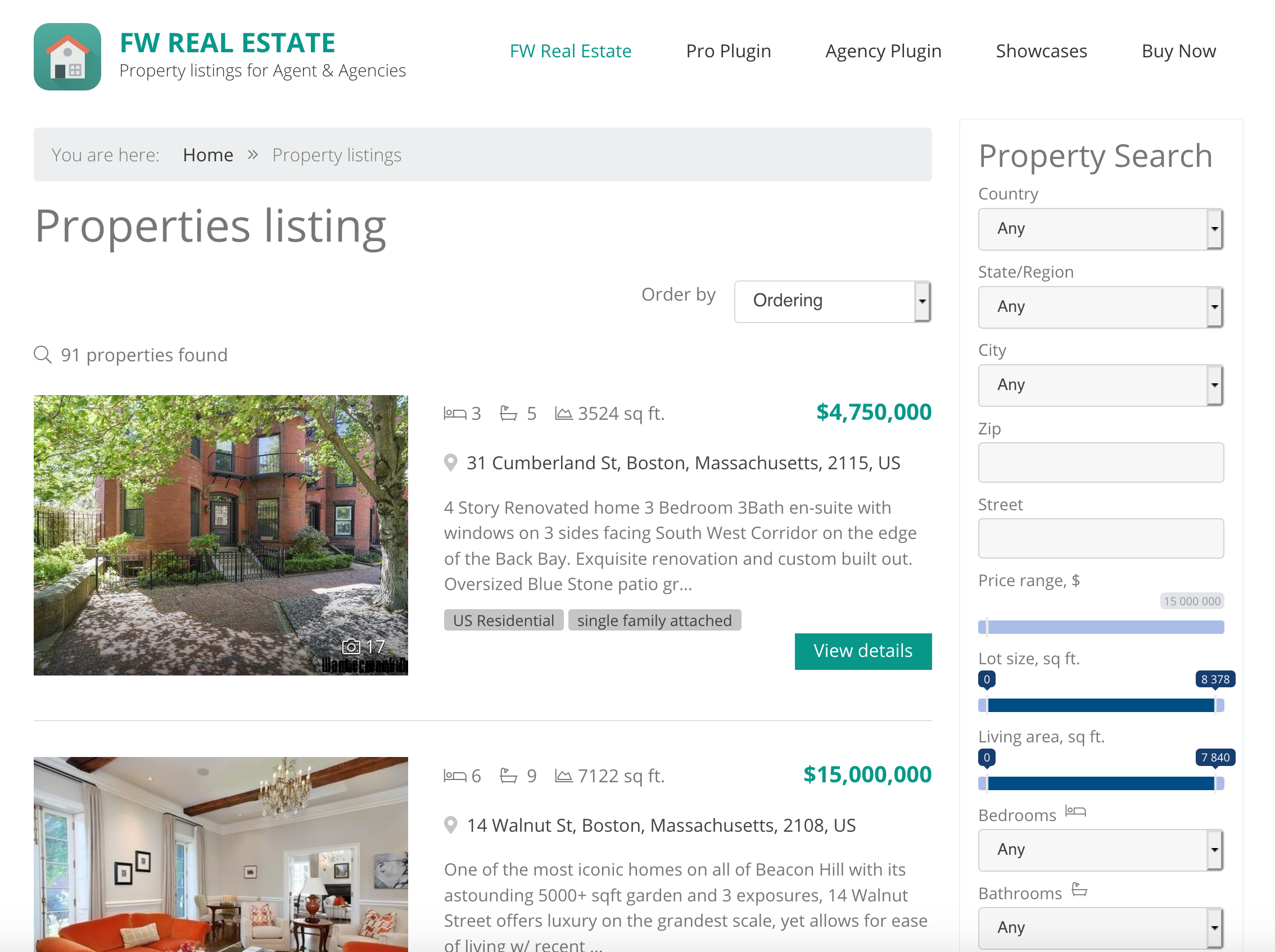
    List view
    List property listings layout with numerous display options.
    Card-Based Grid Layout
    Properties display as equal-size photo cards in a responsive grid. Photos take center stage with essential details below. Far more visually engaging than traditional text-heavy list layouts.
    Visual Featured Badge
    Prominent Featured badge overlaid on property cards in listings. Visitors instantly spot highlighted properties without reading descriptions.
    Customizable Status Badges
    Create unlimited status labels with custom names and colors. Sold, New, Under Offer, Price Reduced, Investment, or any custom status your market needs.
  • Image gallery
    Hi-quality images resized for optimal use with originals kept.
    360-Degree Tour Embedding
    Embed interactive panoramic tours and virtual walkthroughs on property detail pages. Works with Matterport, Kuula, iStaging, Zillow 3D Home or any provider that allows iframe embedding.
    Multi-Source Video Embedding
    Embed videos from YouTube, Vimeo, or direct file upload (MP4, FLV). Also supports remote hosting via URL for videos on your own CDN.
    Unlimited Floor Plan Upload
    Upload unlimited floor plan images per property with custom titles like Ground Floor, Master Suite, or Basement. No limits on number, perfect for multi-level homes and commercial properties.
    Interactive Payment Calculator
    Real-time mortgage payment estimates update as visitors adjust loan amount, down payment, interest rate, and term. Include property taxes, hazard insurance, and PMI for complete monthly cost picture.
  • Batch upload
    Fast and handy files management with batch upload feature.
    Translation manager
    Adjust language interface translations to your needs or create translation for a new language.
    Admin Approval Workflow
    Agent-submitted properties go to the standard admin queue for review. Optional email notifications alert admins to new submissions for quick approval.
    Complete Property Edit Form
    Full FW Real Estate edit form in the frontend. Category, type, pricing, location, metadata, gallery, all fields available to agents with the same controls as admins.
    Unified Lead Inbox
    All inquiries save to FW Real Estate Messages section in admin. Each message shows visitor contact info, property details, and submission date in one central view.
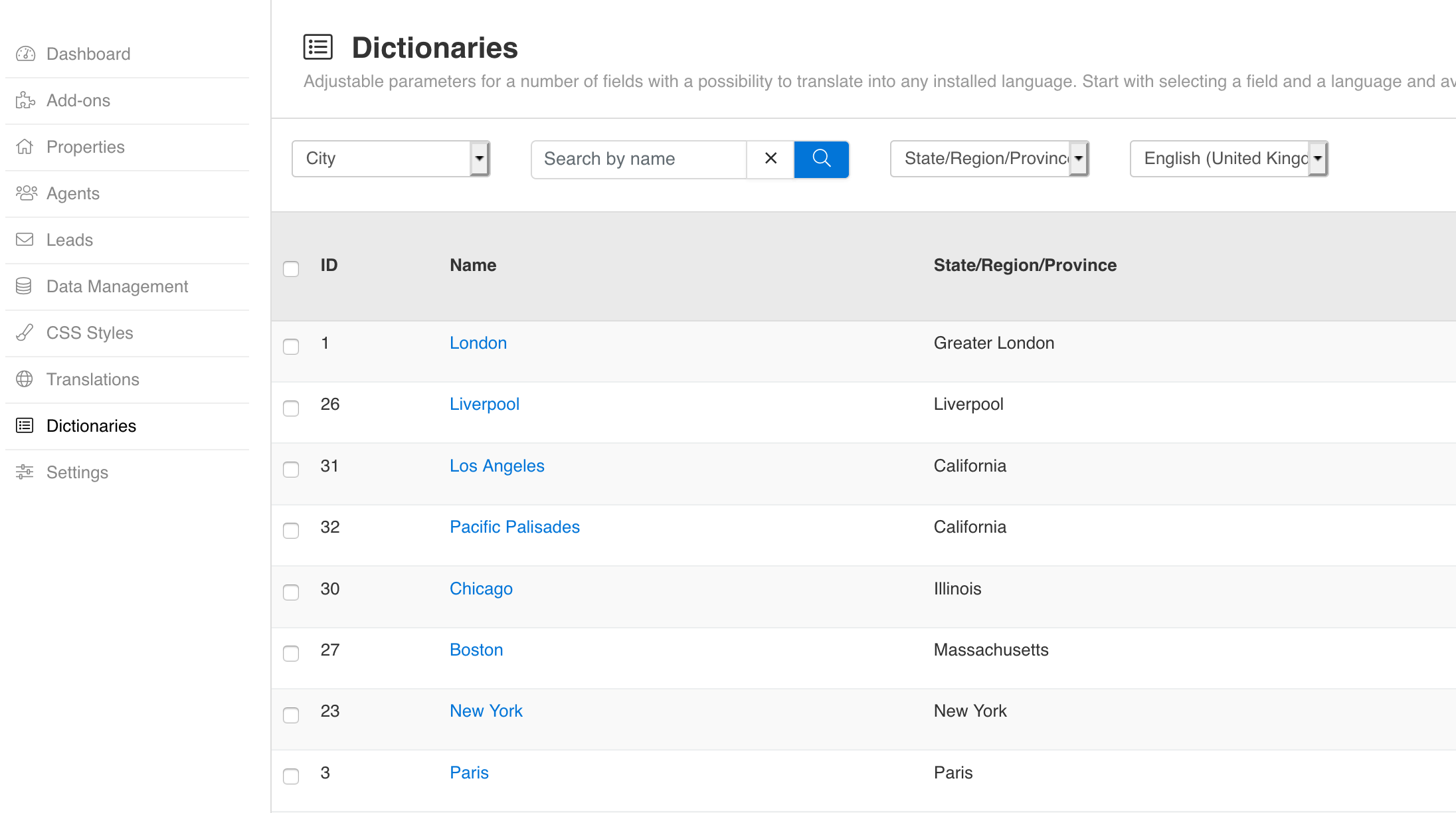
  • Dictionaries (customizable fields)
    10 special fields that can be edited, translated in any language and adjusted to your needs.
    Unlimited Field Creation
    Build as many custom fields as your market demands. No quantity limits. Perfect for luxury homes, vacation rentals, commercial properties, or any specialized real estate niche.
    Structured Amenities Data
    Comprehensive amenities checklist (pool, garage, air conditioning, balcony). Structured data instead of text descriptions lets visitors filter properties by specific features.
    Four Input Types
    Choose from text input, dropdown select, multi-checkbox lists, and yes/no boolean toggles. Select and checkbox types support unlimited predefined options with translatable labels.
    Groups and Tabs Organization
    Group related fields into logical sections and organize groups into tabs. Control display position with three zones: before details, after details, or additional sections.

More Features

  • Multi-Currency Price Display
    FWRE Multi Currency
    Show prices in USD, EUR, GBP, AED, and any ISO currency. Visitors select their preferred currency from a dropdown selector on every listing and property page.
    Agent Contact Cards on Properties
    FWRE Agents
    Automatic agent contact block on every property detail page. Configurable position (right sidebar or bottom). Shows photo, name, company, phone, email, and social links.
    Multi-Language Field Definitions
    FWRE Custom Fields
    Define field names, labels, and option values in multiple languages. Each language version is stored separately, enabling truly localized property listings.
  • Sell listings
    Property for sale with adjusted pricing and terms.
    Multilingual support
    Built-in support for full content translation for any number of languages.
    Listing display settings
    Items per page, ordering, show/hide fields and filters, allow certain functions.
    Adjustable Property Page
    Set property info to be shown as sections listed one by one or tabs to save page space.
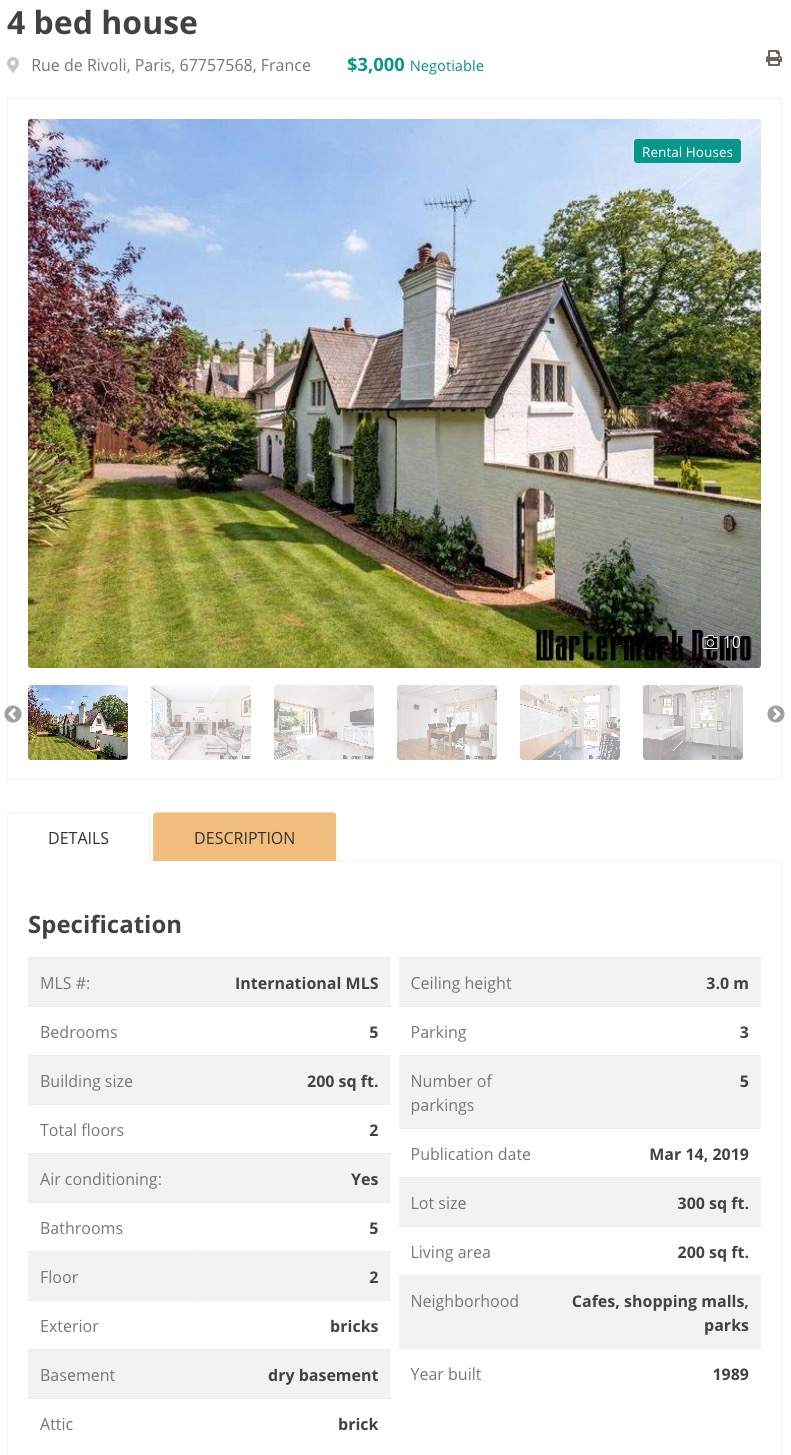
    Single property page
    Detailed property page with configuration option, media gallery, specification sections, etc.
    Property display settings
    Show property fields, set price validation, configure title.
    Resize on upload
    Dimensions set in configuration will be applied on upload while original files will be kept as alternative.
    Self-Service Agent Portal
    FWRE Property Manager
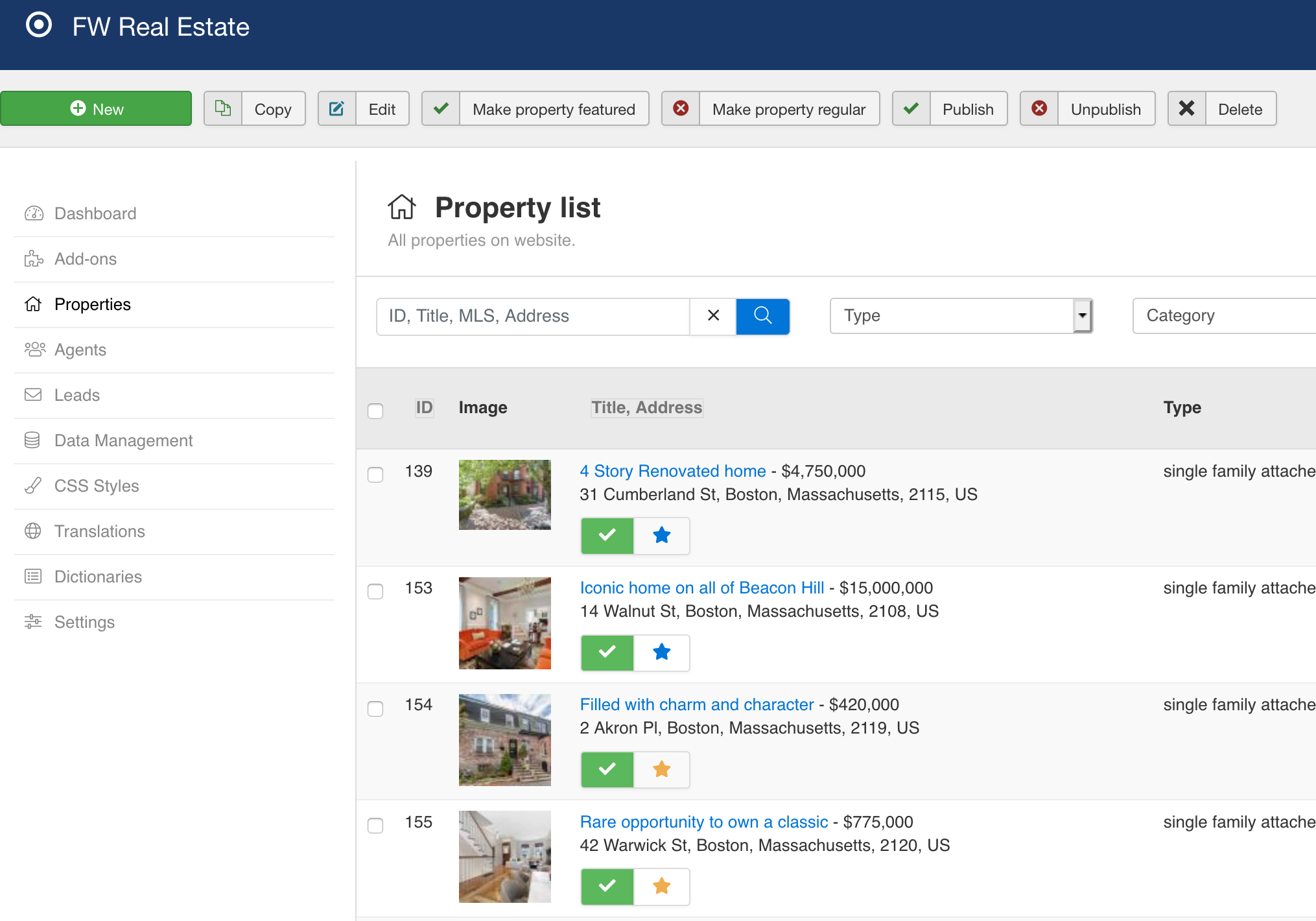
    Agents manage their complete property inventory independently through the Client Section. No admin credentials needed, no dependency on your staff for routine updates.
    Multi-Image Gallery Upload
    FWRE Property Manager
    Bulk upload property images individually or as ZIP files. Automatic processing creates optimized versions (large, medium, thumbnail) for every image.
    Property Duplication
    FWRE Property Manager
    Clone existing listings with one click to create similar properties faster. Preserves all details and metadata so agents only edit what differs.
    ACL Permission Control
    FWRE Property Manager
    Set which user groups can submit properties via Joomla ACL. Each agent sees only their own listings. Admins retain override access to everything.
  • Extended description
    26 fields to describe every listing and show exactly what your customers look for.
    Role-Based Field Visibility
    FWRE Custom Fields
    Restrict individual fields to specific user roles. Show sensitive data only to agents or admins, hide it from guests or public property views.
    Required Field Validation
    FWRE Custom Fields
    Mark any custom field as required. Agents cannot save properties without filling mandatory fields. Enforces data consistency across all listings.
    Investment and Financial Metrics
    FWRE Extra Fields
    Track premium, cost of rehab, fair market value, annual expenses, and capitalization rates. Essential for vacation rentals, investment properties, and income analysis.
    Rental Income Tracking
    FWRE Extra Fields
    Record gross rental income and annual expenses for income properties. Perfect for investment property marketing where buyers need yield calculations.
    Search Filter Integration
    FWRE Extra Fields
    Combined with Search Module, visitors can filter properties by specific amenities. Buyers find exactly what they need without reading descriptions.
    Dictionary Management
    FWRE Extra Fields
    Centrally manage amenities and financial categories from FW Real Estate > Dictionaries. Changes apply everywhere automatically with multi-language support.
  • Menu item settings
    Adjust country, region, city, category, type, filters on listing layout.
    Multiple Ordering Modes
    FWRE Latest Module
    Display properties by newest added, most popular (by view count), or random rotation. Each module instance can use a different sort order for targeted widgets.
    Three Layout Options
    FWRE Latest Module
    Choose vertical list, horizontal grid, or auto-rotating slideshow. Match the layout to your module position and screen space available.
    Advanced Filtering
    FWRE Latest Module
    Filter by category, type, status, featured flag, and open house availability. Build curated widgets for specific pages like Featured Villas or Open Houses This Weekend.
    Two Flexible Layouts
    FWRE Search Module
    Full-width default layout for hero sections and compact minimal layout for sidebars. Both fully responsive and adapt to any screen size.
    18 Configurable Fields
    FWRE Search Module
    Toggle each search field on or off from the admin panel. Show only the filters your visitors need. Bedrooms, price, property type, location, amenities, and 13 more.
    Smart Location Search
    FWRE Search Module
    Separate country, region, and city dropdowns or a single combined location input. Cascading selections narrow results intelligently.
    Range Sliders or Dropdowns
    FWRE Search Module
    Choose between interactive range sliders and traditional select menus for price, area, bedrooms, and bathrooms. Visual or precise, whichever fits your audience.
    Plugin-Aware Fields
    FWRE Search Module
    Automatically adds fields when companion add-ons are installed: radius search from Map View, agent filter from Agents, amenities from Custom Fields, currency from Multi Currency.
    Live Property Counts
    FWRE Search Module
    Every filter option shows the number of matching properties in real time. Visitors know what to expect before searching.
    Multi-Language Ready
    FWRE Search Module
    Full translation support including right-to-left (RTL) layouts for Arabic, Hebrew, and other RTL languages.
    Mobile Responsive
    FWRE Search Module
    Adapts seamlessly to phones and tablets with touch-friendly controls and collapsible filter groups.
    Side-by-Side Comparison Table
    FWRE Compare Properties
    Select 3 to 4 properties and view all their details in aligned columns. Every field (price, area, bedrooms, amenities, custom fields) appears in rows for instant visual comparison.
    Multi-Property Selection
    FWRE Compare Properties
    Checkboxes on listing cards let visitors add properties to the comparison as they browse. Selection persists in the browser session across pages until they click Compare.
    All Fields Included
    FWRE Compare Properties
    Compare standard and custom fields including price, area, bedrooms, bathrooms, amenities, status, agent, and any custom fields you have configured. Every data point appears for direct comparison.
    One-Click Save for Later
    FWRE Favorites
    Heart icon on every property card and detail page. Click to save or unsave instantly. Button state shows whether a property is already saved. Works for both logged-in users and guests.
    Cross-Device Sync for Users
    FWRE Favorites
    Logged-in users have favorites stored in the database and synced across all devices. Log in on phone, tablet, or computer to see the same saved properties. Guest favorites stored in cookies merge into the user account upon registration.
    Dedicated Favorites Page
    FWRE Favorites
    Create a Favorites menu item to show all saved properties in the same grid or list layout as the main listing. Automatic cleanup removes unpublished or deleted properties from everyone favorites.
    Featured Flag and Priority
    FWRE Featured
    Mark any property as featured and it automatically appears at the top of every listing page regardless of sort order. One-click toggle from the property list or edit form.
    Module Integration
    FWRE Featured
    Latest Module and Layout Anywhere can filter to featured properties only. Build dedicated showcase sections for homepage hero, premium listings, or marketing campaigns.
    Interactive Property Maps
    FWRE Map View
    Display properties as clickable markers on a responsive map. Visitors zoom, pan, and click to see property details without leaving the map view. Supports both map and satellite display modes.
    Automatic Address Geocoding
    FWRE Map View
    Enter a property address and the addon converts it to map coordinates automatically using the Google Geocoding API. No manual latitude/longitude entry needed.
    Radius Search by Distance
    FWRE Map View
    Visitors search for properties within a specified distance of any address (miles or kilometers). Perfect for buyers targeting a specific neighborhood, school district, or commute range.
    Dedicated Map Layout
    FWRE Map View
    Map layout option for property listing pages where all properties display as markers with a side panel or grid below. Alternative to traditional list browsing.
    Google Maps or Mapbox
    FWRE Map View
    Choose between Google Maps or Mapbox as your map provider. Switch anytime without reconfiguring properties. Handles dual API keys (browser + server geocoding) for security.
    One-Click Search Save
    FWRE Saved Searches
    Visitors save current search filters with a single button. Property type, location, price, bedrooms, amenities, and all other filters preserved for future notifications.
    Automatic Email Alerts
    FWRE Saved Searches
    When new properties match saved criteria, subscribers receive email notifications with property details, images, and direct links. Keeps buyers engaged without ad spend.
    Multiple Searches Per User
    FWRE Saved Searches
    Each user maintains unlimited saved searches for different criteria. Different neighborhoods, price ranges, or property types with independent alert settings.
    Duplicate Prevention
    FWRE Saved Searches
    System tracks sent notifications across all saved searches to prevent duplicate emails. Users never receive the same listing twice.
    Custom Email Templates
    FWRE Saved Searches
    Admin configures email subject lines and HTML templates with property layouts including price, images, and custom fields. Every alert looks on-brand.
    Visual Property Signals
    FWRE Status Labels
    Status badges appear as overlaid labels on property main images in listing cards and detail pages. Instantly communicates status without requiring visitors to read text.
    Search Filter Integration
    FWRE Status Labels
    Combined with the Search Module, visitors can filter properties by status. Show only new listings, exclude sold ones, or browse price-reduced opportunities.
  • Print friendly listings
    Property page which is the longest among the others is designed to look nice when printed.
    Watermark protection
    Protect images from unauthorized usage on other websites or media.
    Click-to-Enlarge Gallery
    FWRE Floor Plans
    Click any floor plan to view at full size in a lightbox. Responsive sizing works on mobile, tablet, and desktop with touch-friendly controls.
    Drag-to-Reorder
    FWRE Floor Plans
    Reorder floor plans by dragging to control display sequence. Show them in logical order (ground, first, basement) or by priority.
    Multi-Channel Sharing
    FWRE Social Share
    One-click sharing to Facebook, Twitter, LinkedIn, and email from every property detail page. Each button opens the platform native share dialog with property image, price, and address preview pulled from your page meta tags.
    Selective Channel Control
    FWRE Social Share
    Enable or disable individual platforms based on your audience. Residential properties might use Facebook and email, commercial properties LinkedIn. Configure once in settings and every property gets the same buttons automatically.
    Zero Configuration Required
    FWRE Social Share
    No API keys, app registrations, or OAuth setup needed. Uses standard social platform share endpoints that work immediately. Enable in settings and buttons start working on the frontend right away.
    Simple URL Setup
    FWRE 3D Tour
    Paste the panorama URL into the property edit form. The plugin handles embedding automatically with no code or technical setup required.
    Mobile-Friendly Playback
    FWRE 3D Tour
    Tours work seamlessly on phones and tablets with touch gestures for pan and zoom. Native mobile experience for on-the-go buyers.
    Custom Cover Images
    FWRE Video
    Upload a custom thumbnail shown before video plays. Gives viewers a preview of the property content and encourages click-to-play engagement.
    Responsive Player
    FWRE Video
    Videos play in a responsive player adapting to screen size. Full-width on desktop, optimized for mobile viewing with touch-friendly controls.
  • Fully Responsive Columns
    FWRE Grid View
    Automatically reflows to 3 columns on desktop, 2 on tablet, 1 on mobile. No configuration needed. Works on any Joomla template with proper responsive handling.
    Layout Switcher
    FWRE Grid View
    Visitors toggle between grid and list view without page reload. Preferences are remembered so each visitor sees their chosen layout on return visits.
    Embed Listings Anywhere
    FWRE Layout Anywhere
    Place full property listings with search in any Joomla module position: sidebars, articles, custom pages. All active plugins (Map View, Custom Fields, Search) work in the embedded view.
    Multi-Filter Targeting
    FWRE Layout Anywhere
    Filter by country, region, city, category, type, status, and featured flag. Combine filters to create highly targeted displays like Featured Villas in Paris.
    Single Property Embedding
    FWRE Layout Anywhere
    Embed one specific property detail page with all sections: images, floor plans, agent card, location. Perfect for featured property of the month or agent spotlights.
    Dynamic Title Generation
    FWRE SEO Booster
    Generate unique keyword-rich page titles automatically from customizable templates using tokens like {site_name}, {category}, {type}, {price}, {address}. Separate templates for property pages and agent profiles.
    Google Rich Snippets
    FWRE SEO Booster
    Automatic JSON-LD RealEstateListing schema on property pages. Enables rich search results with images, prices, and addresses displayed directly in Google.
    Meta Description Management
    FWRE SEO Booster
    Custom meta descriptions per property with automatic fallback to the property description text. Search engines always have content to show in result snippets.
    Meta Keywords and Multi-Language
    FWRE SEO Booster
    Property-specific keyword tags for SEO context. Fully translatable across multi-language sites with independent metadata per language.
    Complete Design Coverage
    FWRE Official Design
    Styled layouts for all FWRE pages: listings, property detail with tabs, agent profiles, search results, and module templates. Every addon looks cohesive.
    Responsive Layouts
    FWRE Official Design
    All pages adapt seamlessly to desktop, tablet, and mobile screens. Touch-friendly interfaces and readable typography on any device size.
    Plugin Template Support
    FWRE Official Design
    Dedicated layout templates for 15+ plugins: Video, 3D Tour, Map View, Slideshow, Favorites, Compare, Contact Form, and more.
    Module Layout Templates
    FWRE Official Design
    Styled layouts for Search Module, Latest Module, Agent Profile, and Mortgage Calculator. Consistent design across all sidebar and footer areas.
    Tabbed Property Details
    FWRE Official Design
    Property detail page organizes information into tabs: Description, Details, Map, Floor Plans, Features. Keeps pages clean and organized.
    Full-Width Image Gallery
    FWRE Official Design
    Property photos display in a prominent full-width gallery or slideshow at the top of detail pages. Maximizes visual impact.
  • Amortization Schedule
    FWRE Mortgage Calculator
    Display monthly or yearly breakdown of principal and interest payments over the full loan term. Shows how payments change over time for better financial planning.
    Configurable Defaults
    FWRE Mortgage Calculator
    Pre-fill calculator with typical down payment, rate, and loan term for your market. Place on property detail pages (right or bottom) or as standalone module positions.
    Automatic Exchange Rates
    FWRE Multi Currency
    Fetch real-time rates from the European Central Bank once daily. Rates update automatically on the first page visit each day, keeping prices current without manual work.
    Manual Rate Override
    FWRE Multi Currency
    Set manual exchange rates for individual currencies when needed. Useful for handling fees, commissions, or locking rates during volatile market periods.
    Per-Currency Configuration
    FWRE Multi Currency
    Configure each currency independently: symbol, position (before/after), update source, and publish status. Show only the currencies relevant to your markets.
    Session Persistence
    FWRE Multi Currency
    Visitor currency selection persists throughout the browsing session. Prices remain in their chosen currency across all pages until they switch or the session expires.
    Open House Scheduling
    FWRE Open House
    Add multiple open house dates with specific time windows per property. Unlimited events per property for multi-day showings, recurring Sunday viewings, or one-time events.
    Notes and Instructions
    FWRE Open House
    Add viewing notes per event like Ring the bell, Bring ID, Parking in the rear. Information displays alongside the date and time on the property page.
    Automatic Past Event Cleanup
    FWRE Open House
    Past events are filtered out automatically. Only future viewing times appear on the property page so the schedule is always current without manual cleanup.
  • Agent Directory Widget
    FWRE Agent Profile
    Display multiple agents in any module position: sidebar, footer, homepage. Configurable quantity limits and flexible layouts (vertical list or grid with 2-6 columns).
    Flexible Ordering
    FWRE Agent Profile
    Sort agents by newest added, alphabetical, or random rotation. Random gives every agent equal visibility over time for fair team promotion.
    Automatic Property Count
    FWRE Agent Profile
    Each agent card shows the number of their published properties. Visitors see who is most active at a glance. Optional filter to hide agents with only one listing.
    Professional Agent Profiles
    FWRE Agents
    Create detailed profiles with photo, bio, company info, phone, email, and social links. Each agent has a public profile page that establishes credibility with buyers.
    Multi-Agent Property Assignment
    FWRE Agents
    Assign one or multiple agents to any property with custom job titles. Senior Agent, Listing Broker, Property Manager — your structure, your labels.
    Agent Self-Service Dashboard
    FWRE Agents
    Agents log in to the Client Section to upload properties, edit their profile, update contact info, and manage listings independently.
    Automatic Inquiry Routing
    FWRE Agents
    Property inquiry forms automatically email the assigned agent. No manual forwarding. Every lead reaches the right person immediately.
    Automated Lead Capture
    FWRE PDF Brochure
    Every brochure request captures name, email, phone, and address automatically in your Messages section for immediate follow-up. Turn casual viewers into confirmed leads.
    Branded Email Delivery
    FWRE PDF Brochure
    Send professional PDFs with customizable email templates using merge tags for property details, pricing, address, and agency branding. Every email looks on-brand.
    Per-Property PDF Templates
    FWRE PDF Brochure
    Upload custom PDFs and email templates for individual properties in the Media tab. Perfect for premium listings, open-house announcements, or seasonal promotions.
    Admin and Agent Notifications
    FWRE PDF Brochure
    Receive instant notifications when prospects request brochures. Agents get copies automatically so the team stays in sync without manual forwarding.
    Flexible Form Requirements
    FWRE PDF Brochure
    Configure the request form per your sales process. Toggle phone and address as required or optional. Name and email are always mandatory.
    Pre-Built Inquiry Form
    FWRE Contact Form
    Ready-to-use form with name, email, phone, address, and message fields. Configure which fields are required based on your sales process.
    Smart Email Routing
    FWRE Contact Form
    Inquiries automatically email the assigned agent or admin address. Copy inquiries to admin for oversight and compliance.
    reCAPTCHA Protection
    FWRE Contact Form
    Integrate Google reCAPTCHA to prevent spam submissions. Only shows when configured, keeping the form clean and user-friendly.
    Custom Email Templates
    FWRE Contact Form
    Customize notification emails with property variables like property_title, price, and property_link. Full control over message formatting.
26 Add-ons

Add-ons

Free add-ons are available to everyone. Paid add-ons are unlocked by an active subscription. Use the tabs below to see what each tier includes.
  • FWRE Search Module Free
    Add a powerful property search form to any page on your real estate website with configurable fields, flexible layouts, and smart filtering.

    FWRE Grid View Free
    Show off property photos with visually stunning grid layouts. Display listings as attractive card-based grids instead of traditional lists.

    FWRE Map View Starter+
    Display properties on interactive maps for location-driven property discovery. Let buyers search by distance, verify neighborhoods instantly, and explore listings geographically with Google Maps or Mapbox integration.

    FWRE Layout Anywhere Professional+
    Embed property listings anywhere. Display full property browsing experience with search in any module position, article, or custom page.

    FWRE Contact Form Free
    Capture buyer inquiries on every property with built-in contact forms. All inquiries save to your admin Messages inbox and trigger an instant email notification.

    FWRE Custom Fields Starter+
    Create unlimited custom fields to capture any property data your market demands. Organize fields into groups and tabs, manage access by user role, and display them automatically on your property pages without coding.

    FWRE Status Labels Starter+
    Visual status badges that tell buyers the market position of every property in seconds. Mark sold, new, price-reduced, and custom statuses with colored labels on listing cards.

    FWRE Multi Currency Professional+
    Expand global reach by showing prices in any currency. Automatic daily exchange rates from the European Central Bank let international buyers see properties in their preferred denomination.

    FWRE Property Manager Professional+
    Let your agents manage their own listings while you maintain complete control. Property Manager combines self-service flexibility with admin oversight, eliminating the bottleneck between agent submissions and live listings.

    FWRE Floor Plans Professional+
    Display architectural layouts on property pages. Upload multiple floor plans with titles so buyers can explore room configurations before viewing.

    FWRE Agents Starter+
    Connect property buyers with the right agent. Assign agents to properties, showcase professional profiles, and route inquiries directly to your team with automatic email notifications and an agent directory.

    FWRE SEO Booster Professional+
    Boost search visibility for every property listing with automatic SEO title generation and Google rich snippets. Customizable templates, structured data, and agent profile optimization.

    FWRE Open House Professional+
    Schedule open house viewings on property pages. Add dates and times so buyers know when they can visit without contacting the agent.

    FWRE Saved Searches Professional+
    Keep buyers engaged with smart search alerts. Saved searches drive return traffic through automatic email notifications when new properties match visitor preferences.

    FWRE Extra Fields Professional+
    Add investment-focused fields to properties. Track amenities, financial metrics, and rental income with structured data that buyers can search.

    FWRE Featured Professional+
    Pin your best properties to the top. Mark any property as featured and it automatically appears first in all listings with a prominent badge.

    FWRE Favorites Starter+
    Help buyers find their next home faster. Favorites let visitors save and compare properties with a single click, turning browsers into committed shoppers.

    FWRE Compare Properties Starter+
    Help buyers decide faster with side-by-side comparison tables. Add up to 3 properties and see prices, features, and amenities aligned in one view.
    FWRE PDF Brochure Professional+
    Turn property viewers into qualified leads by delivering personalized PDF brochures directly to prospects. Capture contact details, automate email delivery, and track all requests in your Messages inbox.

    FWRE Video Free
    Embed property walkthrough videos from YouTube, Vimeo, remote files, or uploaded MP4. Each property features one video with optional custom cover images.

    FWRE 3D Tour Free
    Interactive 360-degree property tours that keep buyers engaged. Embed virtual walkthroughs from Matterport, Kuula, iStaging, or any embed-compatible tour service.

    FWRE Social Share Starter+
    Turn property pages into viral content. Visitors share listings on Facebook, Twitter, LinkedIn, and email with one click, driving organic traffic through their networks.

    FWRE Latest Module Starter+
    Showcase properties in any module position. Display newest, most popular, or random listings with vertical, horizontal, or slideshow layouts.

    FWRE Mortgage Calculator Professional+
    Help buyers understand affordability instantly. Interactive mortgage calculator with amortization schedule estimates monthly payments.

    FWRE Agent Profile Starter+
    Showcase your agent team everywhere. Display agent profiles in any module position with flexible layouts and smart filtering.

    FWRE Official Design Free
    The free official design template for FW Real Estate. Complete styled layouts for listings, property details, agent profiles, and all plugin features out of the box.
  • FWRE Search Module Free
    Add a powerful property search form to any page on your real estate website with configurable fields, flexible layouts, and smart filtering.
    FWRE Grid View Free
    Show off property photos with visually stunning grid layouts. Display listings as attractive card-based grids instead of traditional lists.
    FWRE Contact Form Free
    Capture buyer inquiries on every property with built-in contact forms. All inquiries save to your admin Messages inbox and trigger an instant email notification.
    FWRE Video Free
    Embed property walkthrough videos from YouTube, Vimeo, remote files, or uploaded MP4. Each property features one video with optional custom cover images.
    FWRE 3D Tour Free
    Interactive 360-degree property tours that keep buyers engaged. Embed virtual walkthroughs from Matterport, Kuula, iStaging, or any embed-compatible tour service.
    FWRE Official Design Free
    The free official design template for FW Real Estate. Complete styled layouts for listings, property details, agent profiles, and all plugin features out of the box.
  • FWRE Agent Profile Starter+
    Showcase your agent team everywhere. Display agent profiles in any module position with flexible layouts and smart filtering.
    FWRE Agents Starter+
    Connect property buyers with the right agent. Assign agents to properties, showcase professional profiles, and route inquiries directly to your team with automatic email notifications and an agent directory.
    FWRE Compare Properties Starter+
    Help buyers decide faster with side-by-side comparison tables. Add up to 3 properties and see prices, features, and amenities aligned in one view.
    FWRE Custom Fields Starter+
    Create unlimited custom fields to capture any property data your market demands. Organize fields into groups and tabs, manage access by user role, and display them automatically on your property pages without coding.
    FWRE Favorites Starter+
    Help buyers find their next home faster. Favorites let visitors save and compare properties with a single click, turning browsers into committed shoppers.
    FWRE Latest Module Starter+
    Showcase properties in any module position. Display newest, most popular, or random listings with vertical, horizontal, or slideshow layouts.
    FWRE Map View Starter+
    Display properties on interactive maps for location-driven property discovery. Let buyers search by distance, verify neighborhoods instantly, and explore listings geographically with Google Maps or Mapbox integration.
    FWRE Social Share Starter+
    Turn property pages into viral content. Visitors share listings on Facebook, Twitter, LinkedIn, and email with one click, driving organic traffic through their networks.
    FWRE Status Labels Starter+
    Visual status badges that tell buyers the market position of every property in seconds. Mark sold, new, price-reduced, and custom statuses with colored labels on listing cards.
  • FWRE Agent Profile Starter+
    Showcase your agent team everywhere. Display agent profiles in any module position with flexible layouts and smart filtering.
    FWRE Agents Starter+
    Connect property buyers with the right agent. Assign agents to properties, showcase professional profiles, and route inquiries directly to your team with automatic email notifications and an agent directory.
    FWRE Compare Properties Starter+
    Help buyers decide faster with side-by-side comparison tables. Add up to 3 properties and see prices, features, and amenities aligned in one view.
    FWRE Custom Fields Starter+
    Create unlimited custom fields to capture any property data your market demands. Organize fields into groups and tabs, manage access by user role, and display them automatically on your property pages without coding.
    FWRE Extra Fields Professional+
    Add investment-focused fields to properties. Track amenities, financial metrics, and rental income with structured data that buyers can search.
    FWRE Favorites Starter+
    Help buyers find their next home faster. Favorites let visitors save and compare properties with a single click, turning browsers into committed shoppers.
    FWRE Featured Professional+
    Pin your best properties to the top. Mark any property as featured and it automatically appears first in all listings with a prominent badge.
    FWRE Floor Plans Professional+
    Display architectural layouts on property pages. Upload multiple floor plans with titles so buyers can explore room configurations before viewing.
    FWRE Latest Module Starter+
    Showcase properties in any module position. Display newest, most popular, or random listings with vertical, horizontal, or slideshow layouts.
    FWRE Layout Anywhere Professional+
    Embed property listings anywhere. Display full property browsing experience with search in any module position, article, or custom page.
    FWRE Map View Starter+
    Display properties on interactive maps for location-driven property discovery. Let buyers search by distance, verify neighborhoods instantly, and explore listings geographically with Google Maps or Mapbox integration.
    FWRE Mortgage Calculator Professional+
    Help buyers understand affordability instantly. Interactive mortgage calculator with amortization schedule estimates monthly payments.
    FWRE Multi Currency Professional+
    Expand global reach by showing prices in any currency. Automatic daily exchange rates from the European Central Bank let international buyers see properties in their preferred denomination.
    FWRE Open House Professional+
    Schedule open house viewings on property pages. Add dates and times so buyers know when they can visit without contacting the agent.
    FWRE PDF Brochure Professional+
    Turn property viewers into qualified leads by delivering personalized PDF brochures directly to prospects. Capture contact details, automate email delivery, and track all requests in your Messages inbox.
    FWRE Property Manager Professional+
    Let your agents manage their own listings while you maintain complete control. Property Manager combines self-service flexibility with admin oversight, eliminating the bottleneck between agent submissions and live listings.
    FWRE Saved Searches Professional+
    Keep buyers engaged with smart search alerts. Saved searches drive return traffic through automatic email notifications when new properties match visitor preferences.
    FWRE SEO Booster Professional+
    Boost search visibility for every property listing with automatic SEO title generation and Google rich snippets. Customizable templates, structured data, and agent profile optimization.
    FWRE Social Share Starter+
    Turn property pages into viral content. Visitors share listings on Facebook, Twitter, LinkedIn, and email with one click, driving organic traffic through their networks.
    FWRE Status Labels Starter+
    Visual status badges that tell buyers the market position of every property in seconds. Mark sold, new, price-reduced, and custom statuses with colored labels on listing cards.
12 Services

Services

Product specific services are listed in this section. Every service can be customized individually for a client, based on the needs and budget. Our manager will ALWAYS get in touch with you and confirm the scope, BEFORE payment is made.
Theme Integration
Your product pages should look like they belong on your website, not like a third-party add-on. We match colors, fonts, layout, and spacing so everyth
Term: 2 days
Price: from $149 USD
3 packages available
Website Speed Boost
Your website is slow and losing visitors? We audit every bottleneck, optimize images, caching, and database, and deliver a before/after speed report w
Term: 2 days
Price: from $149 USD
3 packages available
Custom Feature Development
Need a feature that does not exist yet? We build it as a private addon for your CMS extension or as a module for your custom platform. Clean, document
Term: 10 days
Price: $499 USD
Website Maintenance
Annual website maintenance: monthly updates, security scans, backup verification, uptime monitoring, and emergency fix allowance. Your site stays secu
Price: from $249 USD/yr
2 packages available
Emergency Fix & Recovery
Something on your website is broken? We diagnose and fix the issue, from minor display glitches to critical site failures. One issue per order.
Term: 1 days
Price: from $99 USD
3 packages available
Data Import & Migration
Have data in spreadsheets, another CMS, or an old system? We import it into your website cleanly. Every record mapped, verified, and ready to use.
Term: 2 days
Price: from $149 USD
3 packages available
Joomla & WordPress Plugin Setup
Need a Joomla extension or WordPress plugin installed and configured on your website? We handle the install, the setup, and the verification. From a s
Term: 1 days
Price: from $129 USD
3 packages available
Real Estate Website Package
A complete real estate website delivered by a set date. Configuration, design, MLS integration, SEO, and training. You provide the domain, we handle e
Term: 21 days
Price: from $2,499 USD
3 packages available
Custom MLS Integration
Your MLS provider is not on our standard list? We build custom integrations for any data source: proprietary APIs, XML/CSV feeds, or multi-source aggr
Term: 10 days
Price: from $499 USD
3 packages available
MLS/IDX Integration Setup
Complete MLS/IDX integration: addon installation, provider authentication, field mapping (up to 30 fields), import scheduling, and data verification.
Term: 5 days
Price: $399 USD
FW Real Estate Configuration
Just bought FW Real Estate? We install it, configure property types, custom fields, and search for your specific market. One order, fully ready to lis
Term: 2 days
Price: from $149 USD
3 packages available
MLS Maintenance Add-on
Add MLS monitoring to your maintenance plan. We watch your imports daily, catch errors before they affect your listings, and keep your feed running.
Price: $149 USD/yr
Multilingual Content

Languages

Any Interface Translation

The product comes with native English interface translation. Any additional language activated on your website can be installed via Translations section in Admin.

Multilingual Content

For multilingual websites, use built-in content manager. It allows translating all content stored in FW Real Estate database into any number of additional languages.

Pricing

Subscription Plans

EVERY subscription includes free updates for ALL add-ons, while active.
After subscription expires, the product and all its add-ons remain functional and can be used further.
Standard
Explore the full product with free add-ons. Build your first listings and see if it fits your workflow.
Free
forever
  • Update period
  • Add-ons
    6
  • Websites
  • Technical Support
  • Lifetime usage
Starter
Individual real estate agents on their first RE website. Budget-friendly entry with essential features.
$49USD
$4.08 per month billed annually
  • Update period
    1 y
  • Add-ons
    18
  • Websites
    1
  • Support response
    48h
  • Lifetime usage
Agency
Multi-site agencies running 3+ markets. Fast-track support, MLS provider, and free initial configuration.
$349USD
$29.08 per month billed annually
Renews at 15% off
  • Update period
    1 y
  • Add-ons
    34
  • Websites
    5
  • Support response
    24h
  • Lifetime usage
  • Free setup service
After your first year
Website Maintenance
Annual website maintenance: monthly updates, security scans, backup verification, uptime monitoring, and emergency fix allowance. Your site stays secure and current.
FAQ

Frequently Asked Questions

Extended answers to the questions our customers ask via Ticket Support, while using our product. Don't hesitate to ask yours, in case you don't find the information you need below.
  • Is FW Real Estate a free plugin?

    Yes, FW Real Estate is a free plugin with a comprehensive set of features suitable for most property websites.

  • How to install add-ons?

    Go to Admin panel -> FW Real Estate -> Dashboard. Make sure to verify your website to connect it with your fastw3b.com account and download free and purchased add-ons.

  • Why do I need to verify my website?

    Verification is required for the following reasons:

    1. To install plugin and add-on updates.
    2. To get support in Client Section at fastw3b.com.
    3. To be able to install/update free and purchased add-ons.
    4. To buy new add-ons from Admin -> FW Real Estate -> Add-ons section.
  • What are add-ons?

    Add-ons are specific plugins that work only with FW Real Estate plugin and extend its functionality in various ways. Add-on can be another layout with shortcode to use, a new set of parameters to extend existing plugin functions or even a design for plugin elements.

  • Why would I need an add-on?

    While FW Real Estate is fully seld-sufficient solution, add-ons may add features your website needs. The main plugin has a functionality that is critical for it to work. All other features come as add-ons to allow customers decide which configuration they prefer on their website. Add-on is the simplest way to add new features and design to FW Real Estate.

  • How to get an add-on?

    There are 2 ways to get add-ons:

    1. Go to Admin -> FW Real Estate -> Add-ons and get add-ons from there.
    2. Go to FW Real Estate official page on fastw3b.com, scroll to Add-ons section and get them from there.

    All add-ons you have available will be listed in Admin -> FW Real Estate -> Dashboard -> Add-ons section.

Reviews

12k+ clients love our product

We love our clients, and do our best to release regular updates with new features, improvements and bug fixes. We are proud of our clients, who provide us with a constant feedback, and help us improve our product and serve their needs even better.

If you can dream it, Fastw3b will design it. It is almost a year since I started working with  Fastw3b. In fact, having started on the Joomla journey (three months prior) and with no development experience, Fastw3b was the perfect first date.

After the initial – dancing around – trying to understand each other, we quickly established a relationship based on frankness and directness and this was probably the single most important trait that I respect them for. It would have been easier to repeat the “customer is king” mantra and get paid for the job. Not with Fastw3b. It seemed as if they genuinely were as interested and excited about the project as I was. It was as if I was working with my own inhouse team, rather than distant consultants.

If you are new to Joomla or indeed to development and are looking for a professional yet empathetic partner, I highly recommend Fastw3b. They deliver on time, are willing to own-up to errors and fix them, and best of all are as invested in your project as you.

Hoosen Essof - crowdfunding platform distributor, South Africa

Solid extension with great support

Functionality. This extension had every function available that my client requested and a lot more too.

Ease of use. Even a beginner could configure it right out of the box.

Support. If I could score them 110 here I would. The support has been fantastic, even though I am on the other side of the world.

Documentation. Documentation is a little thin, but the support makes up for it.

Value for money. Yup. Definitely worth it. Going to have them install IDX integration next.

Paul Brugger
Paul Brugger

FW Real Estate Changelog

Version 6.1.2 (30 Mar 2026)

Bug Fixes:
Fixed search module dropdowns not rendering on Android mobile devices (chosen.js was disabling itself)

Version 6.1.1 (24 Mar 2026)

Bug Fixes:
fix: Joomla 4 compatibility and array_search null check fix: add Joomla 4 compatibility for File::getExt/stripExt/makeSafe

Version 6.1.0 (17 Oct 2025)

Updates:
Joomla! v.6.0 compatibility

Version 6.0.11 (26 Feb 2025)

Bug Fixes:
Fixed fatal error in menu configuration when selecting property list

Version 6.0.10 (25 Feb 2025)

Bug Fixes:
Fixed fatal error in menu configuration when selecting property list

Version 6.0.9 (15 Feb 2025)

Bug Fixes:
fixed search by full address from the search module suggestion

Version 6.0.8 (20 Dec 2024)

New Features:
displaying notification on the top of admin pages in the case of network problems
Bug Fixes:
fixed search by dictionary values with a slash in names fixed removing verification in the case of network problems

Version 6.0.7 (09 Sep 2024)

New Features:
Added new parameter to set Single property title with Address (default) or Property title Added notifications after admin actions like save, delete, etc
Updates:
Unpublishing obsolete addons when updating FW Real Estate
Bug Fixes:
minor fixes in admin dashboard

Version 6.0.6 (23 Aug 2024)

Updates:
styles and scripts file versions have been replaced with their md5 hashes

Version 6.0.5 (23 Aug 2024)

New Features:
added images, videos, pdf counter in properties admin list

Version 6.0.4 (20 Aug 2024)

Updates:
removed unused code added new text constant - email body with address fields for contact form plugin

Version 6.0.3 (19 Aug 2024)

Updates:
support for new fields in contact form and pdf request form

Version 6.0.2 (15 Aug 2024)

New Features:
leads administrator dashboards and listing inprovements support

Version 6.0.1 (29 Jul 2024)

Updates:
Updates to support Send PDF brochure via e-mail

Version 6.0.0 (20 Jun 2024)

Updates:
UIkit uk prefix in css classes was replaced to fwk, in scripts to UIkit class was added the fwk prefix to avoid conflicts with UIkit used in templates and others extensions

Version 5.7.21 (15 May 2024)

Updates:
improvements to support menu item selection in agent settings

Version 5.7.20 (01 Apr 2024)

Updates:
moved configuration parameter Admin email from FWRE Contact Form to the component

Version 5.7.19 (15 Mar 2024)

New Features:
bathroom and bedroom max value admin parameters

Version 5.7.18 (11 Mar 2024)

New Features:
Map view to be set to satellite or other map type parameter

Version 5.7.17 (08 Mar 2024)

Bug Fixes:
fixed loading language file on the site side

Version 5.7.16 (09 Feb 2024)

Updates:
ability to load design addons css file(s) via addon to be able to change style file version outside of component

Version 5.7.15 (29 Jan 2024)

Bug Fixes:
fixed limitstart reset on search in admin fixed css storing fix fixed search in the property Layout Anywhere module

Version 5.7.14 (24 Jan 2024)

Bug Fixes:
fixed address fields publishing/unpublishing in admin

Version 5.7.13 (23 Jan 2024)

Bug Fixes:
fixed property saving error

Version 5.7.12 (17 Jan 2024)

Updates:
Address fields are always visible on a property add/edit form despite fields settings
Bug Fixes:
fixed mp4 video uploading fixed remote mp4 displaying

Version 5.7.11 (26 Dec 2023)

Updates:
Set default description length in menu parameters to 200 instead of 20
Bug Fixes:
added checking for numeric values in longitude and latitude fields

Version 5.7.10 (21 Dec 2023)

Updates:
language file update

Version 5.7.9 (12 Dec 2023)

Bug Fixes:
fixed appying fields access settings

Version 5.7.8 (07 Dec 2023)

Updates:
Added global config parameter to Dark Mode On/Off
Bug Fixes:
fixed modules settings custom parameters fixed error when adding some dictionaries new values, new property with some empty numerical fields fixed properties copying

Version 5.7.7 (05 Dec 2023)

Bug Fixes:
fixed checking a property numeric fields for non-numeric (empty) values which led to database server errors

Version 5.7.6 (29 Nov 2023)

Bug Fixes:
fixed fatal error for dictionaries admin in the fresh installations

Version 5.7.5 (28 Nov 2023)

Updates:
possibility to switch off loading UIkit framework for cases of using global Joomla! templates which are using UIkit updates in the dark admin theme
Bug Fixes:
fixed search in overriden language constants

Version 5.7.4 (21 Nov 2023)

Updates:
Sync UIKit css + icons JS Displaying a website key in update websites admin Added JArrayHelper class (if not exists) to support old existing code Added possibility to switch off loading UIkit via custom design addons code Hide admin main menu module in addons list
Bug Fixes:
Language constants fix

Version 5.7.3 (03 Nov 2023)

Updates:
Joomla! v.5.x compatibility Check for lost pdf files and asking to remove them if found after installing the component Added admin dark theme (if the browser or system uses a dark theme) Moving feed tempate to design addons Added displaying of MLS# in property admin list and search by it among some other fields
Bug Fixes:
search functionality improving and debugging

Version 5.7.2 (14 Sep 2023)

Bug Fixes:
fixed error during initial installation of the component

Version 5.7.1 (11 Sep 2023)

New Features:
New FWRE admin menu link module
Updates:
Added an update notification lightbox prior to installing an update
Bug Fixes:
fixed storing user translation to overrides search for street number with slash fix

Version 5.7.0 (18 Jul 2023)

Updates:
Admin Dashboard new design

Version 5.6.4 (09 Jul 2023)

Bug Fixes:
fixed notification popup design

Version 5.6.3 (05 Jul 2023)

Bug Fixes:
improved verification routine fixed css section

Version 5.6.2 (29 Jun 2023)

Updates:
added Agency and Demo designs to the installation package for easy upgrade and launch

Version 5.6.1 (27 Jun 2023)

Bug Fixes:
fixed Joomla 3.x fatal error with wrong parameter type for HttpFactory::getHttp()

Version 5.6.0 (26 Jun 2023)

Updates:
Moved all site template files (from the component, modules, add-ons) to the design add-ons

Version 5.5.0 (17 Apr 2023)

Updates:
Full admin design update
Bug Fixes:
Cleaning up update links to the .net domain

Version 5.4.4 (22 Mar 2023)

Bug Fixes:
fixed Placeholder images work for admin, not for the front-end

Version 5.4.3 (21 Mar 2023)

Bug Fixes:
Description doesn't save on Save

Version 5.4.2 (01 Mar 2023)

Updates:
added a badge with the current value to range sliders on property edit forms removed from the settings ability to switch off loading of UI kit

Version 5.4.1 (19 Feb 2023)

Updates:
rebuilding files upload scheme to making changes with files after pressing apply or save button only

Version 5.4.0 (14 Feb 2023)

Updates:
Better website verification
Bug Fixes:
fixed calulating properties qty in the search module when multicurrency plugin is enabled

Version 5.3.3 (23 Jan 2023)

Updates:
- on print page switching off tabs to display maximum info
Bug Fixes:
- changed filtering and calculating qty properties by exact qty of bathrooms or bedrooms - fixed error in the backup restore - non static method called statically in the component helper - calculating property slider thumbs height by js

Version 5.3.2 (20 Jan 2023)

Bug Fixes:
fixed loading UIkit custom icons

Version 5.3.1 (18 Jan 2023)

Bug Fixes:
for the new properties set initial empty values for ranges fixed escaping fron-end links when Joomla! SEF mode is off

Version 5.3.0 (05 Jan 2023)

New Features:
Add a setting to set a default image for properties when no images are uploaded.

Version 5.2.6 (02 Jan 2023)

Bug Fixes:
translation requesting and loading fix

Version 5.2.5 (13 Dec 2022)

Bug Fixes:
Do not display the slider if there are no pictures Property storage error when country, region, city, or other dictionaries are empty

Version 5.2.4 (17 Oct 2022)

Bug Fixes:
added a property title to the page title on a one property view

Version 5.2.3 (14 Sep 2022)

Bug Fixes:
fixed display of properties when no filters are set in the menu settings

Version 5.2.2 (13 Sep 2022)

Bug Fixes:
fixed display of installed addons on *nix hosting when there are uppercase letters in the path

Version 5.2.1 (12 Sep 2022)

Bug Fixes:
added a check for an active subscription with an inactive site

Version 5.1.1 (29 Jul 2022)

Bug Fixes:
unable to get to the FW dashboard

Version 5.0.3 (16 Feb 2022)

Updates:
Property List, Grid and Single Property layout icons fix.
Bug Fixes:
Map view critical fix to show property popup on marker click.

Version 5.0.2 (15 Feb 2022)

New Features:
Update button in admin Dashboard, when a new version comes out.

Version 5.0.1 (15 Feb 2022)

Updates:
Optimized FWRE Map View to avoid map markers duplication for some templates, when properties are clustered.
Bug Fixes:
Critical bugfix for saving properties when FWRE Status Labels add-on was not installed resulted in inability to save a property. Removed a country with "0" name when a property was created.

Version 5.0.0 (13 Feb 2022)

New Features:
New UIKit responsive framework used as a core library. Remembering opened tabs in Admin when a page is reloaded. Drag & drop sorting for property images and storing by clicking Save button. Property images Alt attributes for every image.
Updates:
Optimized component, which help to reduce a product size more than by 50%. Removed Bootstrap from the core of the component. Replaced Font Awesome with SVG elements. Significantly improved Admin design and unification. Admin Dictionaries ordering update to work the same way as in the other sections. Reworked and fixed modules' admin parameters and controls layout.

Version 4.4.1 (26 Nov 2021)

Updates:
FWRE Custom Fields sorting parameter for the fields. Remembering filter setting after a new field, fields group or fields tab is added/edited. If the new custom field alias is not unique, a warning message will be shown.

Version 4.4.0 (19 Oct 2021)

New Features:
Support for FWRE Custom Fields checkbox and select new field types. Group Custom fields in cards by field groups. Break custom fields cars into 2 columns.

Version 4.3.1 (17 Sep 2021)

Updates:
FWRE Saved Search removed one notification a day limit.
Bug Fixes:
FWRE Saved Search saving admin email template code parameter bug fixed.

Version 4.3.0 (09 Sep 2021)

Updates:
Major Joomla! 4 review Admin design fix Joomla! 4 router update

Version 4.2.3 (16 Jul 2021)

Updates:
Admin CSS Styles editor update for easier code look up and copy. Better integration with FWRE SEO Booster add-on.

Version 4.2.2 (28 Jun 2021)

Bug Fixes:
JavaScript bugfixes clean up. FWRE Social Share bug fixe to share properties with a friend.

Version 4.2.1 (25 Jun 2021)

New Features:
Copy from English button in Admin -> Dictionaries allow multilingual websites copying English (original) fields values into active additional language for selected values.
Bug Fixes:
Admin Wizard Assistant menu item is now static and only messages indicator changes when new notifications are available.

Version 4.2.0 (24 Jun 2021)

Updates:
Big update for multilingual websites: now when editing property, all dictionary fields show native value and original English version in parentheses. It was tricky to notice that the value was set in a different language, which caused many confusions.

Version 4.1.2 (24 Jun 2021)

Bug Fixes:
A fix for FWRE Extra Fields Interior dictionary field typo, that resulted into blank result on the front-end.

Version 4.1.1 (24 Jun 2021)

Bug Fixes:
Removed legacy .fade CSS class on front-end, that started to cause content invisibility for some templates.

Version 4.1.0 (22 Jun 2021)

New Features:
New admin panel design Sidebar wizard with batch installation and updates New verification system, using login instead of access code
Updates:
Numerous layout updates through admin system
Bug Fixes:
Custom fields fixes for earlier versions City dictionary bugfix Minor bugs clean up

Version 4.0.0 (22 Jun 2021)

New Features:
Major component review in terms of architecture and functionality. Joomla! 4.0.x compatibility.

Version 3.11.1 (27 Dec 2020)

Updates:
CSS clean up and optimization.

Version 3.11.0 (24 Dec 2020)

Updates:
Menu item options allow multiple status fields as parameter.

Version 3.10.1 (18 Dec 2020)

Bug Fixes:
Minor bug fix to show saved email when viewing lead (message) in a back-end.

Version 3.10.1 (18 Dec 2020)

Bug Fixes:
Minor bug fix to show saved email when viewing lead (message) in a back-end.

Version 3.10.1 (17 Dec 2020)

Bug Fixes:
Minor bug fix to show saved email when viewing lead (message) in a back-end.

Version 3.10.0 (15 Oct 2020)

New Features:
Integration with new radial search feature in Map View add-on allowing to set center point with coordinates and radius with mi/km to be visible on a Map View.

Version 3.9.9 (13 Oct 2020)

Bug Fixes:
Duplicating file extension bug fix on resize.

Version 3.9.8 (13 Oct 2020)

Bug Fixes:
Bug fix for gallery pictures not being stored on save. Old code cleanup.

Version 3.9.7 (08 Oct 2020)

Bug Fixes:
Minor updates and reported bugfixes.

Version 3.9.6 (01 Sep 2020)

Updates:
Changed add-ons publishing after update. Now all disabled add-ons will remain disabled after update.
Bug Fixes:
A fix for User Section menu to correctly appear on mobile views.

Version 3.9.6 (01 Sep 2020)

Bug Fixes:
A fix for User Section menu to correctly appear on mobile views.

Version 3.9.5 (28 Aug 2020)

Updates:
Update for parameters passed to Maps add-ons when calculating property coordinates by address. Now coordinates are more precise.

Version 3.9.4 (07 Aug 2020)

Updates:
Admin-> Add-ons: added detailed deals page with option to get a deal from the component.
Bug Fixes:
Admin -> Properties: search by address didn't work correctly in a search field in property list.

Version 3.9.3 (03 Aug 2020)

Updates:
Important search update to work with latest modifications that allow to store street number in a separate field. It was ignored in search previously, but now will work in Search module in a Street field or combined search field along with Country and State/Province.

Version 3.9.2 (24 Jul 2020)

Bug Fixes:
Leads admin section fixes to render recent updates from FWRE Contact Form add-on.

Version 3.9.1 (23 Jul 2020)

Updates:
Removed lightbox for password change in User Section.
Bug Fixes:
Active tab selection in User Section. Invisible Google Captcha fix to work with FWRE Google Captcha add-on.

Version 3.9.0 (19 Jul 2020)

New Features:
New Add-ons Menu Settings parameter with Hide value by default to avoid advanced add-on configuration for menu item settings. This was rarely used, but caused complications for add-ons added after menu item was created. Added Updated date field to make it possible to update this field with MLS/IDX import.
Updates:
Added Version and Subscription cart buttons to add-ons details in Add-ons section for better clarity for each option. Updated Fields Mapping table for smooth synchronization with external data feeds. Admin tabs and blocks with fields layout were unified.
Bug Fixes:
Fixed issue with disappearing menu column after hitting Apply button in Property Manager add-on. CSS refactoring.

Version 3.8.2 (13 Jul 2020)

Bug Fixes:
MLS/IDX integration updates. Cron jobs unification.

Version 3.8.1 (13 Jul 2020)

Bug Fixes:
Bugfixes for Agents and Rental add-ons.

Version 3.8.0 (10 Jul 2020)

New Features:
Separated apartment number from address in its own field for smooth MLS/IDX synchronization. It affected a number of add-ons. Make sure you have all your add-ons up to date.
Updates:
Default values set for Currency dictionary. Works for fresh installation only. Renames Dimensions to Measures in admin Dictionaries and added default values set. Works for fresh installation only.

Version 3.7.1 (17 Jun 2020)

New Features:
Admin Dashboard: add-ons section will now show documentation and demo links when available.
Updates:
Admin Dashboard: component section separated from add-ons list. Admin Dashboard: install all and update all buttons will appear in add-ons section header if available.
Bug Fixes:
Admin Dashboard: missing language constants added. Admin Dashboard: add-ons counter fixed in component section. Admin Translations: bug with copying language constants to Overrides.

Version 3.7.0 (13 Jun 2020)

New Features:
New Available Add-ons and Updates section in admin Dashboard. Now all available plugins are listed there and you can easily track installed versions and manager your add-ons set up. Admin Dashboard section provides all information on add-ons with links to product page, demo and documentation. Overrides option in Translations allows to copy constants you need to Joomla! Overrides to keep them through upgrades. Also if a constant has a value defined in Overrides there will be an indicator to notify that. Backup Translation button in admin Translations section helps storing manually modified file and prevent it from being replaced after an update. Added pagination to Translations section in admin.
Updates:
Translations in admin: path to main(edited) language file is shown upon selection. Translations in admin: path to Joomla! Overrides language file is shown to let user know where to lookup for replacement. Translations in admin: empty constants are not shown. Add-ons in admin: now shows only Add-ons you didn't purchase. All purchased and free add-ons are shown in Dashboard in a table for easier management.

Version 3.6.0 (10 May 2020)

New Features:
Integration with FWRE Slideshow View add-on that adds a new layout for component and Layout module. Integration with Featured add-on to allow showing featured properties on top in layouts. Integration with Google Structured data to allow adding structured code to optimize page for search bots and improve SEO. Integration with Mapbox Maps to allow using Mapbox APIs for map view. Integration with Yandex Maps to allow using Yandex APIs for map view.
Updates:
On single listing page slideshow update slider height to match the height of image in slider rather than keep it the same for all images disregarding their size. Updated Font Awesome CSS that comes with FWRE to isolate it from template's Font Awesome.
Bug Fixes:
Fixed prices output to make only price bold and all other text comments small on all layouts and single listing view.

Version 3.5.2 (15 Apr 2020)

Bug Fixes:
A typo in SQL query that resulted in inability to verify account in Admin panel.

Version 3.5.1 (09 Apr 2020)

Bug Fixes:
Update link was not rendered properly giving error at automatic Joomla! update.

Version 3.5.0 (08 Apr 2020)

New Features:
New design system allowing changing design and layouts. Currently we separated Default minimalistic Bootstrap design and added free Demo design shown on our demo website. But there will be more to come soon.
Updates:
Add-ons badges to help you see most popular, new, recommended and add-ons that have updates available. Add-on view page that provides detailed information on add-ons which is being constantly updated.

Version 3.4.2 (13 Mar 2020)

Updates:
Special update to make extension add-ons work with Joomla! native update system and show updates available if logged in into Fastw3b account with client Access Code.

Version 3.4.1 (04 Mar 2020)

Bug Fixes:
When property access for fields was saved it didn't restore in settings and all fields were showing Default instead of actual values.

Version 3.4.0 (27 Feb 2020)

New Features:
Publish/Unpublish property fields in Property Fields section. Added backups info into Quick Check on Dashboard. Added XML files for managing extension access in Joomla! Admin. Moved Digit Grouping parameter for formatting price output from Multi Currency add-on into main component.
Updates:
Google reCaptcha add-on image. CSS styles for deals and account block. Language constants update.
Bug Fixes:
Removed automated price update from Price Label field into Price Value if empty. This caused some issues depending on how numbers were entered. Changes classes in lightbox from “close” to “btn btn-secondary” for visual consistency. Fixed height for invisible captcha to avoid blocking textarea elements.

Version 3.3.0 (08 Feb 2020)

New Features:
Separated Pro and Agents pack into 27 independent add-ons which were refined and significantly improved. All previous purchases will be converted with the same add-ons amount as they were made in packs. Fastw3b account verification moved on top of side menu. As linking account is critical for downloading purchased add-ons we made it more obvious and easier to find. Maps Module is now replaced with Layout Module that can show any layout in module position with selection option or precisely the one layout selected. Property Fields section in Admin with the list of all fields available. Has convenient filters to search by title or select only fields relative to a certain add-on. Access level setting for every field on a front-end defines which user group can see data. New Custom Fields plugin allows adding your own text fields. They are not searchable at the moment, but you can define where to show them on a front-end. Right/Main/Hide setting for Agent, Mortgage Calculator and Contact form on a Property view. Property can now be assigned to multiple agents. All agents will receive email notification if Contact form is filled and sent.
Updates:
Sorted fields on Property Edit view to keep more import on the General tab and others on the Secondary tab. Thumbs will now not show up if there in only one image on a property view. Status add-on now shows selected color in a Dictionary list when selected. Contact form add-ons: phone field is now required. Properties can now be filtered by Agent when shown. Social share add-on now allows to share via email. Listing layout menu item now has "Allow layout switching" parameter to allow switching between different view or show only the one selected.
Bug Fixes:
Status edit view is fixed: color field in now bigger and fits HEX code number.

Version 3.2.1 (09 Dec 2019)

Updates:
Agent Property Listings view is now available in Menu Item if Agency plugin is activated.

Version 3.2.0 (18 Nov 2019)

New Features:
New concept: free main extension with add-ons. Now there will be same FW Real Estate platform for all packs with ability to extend core functionality. Mass add-ons installation and update. After add-ons are installed for the first time thay are enabled or published, but still parameters may need to be configured to use them properly. Admin Add-ons section new filters to easily see installed and available add-ons.
Updates:
Fastw3b Access Code form authorization has moved on top of sections menu as it now becomes vital for updates and support. Dashboard Add-ons statistics table with data on total, installed, available and update required items. FWRE Search module has all display fields enabled by default.

Version 3.0.0 (28 Oct 2019)

New Features:
The first release of FW Real Estate updated platform based on single environment with add-ons to extend functionality and design.

Download FW Real Estate

FW Real Estate

FW Real Estate

Free
Real estate listing platform for individual agents, brokers, and agencies. MLS integration included in Professional and Agency tiers, plus a full addon library covering search, property management, agents, SEO, and custom fields. Self-hosted on Joomla or WordPress, one subscription covers everything.
Please read the document to get familiar with our service model and rules before you agree. Thanks!
  • Client Login

    Restore password
  • New Registration

or
Make sure @fastw3b.com email domain is white-listed in your email client to restore password, verify registration, get order confirmations, etc.