Press Enter to search or Esc to close

FW Gallery

Self-hosted creative portfolio for photographers, videographers, graphic designers, musicians, and mixed-media artists. Complete addon library covering image galleries, video files, audio playback, client proofing, front-end upload, SEO, and design templates. Your domain, your files, unlimited galleries.
Subscribe Now
Download v 8.2.0
Released 24 Mar 2026
Compatibility: 3.10.x, 4.x, 5.x, 6.x
Download v 8.0.0
Released 21 Jun 2024
Compatibility: 5.x / 6.x
Top Features & Screenshots

Product Features

  • Responsive Photo Gallery
    Mobile friendly layouts for best performance and look on any device.
    Multi-level Galleries Hierarchy
    Unlimited levels of galleries to build required folders tree.
    Gallery Creation and Edit
    Users can create their own galleries with parent-child hierarchy when the feature is enabled. Each creator manages their own namespace.
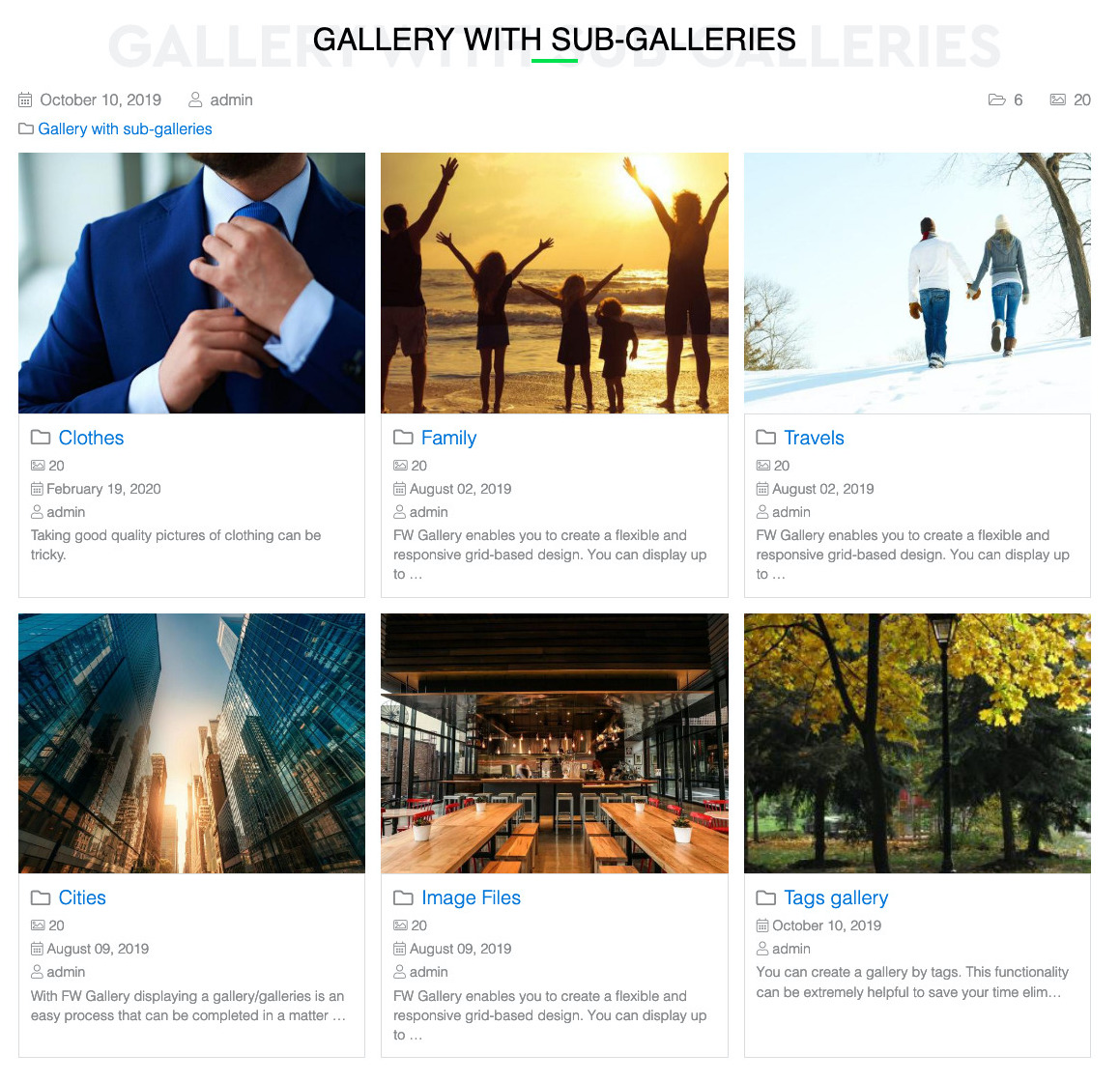
    Galleries list view
    Top level gallery view with all galleries included as a sub-folder. No images in this view.
    Gallery display settings
    Configure galleries grid, number per page and ordering. Show/hide empty galleries
  • Item view
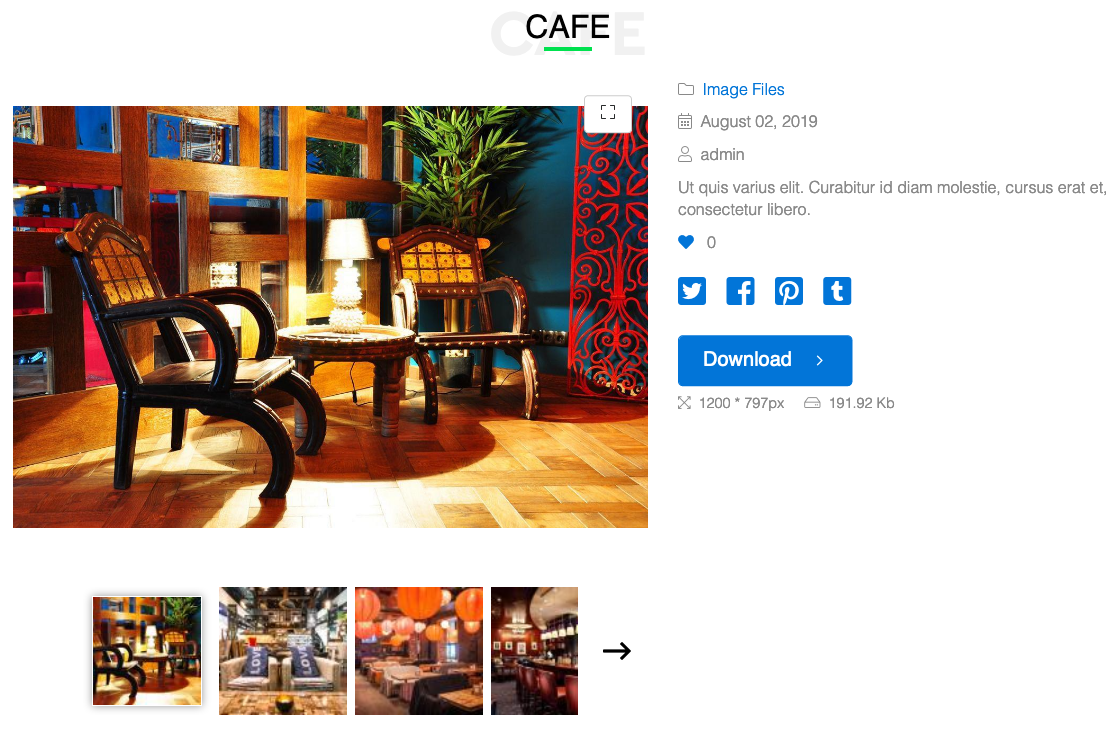
    Single photo layout with its display settings and options.
    Item details
    Set image name, owner, upload date, description, copyright note. Choose what is shown.
    EXIF and IPTC Parsing
    Reads camera metadata (EXIF) and news/stock photo tags (IPTC) on upload. Title, caption, copyright holder, artist, and shoot date fill in automatically from the file.
    Item display settings
    Configure images display grid, number per page and ordering.
    Social Share Buttons
    A button group with Facebook, Twitter, LinkedIn, and other social networks appears below file listings and detail pages. One click to share.
  • Quick categories
    Create category tree with subcategories in a text window in minutes.
    Batch operations
    Move files, change owner, access level, copyright or add tags to selected files in one go.
    Batch Multi-File Upload
    A batch uploader respects Joomla server limits (post_max_size, upload_max_filesize) and processes multiple files per upload. Integrates with Files Import for OAuth-based Facebook, Picasa, and Instagram imports.
    Images Batch Upload
    Fast and handy files management with batch upload feature.
    Self-Service Upload
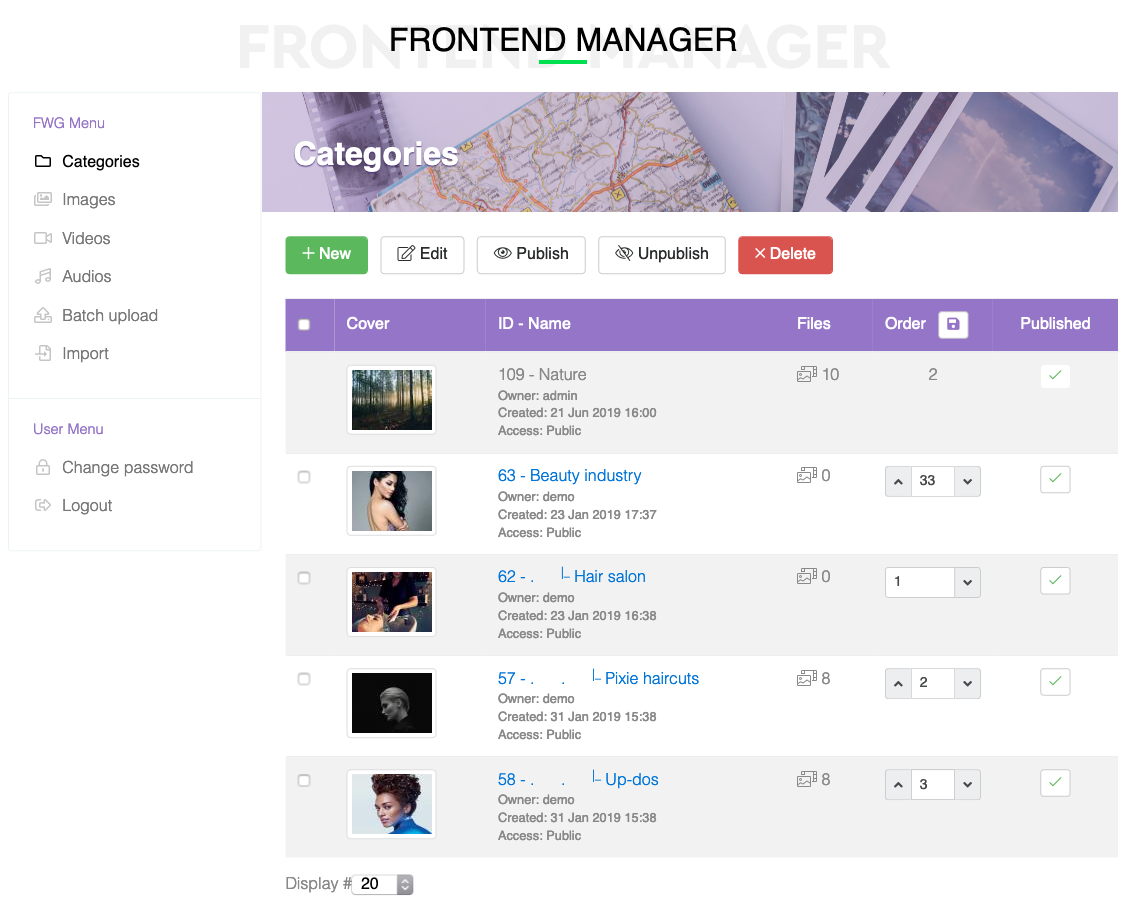
    Logged-in users get a dedicated management interface on the frontend with tabs for images, videos, audio, batch upload, and bulk import.
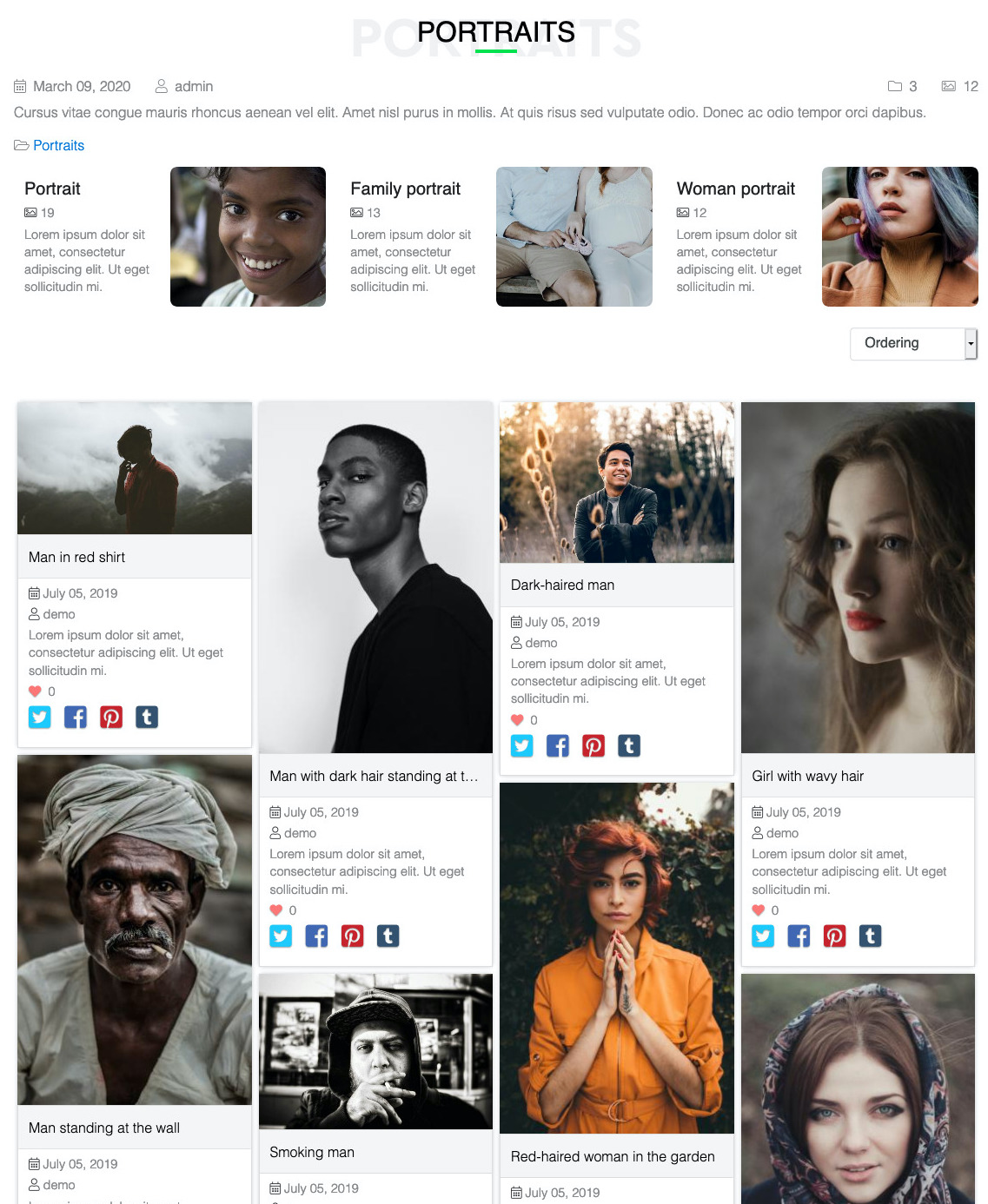
  • Single gallery view
    A gallery with any number of sub-galleries and images included in a current.
    Gallery details
    Set gallery name, owner, create date and description. Choose what is shown.
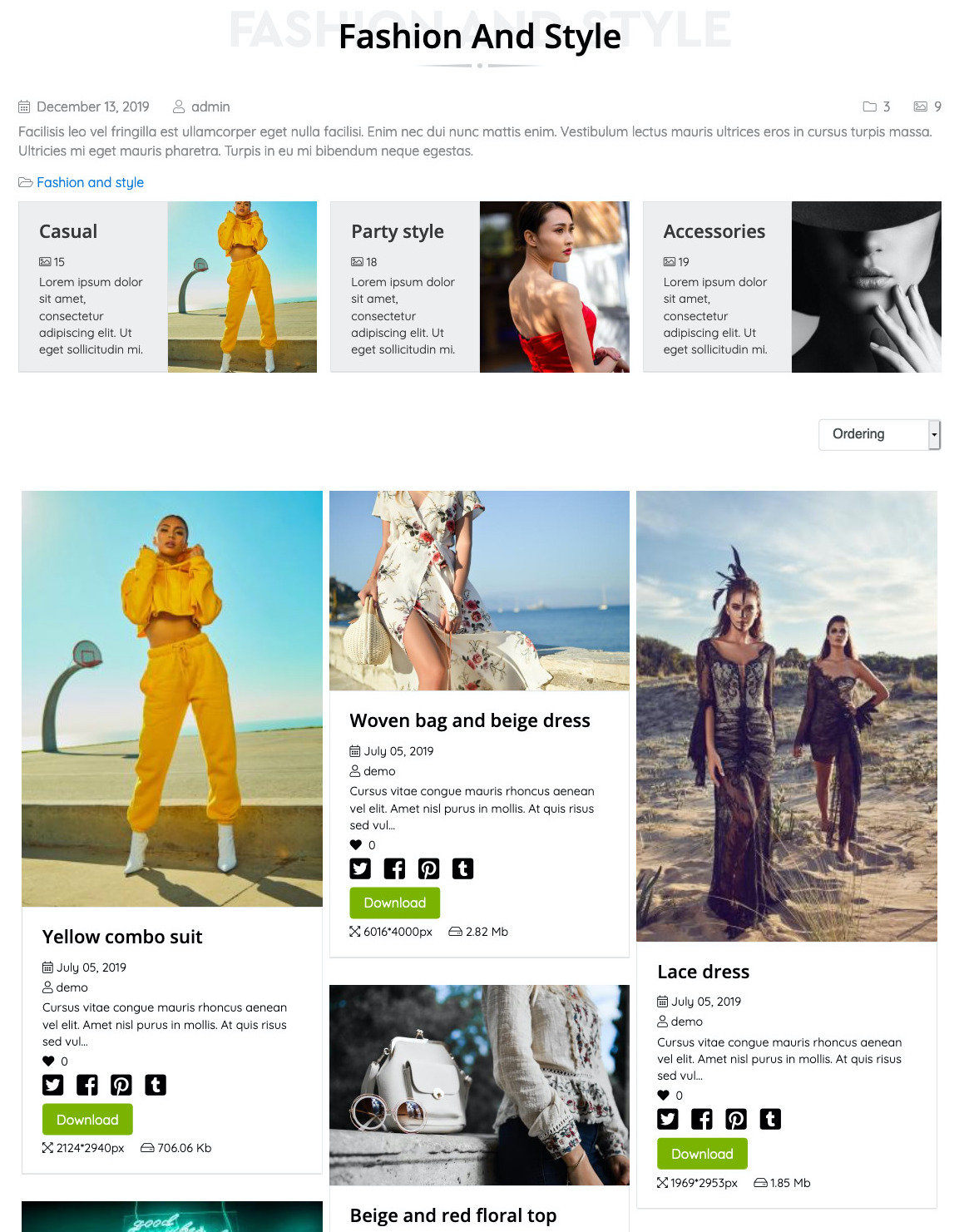
    CSS Grid Masonry
    Brick-like layout with variable column and row spans. Different images get different sizes for a natural, curated feel.
    Watermark protection
    Protect images from unauthorized usage on other websites or media.
    AJAX Lazy Loading
    Slides load on-demand via AJAX, so 500-image galleries run without memory issues. Customize max slides, effects, and ordering per gallery.
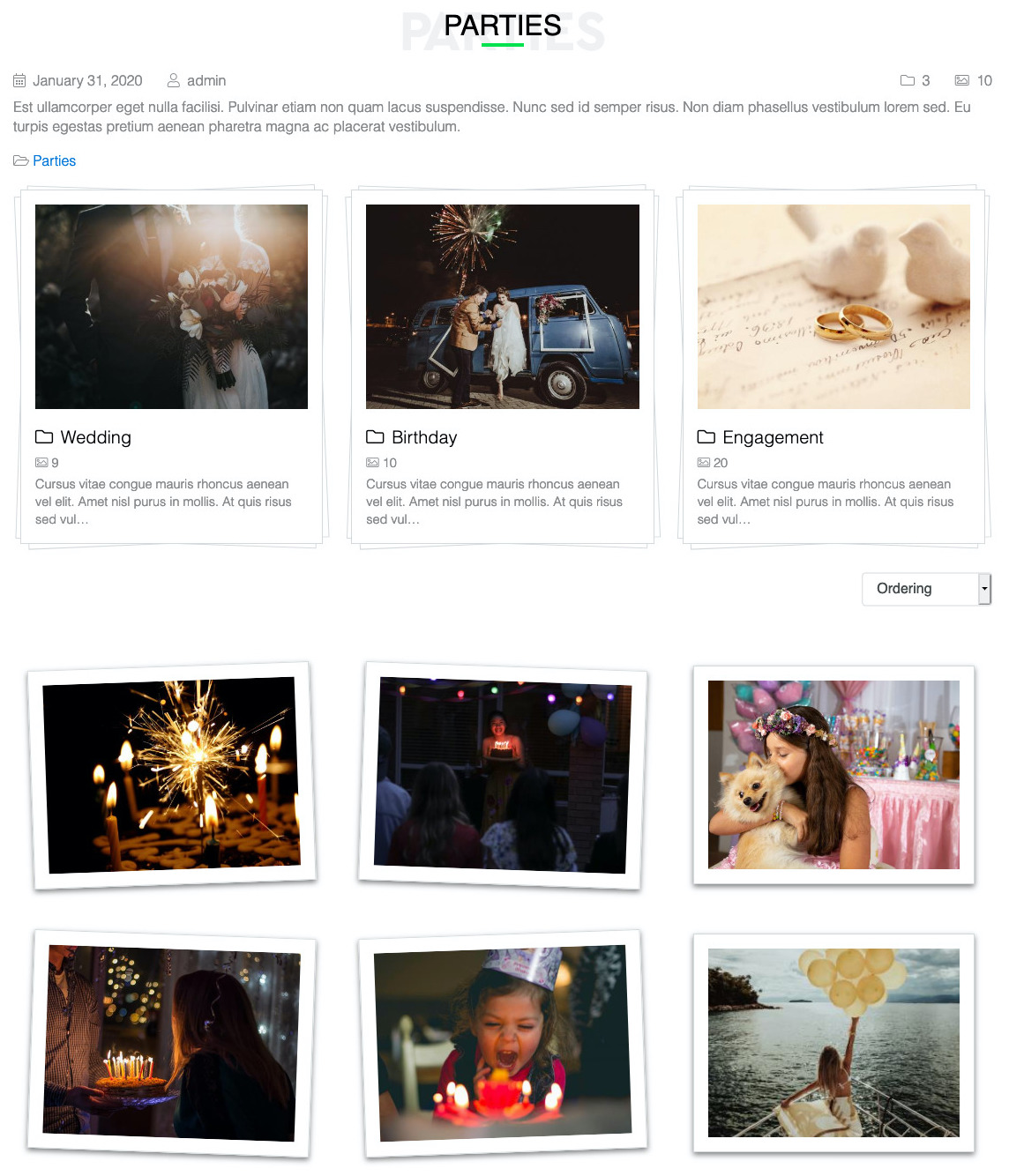
  • Tilted Polaroid Frames
    Every image rotates between -2 and 2.4 degrees with alternating directions. Feels hand-placed, not computer-generated.
    Soft Drop Shadows
    Warm paper-like shadows create subtle depth on a neutral background. No harsh effects.
    Refined Minimalism
    Generous whitespace and decorative header bars. The layout does less so your photography does more.
    Hover Lift Effect
    Hovering an image lifts it with an elevation animation. Small interaction that adds a sense of touch.
    Animated Text Reveals
    Text fades in with configurable transition delays for a choreographed reveal effect.
  • Default gallery image
    Select default preview image among the images in a gallery.
    Images rotate
    Rotate manually images if camera rotation is not rendered correctly.
    YouTube and Vimeo Embeds
    Paste a YouTube or Vimeo URL and the plugin fetches the thumbnail and metadata via the platform API. No re-uploading videos you already host externally.
    MP4 Self-Hosted Upload
    Upload MP4 videos directly to your server for full control over hosting and branding. Duration and dimensions captured automatically on upload.
    Four Audio Formats
    Upload and play MP3, WAV, OGG, and AAC files with a unified player. Covers compressed and uncompressed formats for musicians and podcasters alike.

More Features

  • Multiple Grid Engines
    FWG Classic
    Standard Grid, Waterfall, Justified, and Custom layouts. Each handles mixed aspect ratios differently so you can pick what fits your portfolio.
    Three Rating UI Types
    FWG Vote & Rate
    Pick stars (0-5 scale), hearts (binary favorite), or thumbs (binary approve) to match the context. Stars for critic ratings, hearts for client favorites, thumbs for team approval.
    ACL-Governed Ownership
    FWG Front-end Manager
    Users see only their own files and galleries, governed by Joomla's access control. Admins retain override access to everything.
    Five Thumbnail Positions
    FWG Slideshow Layout
    Position the thumbnail strip at the bottom, top, left, right, or hide it entirely for a pure image view. Each layout fits different brand styles.
    Dark Cinematic Overlays
    FWG Fancy
    Semi-transparent dark backgrounds with inset shadows. Images take center stage with dramatic framing.
    Interactive Progress Bar
    FWG Audio Files
    Visitors can click anywhere on the progress bar to seek. Play and pause controls, visual time display, and smooth playback across devices.
  • XMP Adobe Metadata
    FWG File Meta Data
    Parses XMP metadata embedded by Lightroom, Photoshop, and Bridge. Dublin Core fields (title, description, rights, creator) map directly to gallery fields.
    Audio ID3 Tags
    FWG File Meta Data
    For audio uploads, the plugin reads ID3v2 and ID3v1 tags via the getID3 library. Artist, album, year, genre, title, and duration populate automatically.
    Embedded Artwork Extraction
    FWG File Meta Data
    Album art embedded in MP3 files gets extracted and stored as the cover image. Musicians upload tagged MP3s and the gallery looks complete.
    Video Duration and Dimensions
    FWG File Meta Data
    For MP4 uploads, the plugin reads duration and resolution from the container. Remote YouTube and Vimeo embeds get title and dimensions via Open Graph.
    Facebook Album Import
    FWG Files Import
    Connect your Facebook account and import entire albums from personal profiles or fan pages. OAuth token handling included, no developer setup needed.
    Google Picasa Integration
    FWG Files Import
    Authenticate with Google to pull Picasa albums directly into your gallery. Album listing and batch download happen server-side.
    Instagram Media Import
    FWG Files Import
    Paste an Instagram access token to import media from your feed. Individual posts become gallery files with the original caption as description.
    Local Folder Import
    FWG Files Import
    Point to a server folder or upload a zip and the plugin processes everything in chunks. File type detection routes JPG, GIF, PNG, and JPEG to the image type automatically.
    Resumable Progress Tracking
    FWG Files Import
    Long imports run in a two-step process with progress tracking and the ability to pause or stop. No browser timeouts on 500-photo album imports.
  • Cross-Gallery Tagging
    FWG Tags
    One tag can link files from any number of galleries. A "black and white" tag pulls every monochrome image together without moving anything.
    Synthetic Tag Pages
    FWG Tags
    Clicking a tag opens a virtual category view showing all tagged files with matching breadcrumbs. Visitors browse by topic, not just by folder.
    Alphabetical or Manual Sort
    FWG Tags
    Configure tag lists to sort alphabetically or by manual ordering field. Feature your most important tags at the top.
    Per-Type Tag Counts
    FWG Tags
    Each tag tracks counts per file type (images, videos, audio) so you can see at a glance how much content each tag contains.
    Three Content Types Indexed
    FWG Extended Joomla! Search
    Separate indexer adapters for gallery files, categories, and tags. All three appear in Smart Search results with proper type labels.
    Access Level Enforcement
    FWG Extended Joomla! Search
    Search results respect Joomla access levels and publish state. Private files do not leak into public search results.
    Automatic Reindexing
    FWG Extended Joomla! Search
    Publish, unpublish, and delete actions trigger reindexing so search results stay current as your portfolio changes.
    File Type Filter Buttons
    FWG Search & Filter
    File type selection buttons show live counts per category: Images 120, Videos 45, Audio 12. Visitors pick a type and search.
    Smart Gallery Detection
    FWG Search & Filter
    The module detects whether the visitor is on a gallery page and restricts the search to that gallery automatically. Off a gallery page, it searches the whole site.
    Addon Type Support
    FWG Search & Filter
    Supports images plus any custom file type from installed addons: Audio Files, Video Files, and any third-party file type plugin.
  • Public or Authenticated Voting
    FWG Vote & Rate
    Choose between public voting with IP-based duplicate prevention or login-required voting with user-based tracking. Client proofing works best with login; fan engagement works best public.
    Admin Vote Counts
    FWG Vote & Rate
    The admin file list shows positive and negative vote counts per file. Sort by popularity to find your most-loved work or flag low-rated shots for review.
    AJAX Vote Submission
    FWG Vote & Rate
    Votes submit without page reload. Visitors see instant feedback, and the UI updates to show their vote and the new aggregate count.
    Three Layout Modes
    FWG Latest Files
    Display recent files as a vertical stack, horizontal row, or trendy slider with lightgallery lightbox integration. Drop the module in any Joomla position.
    Flexible Sorting
    FWG Latest Files
    Sort by newest, popular (by hits), alphabetical, or random order. Each module instance can use a different sort, so you can show newest in the sidebar and random in the footer.
    Per-Field Metadata Toggles
    FWG Latest Files
    Independently toggle name, upload date, owner, description, and download link for each module instance. Build a minimal image wall or a detailed recent-work panel.
    Categories or Files
    FWG Latest Files
    Display latest files OR latest categories, depending on whether you want to showcase individual work or recent gallery additions.
    One-Click Featured Toggle
    FWG Featured Files
    A featured checkbox on every file edit screen pins the file to the top of its gallery. Unfeature with one click when the rotation changes.
    Batch Feature Operations
    FWG Featured Files
    Select multiple files and feature or unfeature them in one action from the admin toolbar. Perfect for seasonal portfolio refreshes.
    Three Display Modes
    FWG Featured Files
    Show all with featured first, show only featured, or hide featured entirely per gallery. Different pages can surface different curated sets from the same library.
  • Automatic Thumbnails
    FWG Video Files
    YouTube and Vimeo thumbnails come in via API calls on save. For MP4 uploads, the plugin reads the first frame or lets you upload a custom poster image.
    Hover Preview Autoplay
    FWG Video Files
    Mouse over a video and it autoplays silently as a preview. YouTube plays muted, Vimeo plays audible by default. Visitors get a taste without committing.
    Video SEO Schema
    FWG Video Files
    Emits schema.org VideoObject markup with duration, dimensions, thumbnail, and upload date. Your portfolio becomes eligible for Google video rich results.
    Per-File Geolocation
    FWG Files on Map
    Latitude, longitude, and address stored per file. Fill in manually or read from EXIF GPS data on upload when File Meta Data is installed.
    Google Maps Integration
    FWG Files on Map
    Interactive Google Map with thumbnail pins for every mapped file. Configurable map height and thumbnail size per layout.
    Map Module for Any Page
    FWG Files on Map
    A companion module embeds the map on any Joomla page position. Drop a travel map on the homepage or a tour map in the footer.
    Category Filtering
    FWG Files on Map
    Restrict the map to files from specific galleries. Build a Europe-only travel map or a 2024-tour concert map without showing the whole library.
    Auto-Stop On New Track
    FWG Audio Files
    When one track starts, any playing track stops automatically. Visitors never hear two audio files at once, even when clicking rapidly through a portfolio.
    Google Audio Schema
    FWG Audio Files
    Emits schema.org AudioObject markup per file with duration, file size, and metadata. Google recognizes your audio portfolio as indexed media.
  • Subtle Hover Reveals
    FWG Elegant
    Metadata appears through smooth delayed transitions on hover. No heavy overlays or jarring color changes.
    Typography Hierarchy
    FWG Elegant
    Careful heading and caption styling with pseudo-element decorative bars. Feels curated rather than templated.
    Configurable Column Count
    FWG Classic
    2 to 6 columns per row with responsive collapse on smaller screens. Works from minimalist two-column portfolios to dense six-column image walls.
    Subtle Hover Effects
    FWG Classic
    Ken Burns zoom and clean overlay animations on hover. Polished without distracting from the work.
    Sliding Info Panels
    FWG Fancy
    On hover, info panels slide in with white accent borders and reveal metadata in a staggered sequence.
    Adaptive To Aspect Ratios
    FWG Pinterest
    Portrait, landscape, and square images flow together without awkward gaps. The grid bends around the content.
    Configurable Columns
    FWG Pinterest
    2 to 6 columns in waterfall mode with responsive collapse on smaller screens.
    Two Display Modes
    FWG Layout Anywhere
    Grid mode shows multiple files, detail mode shows a single file with left/right float. Pick the mode that fits the page position.
    Float and Text Wrap
    FWG Layout Anywhere
    Single-file mode supports float:left or float:right with a configurable width percentage. Content wraps around the file like a magazine layout.
    Category Scoping
    FWG Layout Anywhere
    Restrict the module to a specific category or subcategory. Homepage can showcase a different gallery from the sidebar and footer modules.
    Design Template Inheritance
    FWG Layout Anywhere
    The module inherits design templates from the parent category params. Styling stays consistent with the main gallery pages without duplicating configuration.
    Full-Screen Presentation
    FWG Slideshow Layout
    Full-screen slideshow with centered main image and thumbnail strip. Visitors see your work large and uncluttered, the way it was meant to be shown.
    Fit or Fill Scaling
    FWG Slideshow Layout
    Choose between fit mode (letterbox, shows the full image) and fill mode (crop, fills the frame). Photographers often prefer fit to respect composition, agencies often prefer fill.
    Auto-Play Control
    FWG Slideshow Layout
    Auto-start on load with a configurable pause interval between slides. Visitors see a rotating showcase without clicking. Pause and resume via space bar.
    Keyboard and Touch Navigation
    FWG Slideshow Layout
    Arrow keys, space bar pause, escape to exit, plus touch swipe on mobile. Works naturally on every device without extra setup.
    Subcategory Tabs
    FWG Tabbed Layout
    Subcategories render as tabs at the top of the page. Clicking a tab loads files in the grid below without a full page reload.
    Cascading Masonry Grid
    FWG Tabbed Layout
    Files display in a cascading masonry layout beneath the active tab. Different aspect ratios fit together naturally like Pinterest.
    Per-Tab Design Template
    FWG Tabbed Layout
    Each subcategory can use its own design template. Mix Classic, Elegant, Pinterest, and Polaroid within the same parent gallery.
  • Social share buttons
    Allow your visitors to share on Facebook, Twitter, Tumblr, Pinterest.
    Open Graph and Twitter Cards
    FWG Social Share
    Writes og:url, og:image, og:title, og:description, and twitter:card meta tags automatically. Shared links render with clean preview cards.
    Per-Context Visibility
    FWG Social Share
    Toggle share buttons on file listings, detail pages, or both. Show them where they help and hide them where they would clutter the layout.
    SEO URL Rewriting
    FWG SEO Booster
    Clean paths like /portfolio/wildlife-photography-c123 replace ugly query strings. URL masks let you customize the pattern for files and categories separately.
    JSON-LD Structured Data
    FWG SEO Booster
    Galleries emit ItemList schemas, individual files emit ImageObject schemas. Google uses these for rich image search results with upload dates and thumbnails.
    Open Graph Social Tags
    FWG SEO Booster
    og:url, og:image (300x200 thumbnail), og:title, og:description render on every gallery and file page. Facebook and LinkedIn preview cards look clean automatically.
    Auto Meta Description
    FWG SEO Booster
    Meta description fills from file or category descriptions, meta keywords extract from tags or title words longer than 3 characters. Manual overrides always respected.
    Image Alt Text Masks
    FWG SEO Booster
    Dynamic alt attribute generation using masks with {site}, {file}, {category} variables. Every image gets a descriptive alt tag without manual entry.
    Dimensions in URL Path
    FWG SEO Booster
    Image URLs can include dimensions as path segments (w300h200) for semantic sizing. Different gallery views get correctly sized images without query-string ugliness.
  • Menu item settings
    Define specific gallery and image settings via menu item options.
    Multi-Media Management
    FWG Front-end Manager
    Separate management sections for each file type appear automatically based on which FWG type plugins are installed. Audio and video tabs only show if those addons are active.
22 Add-ons

Add-ons

Free add-ons are available to everyone. Paid add-ons are unlocked by an active subscription. Use the tabs below to see what each tier includes.
  • FWG Video Files Free
    Upload MP4 videos or embed YouTube and Vimeo clips in your gallery. Responsive player, automatic thumbnails, and hover-to-preview for videographers and motion designers.

    FWG Audio Files Free
    Add MP3, WAV, OGG, and AAC audio files to your gallery with a built-in player. For musicians, podcasters, and sound designers hosting portfolios on their own site.

    FWG Social Share Free
    Add social share buttons to every gallery and file page. Writes Open Graph and Twitter Card meta tags so shared links render with clean preview images.

    FWG Tabbed Layout Free
    Display subcategories as tabs in a cascading masonry layout. Each tab can use its own design template for a fully customized portfolio browsing experience.

    FWG Search & Filter Free
    Frontend search module with file-type counters and smart redirect handling. Drop it in a sidebar and visitors filter your portfolio by images, videos, or audio instantly.

    FWG Files on Map Free
    Pin every file to a location on Google Maps. Visitors browse your portfolio by geography, perfect for travel photographers, event coverage, and location-based projects.

    FWG Extended Joomla! Search Free
    Integrate FW Gallery files, categories, and tags into Joomla's built-in Smart Search. Visitors searching your site find portfolio content alongside articles and pages.

    FWG File Meta Data Professional+
    Automatically read EXIF, IPTC, XMP, and ID3 metadata from every upload. Photographer credits, shot dates, copyright, audio tags, and video dimensions get filled in without touching the file edit screen.

    FWG Files Import Professional+
    Import photos in bulk from a local folder, Facebook albums, Google Picasa, or Instagram. No manual uploading, no dragging files one by one.

    FWG SEO Booster Starter+
    Auto-generates clean URLs, Open Graph tags, JSON-LD structured data, and meta descriptions for every gallery and file. Your portfolio gets discovered in image search without manual SEO work.

    FWG Layout Anywhere Free
    Embed any FW Gallery on any Joomla page, module position, or custom layout. Show a single file with text wrap, a grid of recent work, or a full category anywhere on your site.

    FWG Latest Files Starter+
    Display newest, most popular, or random files in a sidebar or footer module. Three layout modes (vertical, horizontal, slider) with full metadata control.

    FWG Slideshow Layout Professional+
    Transform any gallery into a full-screen slideshow with thumbnails, auto-play, keyboard navigation, and touch swipe support. Perfect for immersive portfolio presentations.

    FWG Classic Free
    A clean, structured grid layout for portfolios that want clarity over flourish. Multiple grid engines, configurable columns, and subtle hover animations.

    FWG Tags Starter+
    Tag files across galleries and give visitors a second way to browse your portfolio. Click a tag to see every image, video, and audio file that shares it regardless of which gallery they live in.

    FWG Vote & Rate Professional+
    Let visitors rate your work with stars, mark favorites with hearts, or approve with thumbs. Build social proof on your portfolio and give clients a way to flag the shots they love.

    FWG Front-end Manager Professional+
    Let logged-in users upload and manage their own photos, videos, and audio directly from the website. A full portfolio management interface without needing Joomla admin access.

    FWG Featured Files Starter+
    Pin your best work to the top of every gallery with one click. Featured files stay visible regardless of upload date so your portfolio always leads with impact.

    FWG Fancy Free
    A dramatic, cinematic design template with dark overlays, sliding info panels, and animated reveals. For creative agencies and bold design-forward portfolios.

    FWG Elegant Free
    A refined, minimal design template with sophisticated typography and understated details. Built for high-end photographers, luxury brands, and design studios.

    FWG Pinterest Free
    A masonry-style design template inspired by Pinterest. Variable column spans and adaptive row heights create an organic, brick-like layout that adapts to any image proportion.

    FWG Polaroid Free
    A playful, nostalgic template that mimics instant film photography. Randomly rotated frames, soft drop shadows, and hover lifts give portfolios a personal, handmade feel.
  • FWG Video Files Free
    Upload MP4 videos or embed YouTube and Vimeo clips in your gallery. Responsive player, automatic thumbnails, and hover-to-preview for videographers and motion designers.
    FWG Audio Files Free
    Add MP3, WAV, OGG, and AAC audio files to your gallery with a built-in player. For musicians, podcasters, and sound designers hosting portfolios on their own site.
    FWG Social Share Free
    Add social share buttons to every gallery and file page. Writes Open Graph and Twitter Card meta tags so shared links render with clean preview images.
    FWG Tabbed Layout Free
    Display subcategories as tabs in a cascading masonry layout. Each tab can use its own design template for a fully customized portfolio browsing experience.
    FWG Search & Filter Free
    Frontend search module with file-type counters and smart redirect handling. Drop it in a sidebar and visitors filter your portfolio by images, videos, or audio instantly.
    FWG Files on Map Free
    Pin every file to a location on Google Maps. Visitors browse your portfolio by geography, perfect for travel photographers, event coverage, and location-based projects.
    FWG Extended Joomla! Search Free
    Integrate FW Gallery files, categories, and tags into Joomla's built-in Smart Search. Visitors searching your site find portfolio content alongside articles and pages.
    FWG Layout Anywhere Free
    Embed any FW Gallery on any Joomla page, module position, or custom layout. Show a single file with text wrap, a grid of recent work, or a full category anywhere on your site.
    FWG Classic Free
    A clean, structured grid layout for portfolios that want clarity over flourish. Multiple grid engines, configurable columns, and subtle hover animations.
    FWG Fancy Free
    A dramatic, cinematic design template with dark overlays, sliding info panels, and animated reveals. For creative agencies and bold design-forward portfolios.
    FWG Elegant Free
    A refined, minimal design template with sophisticated typography and understated details. Built for high-end photographers, luxury brands, and design studios.
    FWG Pinterest Free
    A masonry-style design template inspired by Pinterest. Variable column spans and adaptive row heights create an organic, brick-like layout that adapts to any image proportion.
    FWG Polaroid Free
    A playful, nostalgic template that mimics instant film photography. Randomly rotated frames, soft drop shadows, and hover lifts give portfolios a personal, handmade feel.
  • FWG Featured Files Starter+
    Pin your best work to the top of every gallery with one click. Featured files stay visible regardless of upload date so your portfolio always leads with impact.
    FWG Latest Files Starter+
    Display newest, most popular, or random files in a sidebar or footer module. Three layout modes (vertical, horizontal, slider) with full metadata control.
    FWG SEO Booster Starter+
    Auto-generates clean URLs, Open Graph tags, JSON-LD structured data, and meta descriptions for every gallery and file. Your portfolio gets discovered in image search without manual SEO work.
    FWG Tags Starter+
    Tag files across galleries and give visitors a second way to browse your portfolio. Click a tag to see every image, video, and audio file that shares it regardless of which gallery they live in.
  • FWG Featured Files Starter+
    Pin your best work to the top of every gallery with one click. Featured files stay visible regardless of upload date so your portfolio always leads with impact.
    FWG File Meta Data Professional+
    Automatically read EXIF, IPTC, XMP, and ID3 metadata from every upload. Photographer credits, shot dates, copyright, audio tags, and video dimensions get filled in without touching the file edit screen.
    FWG Files Import Professional+
    Import photos in bulk from a local folder, Facebook albums, Google Picasa, or Instagram. No manual uploading, no dragging files one by one.
    FWG Front-end Manager Professional+
    Let logged-in users upload and manage their own photos, videos, and audio directly from the website. A full portfolio management interface without needing Joomla admin access.
    FWG Latest Files Starter+
    Display newest, most popular, or random files in a sidebar or footer module. Three layout modes (vertical, horizontal, slider) with full metadata control.
    FWG SEO Booster Starter+
    Auto-generates clean URLs, Open Graph tags, JSON-LD structured data, and meta descriptions for every gallery and file. Your portfolio gets discovered in image search without manual SEO work.
    FWG Slideshow Layout Professional+
    Transform any gallery into a full-screen slideshow with thumbnails, auto-play, keyboard navigation, and touch swipe support. Perfect for immersive portfolio presentations.
    FWG Tags Starter+
    Tag files across galleries and give visitors a second way to browse your portfolio. Click a tag to see every image, video, and audio file that shares it regardless of which gallery they live in.
    FWG Vote & Rate Professional+
    Let visitors rate your work with stars, mark favorites with hearts, or approve with thumbs. Build social proof on your portfolio and give clients a way to flag the shots they love.
9 Services

Services

Product specific services are listed in this section. Every service can be customized individually for a client, based on the needs and budget. Our manager will ALWAYS get in touch with you and confirm the scope, BEFORE payment is made.
Theme Integration
Your product pages should look like they belong on your website, not like a third-party add-on. We match colors, fonts, layout, and spacing so everyth
Term: 2 days
Price: from $149 USD
3 packages available
Website Speed Boost
Your website is slow and losing visitors? We audit every bottleneck, optimize images, caching, and database, and deliver a before/after speed report w
Term: 2 days
Price: from $149 USD
3 packages available
Custom Feature Development
Need a feature that does not exist yet? We build it as a private addon for your CMS extension or as a module for your custom platform. Clean, document
Term: 10 days
Price: $499 USD
Website Maintenance
Annual website maintenance: monthly updates, security scans, backup verification, uptime monitoring, and emergency fix allowance. Your site stays secu
Price: from $249 USD/yr
2 packages available
Emergency Fix & Recovery
Something on your website is broken? We diagnose and fix the issue, from minor display glitches to critical site failures. One issue per order.
Term: 1 days
Price: from $99 USD
3 packages available
Data Import & Migration
Have data in spreadsheets, another CMS, or an old system? We import it into your website cleanly. Every record mapped, verified, and ready to use.
Term: 2 days
Price: from $149 USD
3 packages available
Joomla & WordPress Plugin Setup
Need a Joomla extension or WordPress plugin installed and configured on your website? We handle the install, the setup, and the verification. From a s
Term: 1 days
Price: from $129 USD
3 packages available
Creative Portfolio Setup
Self-hosted portfolio for videographers, graphic designers, musicians, and mixed-media creatives. FW Gallery configured around your work with category
Term: 5 days
Price: from $299 USD
2 packages available
Photographer Portfolio Setup
Professional portfolio for photographers: FW Gallery setup, category structure, layout selection, watermark protection, SEO, and social sharing. Desig
Term: 5 days
Price: $349 USD
Multilingual Content

Languages

Any Interface Translation

The product comes with native English interface translation. Any additional language activated on your website can be installed via Translations section in Admin.

Multilingual Content

We do not have a solution for multilingual websites yet, but this will change soon.

Pricing

Subscription Plans

EVERY subscription includes free updates for ALL add-ons, while active.
After subscription expires, the product and all its add-ons remain functional and can be used further.
Standard
Explore the full product with free add-ons. Build your first listings and see if it fits your workflow.
Free
forever
  • Update period
  • Add-ons
    13
  • Websites
  • Technical Support
  • Lifetime usage
Starter
Creatives testing a self-hosted image portfolio. Core gallery with 2 design templates, tags, and SEO.
$49USD
$4.08 per month billed annually
  • Update period
    1 y
  • Add-ons
    23
  • Websites
    1
  • Support response
    48h
  • Lifetime usage
Agency
Creative agencies managing multiple client portfolios. Fast-track 24h support and 15% renewal discount.
$299USD
$24.92 per month billed annually
Renews at 15% off
  • Update period
    1 y
  • Add-ons
    35
  • Websites
    5
  • Support response
    24h
  • Lifetime usage
After your first year
Website Maintenance
Annual website maintenance: monthly updates, security scans, backup verification, uptime monitoring, and emergency fix allowance. Your site stays secure and current.
FAQ

Frequently Asked Questions

Extended answers to the questions our customers ask via Ticket Support, while using our product. Don't hesitate to ask yours, in case you don't find the information you need below.
  • Is FW Gallery a free plugin?

    Yes, FW Gallery is a free plugin with a comprehensive set of features suitable for most gallery websites.

  • How to install add-ons?

    Go to Admin panel -> FW Gallery -> Dashboard. Make sure to verify your website to connect it with your fastw3b.com account and download free and purchased add-ons.

  • Why do I need to verify my website?

    Verification is required for the following reasons:

    1. To install plugin and add-on updates.
    2. To get support in Client Section at fastw3b.com.
    3. To be able to install/update free and purchased add-ons.
    4. To buy new add-ons from Admin -> FW Gallery -> Add-ons section.
  • What are add-ons?

    Add-ons are specific plugins that work only with FW Gallery plugin and extend its functionality in various ways. Add-on can be another layout with shortcode to use, a new set of parameters to extend existing plugin functions or even a design for plugin elements.

  • Why would I need an add-on?

    While FW Gallery is fully seld-sufficient solution, add-ons may add features your website needs. The main plugin has a functionality that is critical for it to work. All other features come as add-ons to allow customers decide which configuration they prefer on their website. Add-on is the simplest way to add new features and design to FW Gallery.

  • How to get an add-on?

    There are 2 ways to get add-ons:

    1. Go to Admin -> FW Gallery -> Add-ons and get add-ons from there.
    2. Go to FW Gallery official page on fastw3b.com, scroll to Add-ons section and get them from there.

    All add-ons you have available will be listed in Admin -> FW Gallery -> Dashboard -> Add-ons section.

Reviews

12k+ clients love our product

We love our clients, and do our best to release regular updates with new features, improvements and bug fixes. We are proud of our clients, who provide us with a constant feedback, and help us improve our product and serve their needs even better.

If you can dream it, Fastw3b will design it. It is almost a year since I started working with  Fastw3b. In fact, having started on the Joomla journey (three months prior) and with no development experience, Fastw3b was the perfect first date.

After the initial – dancing around – trying to understand each other, we quickly established a relationship based on frankness and directness and this was probably the single most important trait that I respect them for. It would have been easier to repeat the “customer is king” mantra and get paid for the job. Not with Fastw3b. It seemed as if they genuinely were as interested and excited about the project as I was. It was as if I was working with my own inhouse team, rather than distant consultants.

If you are new to Joomla or indeed to development and are looking for a professional yet empathetic partner, I highly recommend Fastw3b. They deliver on time, are willing to own-up to errors and fix them, and best of all are as invested in your project as you.

Hoosen Essof - crowdfunding platform distributor, South Africa

Simple, quick and easy

Functionality. It presents picture albums with captions and nothing else. Exactly what I need for a non-commercial, private family website.

Ease of use. The absence of commercial and social media features makes it very easy to set up and use.

Support. Didn't need it. That is perfect support.

Documentation. It is simple and the documentation is simple.

John Harper
John Harper

FW Gallery Changelog

Version 8.2.0 (24 Mar 2026)

New Features:
WebP image format support
Bug Fixes:
Maximum stored image size (image_width / image_height)

Version 8.1.1 (22 Jan 2026)

Bug Fixes:
fixed - Images indexing issue when batch uploaded

Version 8.1.0 (17 Oct 2025)

Updates:
Joomla! v.6.0 compatibility

Version 8.0.5 (07 Oct 2025)

Bug Fixes:
fixed displaying finder plugin as non-installed

Version 8.0.4 (09 May 2025)

Bug Fixes:
fixed gallery and tags links in module anywhere

Version 8.0.3 (23 Apr 2025)

Bug Fixes:
fixed gallery and tags links in module anywhere

Version 8.0.2 (28 Mar 2025)

New Features:
added Admin sidebar menu with logo

Version 8.0.1 (06 Mar 2025)

Bug Fixes:
fixed ordering in files on the site side by created date (which is editable) instead of using of updated date

Version 8.0.0 (21 Jun 2024)

Updates:
UIkit uk prefix in css classes was replaced to fwk, in scripts to UIkit class was added the fwk prefix to avoid conflicts with UIkit used in templates and others extensions

Version 7.5.5 (16 Apr 2024)

Bug Fixes:
fixed problem with WordPress integration regarding moving downloaded files and addons to the WP uploads folder

Version 7.5.4 (29 Nov 2023)

Bug Fixes:
using overriden language constants from admin language file

Version 7.5.3 (28 Nov 2023)

Updates:
updates in the dark admin theme
Bug Fixes:
fixed search in overriden language constants

Version 7.5.2 (06 Nov 2023)

New Features:
Admin dark theme
Updates:
Joomla! v.5.x compatibility

Version 7.5.1 (18 Oct 2023)

Updates:
- Removed User section menu - it can be done via Joomla menu - Main component update notification lightbox prior to installing an update - Add-ons section design
Bug Fixes:
- Removed a few obsolete update links in Joomla updates - Website verification desing changed

Version 7.5.0 (18 Jul 2023)

Updates:
Admin Dashboard new design

Version 7.4.3 (09 Jul 2023)

Bug Fixes:
fixed notification popup design added classic design addon to the package

Version 7.4.2 (05 Jul 2023)

Bug Fixes:
improved verification routine fixed css section

Version 7.4.1 (27 Jun 2023)

Bug Fixes:
fixed Joomla 3.x fatal error with wrong parameter type for HttpFactory::getHttp()

Version 7.4.0 (26 Jun 2023)

Updates:
Moved all site template files (from the component, modules, add-ons) to the design add-ons

Version 7.3.1 (08 May 2023)

Bug Fixes:
fixed finder data keeping consistency

Version 7.3.0 (02 May 2023)

Updates:
Full admin design update

Version 7.2.1 (21 Mar 2023)

Bug Fixes:
fixed search doesn't work for file names

Version 7.2.0 (14 Feb 2023)

Updates:
Better website verification
Bug Fixes:
fixed storing "off" values in the desing settings

Version 7.1.9 (20 Jan 2023)

Bug Fixes:
removed tree dots instead of 5 in the pagination block

Version 7.1.8 (20 Jan 2023)

Bug Fixes:
fixed pagination width when no sorting/limit options enabled

Version 7.1.7 (18 Jan 2023)

Bug Fixes:
fixed escaping fron-end links when Joomla! SEF mode is off

Version 7.1.6 (16 Jan 2023)

Bug Fixes:
fixed php 8 notices

Version 7.1.5 (02 Jan 2023)

Bug Fixes:
links in modules on pages without FW Gallery component fix translation requesting and loading fix

Version 7.1.4 (21 Dec 2022)

Bug Fixes:
* FWG - waterfall grid fix * FWG - moved watermark settings from Files desigs section to Watermark settings

Version 7.1.3 (14 Oct 2022)

Updates:
slightly changed the display of cards in the admin
Bug Fixes:
fixed batch upload and folder import of videos and music fixed display of vertical images configured in the component settings (when the height is greater than the width)

Version 7.1.2 (13 Sep 2022)

Bug Fixes:
fixed display of installed addons on *nix hosting when there are uppercase letters in the path

Version 7.1.1 (12 Sep 2022)

Bug Fixes:
added a check for an active subscription with an inactive site

Version 7.0.1 (29 Jul 2022)

Bug Fixes:
unable to get to the FW dashboard

Version 6.7.2 (20 Sep 2021)

Bug Fixes:
Critical Editor bug fix for Joomla 4 when editing files and categories.

Version 6.7.1 (10 Sep 2021)

Bug Fixes:
Adding new category error fixed. Cleaned up uploading images process and notifications fix.

Version 6.7.0 (08 Sep 2021)

Updates:
Major Joomla! 4 review Admin design fix Joomla! 4 router update

Version 6.6.4 (19 Jul 2021)

Updates:
Frontend gallery date ordering changed to creation date instead of last edit date.

Version 6.6.3 (17 Jul 2021)

Updates:
Improved integration for FWG Front-end manager add-on. Language files update.

Version 6.6.2 (13 Jul 2021)

Updates:
Admin CSS Styles update to make design CSS tabs editable for easier text copying. Renamed "Save" button to "Save Custom CSS" to make more obvious the fact that only Custom CSS can be edited and stored in the database.
Bug Fixes:
Numerous language corrections.

Version 6.6.1 (02 Jul 2021)

Bug Fixes:
Front-end audio files upload fix. Back-end big size MP4 video files upload improvements. Back-end language constants fix. CSS Styles typo resulted into broken data save fixed.

Version 6.6.0 (16 Jun 2021)

New Features:
Menu Item layout shows only settings for selected options Added Category and Files sorting option to show latest updated/uploaded. Sorting by order is still there when Order column is clicked.
Updates:
Moved uninstalled add-ons placeholders to the end of the list in Settings -> Add-ons. Improved mass update/installation process in admin Dashboard and Wizard.
Bug Fixes:
Vote bugs fixed for showing stars when a heart was selected, and choosing always thumb up when thumbs option was set. FWMG_NOTIFICATION language constant translated in admin panel for notification toasts. Fixed removing category cover image. Fixed Video Autoplay for FWG Layout Anywhere module.

Version 6.5.0 (09 Jun 2021)

New Features:
Download Access parameter in Category and Settings added to define level of users who can see and use Download button. Download File parameter in Settings allows choosing which file will be downloaded when Download button is clicked.
Updates:
Single file view is updated to show new FWG File Meta Tags add-on parameter to show IPTC image tags. Wizard Assistant Update/Install process improved and simplified.

Version 6.4.1 (08 Jun 2021)

Updates:
FWG Meta Data import meta title as file name upon upload.
Bug Fixes:
Update cache time issue fixed. Removed temporary admin placeholders in Add-ons section.

Version 6.4.0 (07 Jun 2021)

New Features:
Redesigned Admin panel to use available space more efficiently. Wizard assistant to help with key steps for straightforward configuration and management process.
Updates:
Better add-ons interaction and data exchange. When files are batch uploaded, all add-ons process them as if it was one by one upload.

Version 6.2.0 (10 May 2021)

Updates:
Major language file structure rework that affected all add-ons as well. Make sure you update all add-ons as well. Overall code optimization and stability improvements.
Bug Fixes:
Resolved problem with some add-ons not being correctly updated via native Joomla! updater.

Version 6.1.1 (29 Mar 2021)

Updates:
File upload optimization and improved Joomla! 4 compatibility.
Bug Fixes:
Title is changing when when files are browsed via thumbnails on a single file view.

Version 6.1.0 (24 Mar 2021)

Updates:
Important update to make FW Gallery work with mootools libraries on the front-end and in the back-end. Make sure you update add-ons that requires FW Gallery version 6.1.x at least.

Version 6.0.0 (23 Mar 2021)

New Features:
Full Joomla! 4 compatibility. Major code review and refactoring to work with new architecture and libraries. Stackideas Komento product integration as an alternative comments solution to Disqus.
Updates:
IMPORTANT! All add-ons must be updated to work with FW Gallery v 6.x.

Version 5.13.0 (15 Feb 2021)

Updates:
Admin -> Dashboard Add-ons update process. Some add-ons kept telling to install new update while the latest version was installed.

Version 5.12.2 (19 Jan 2021)

Bug Fixes:
3rd level categories infinite loop that led to timeout in back-end and on a front-end. Now fixed.

Version 5.12.1 (18 Dec 2020)

Updates:
Waterfall grid responsive styles update.

Version 5.12.0 (28 Oct 2020)

New Features:
New Cascading layout for categories allowing fast tab-like navigation between sub-categories with specific design of each category. Admin Categories list new Parent category filter. Admin images file list now shows real file name as it is stored on a server. Admin Categories/Files: Description column shows up to 200 symbols or counter of total symbols. Admin Categories: Images counter shown only if images are in a category. Admin Categories/Files: colors for publish/unpublish button icons. Admin Categories/Files: nice class frame for cover images preview. Admin Categories/Files: full footer pagination: counter, navigation, limit box. Add-ons layout settings admin parameter for advanced add-on management on menu items layouts. Admin Settings get Font size parameter to control relative size of the elements as all styling is done using rem units which is based on HTML font size. New Useful Services section in admin Dashboard to help see new available services for FW Gallery.
Updates:
Merged all file types into one listing instead of file type tabs as was before. Site category limit pagination is now proportional to number of rows and columns selected for grid. Used to be fixed In admin Category edit: a current date will be stored as create date, if date is empty or incorrect. In admin Category edit: a first file image will be stored as a category cover image on save, if cover image is empty. Removed Empty categories show/hide parameter to avoid confusion. Copyright field is now part of the main component. Used to be part of FWG Meta Data add-on. Waterfall load more pagination now sorts images in columns. Context help and detailed parameter description with all language files update.
Bug Fixes:
Cover image was not removing in admin Category edit. When a file grid was loaded in FWG Layout Anywhere add-on there was no top margin for the loaded row.

Version 5.11.1 (01 Oct 2020)

Updates:
Admin Categories and Files sections context help update.
Bug Fixes:
Admin main menu constants cleanup and fix.

Version 5.11.0 (28 Sep 2020)

New Features:
- Unified files layout for all files types. - Added physical file name for images. - New parent category filter in categories section.
Updates:
- Huge update in context help for FW Gallery Admin section. - Cleaned up layouts in admin sections.
Bug Fixes:
- Vimeo thumbnail was not saved from a server when a video was stored. - Fixed linear effect for justified section in order to prevent image overlapping. - Casual AJAX warning fix for categories list to prevent warning message with strict reporting websites. - Dashboard files cleanup was deleting cover images for videos and audios. - Video thumbnail is stored now if no particular file was selected. - Fixed category pagination limit to be proportional to columns number multiplied by rows. - Fixed filters to apply when files tab is switched.

Version 5.10.1 (15 Sep 2020)

Updates:
- Improved integration with Slideshow Layout add-on.

Version 5.10.0 (14 Sep 2020)

New Features:
- FWG Slideshwo Layout add-on inetgration - FWG SEO Booster add-on integration
Bug Fixes:
- Thumbnails image stretch fix in Chrome. - Category ordering reset after selection.

Version 5.9.0 (01 Jul 2020)

New Features:
Files Cleanup section in admin Dashboard to detect unlinked files on server and delete them permanently.
Updates:
Loading files on Single File view in gallery thumbnails on demand rather than all at once. It was a problem for big galleries as it loaded all files at once.
Bug Fixes:
CSS Styles fix for FWG Layout Anywhere add-on to load styles in module layouts. Update button not working in admin Dashboard fix.

Version 5.8.1 (22 Jun 2020)

Updates:
Admin Dashboard update for installed add-ons layout.
Bug Fixes:
AJAX pagination bug fix.

Version 5.8.0 (18 Jun 2020)

New Features:
Admin Dashboard: add-ons section will now show documentation and demo links when available. You will be able to upgrade your component and add-ons just from admin Dashboard. Admin Translations: copying constants to Overrides option. Also an icon will appear if a constant has an override which means ignoring any value set in language file. Site: added files prefix to make pagination work in FWG Layout Anywhere add-on.
Updates:
Admin Dashboard: component section separated from add-ons list. Admin Dashboard: install all and update all buttons will appear in add-ons section header if available. Admin general: language file wording update. Site: updated style for Justified category view.
Bug Fixes:
Admin Dashboard: missing language constants added. Admin Dashboard: add-ons counter fixed in component section. Admin Categories: fixed double category creation when it was created with a cover image. Site: fixed AJAX pagination for categories and files.

Version 5.7.0 (04 Jun 2020)

New Features:
Flat view category layout allows show a category with all its subcategories as a flat list. See on demo Gallery -> Front-end layouts -> Flat Gallery Layout.
Updates:
Trim files description in admin in file list if it is longer than 250 symbols. In CSS Stlys admin show text area if no editor is selected in Joomla!. In CSS Stlys admin added Joomla! standard code editor with lines and markup.
Bug Fixes:
Fix design for categories with video cover. Updated column styles to support Flat view. Fixed tag gallery category ID parameter to be used only if category is defined by tags.

Version 5.6.2 (07 May 2020)

Bug Fixes:
Fixes to make layouts and other plugin work correctly with video and audio file types.

Version 5.6.1 (15 Apr 2020)

Bug Fixes:
A typo in SQL query that resulted in inability to verify account in Admin panel.

Version 5.6.0 (14 Apr 2020)

New Features:
Single file view can now use keyboard arrows to navigate through gallery thumbnails. File Grid parameter to hide file types icons in listing. Google Structured data add-on support.
Updates:
Added an option to get error message if images can not be properly rendered via caching mechanism FW Gallery uses. Previously it was impossible to detect why images do not generate and no errors appeared.

Version 5.5.1 (09 Apr 2020)

Bug Fixes:
Update link was not rendered properly giving error at automatic Joomla! update.

Version 5.5.0 (08 Apr 2020)

Updates:
Add-ons badges to help you see most popular, new, recommended and add-ons that have updates available. Add-on view page that provides detailed information on add-ons which is being constantly updated.

Version 5.4.6 (02 Apr 2020)

Bug Fixes:
Fixes "Enable add-ons" parameters for newly installed add-ons to show them as No. Previously it showed Yes, but in real this setting was not saved in an existing menu item.

Version 5.4.5 (18 Mar 2020)

Updates:
Tags import update APIs to process correctly images made with front-end cameras and then rotated or edited in phone editors.

Version 5.4.3 (13 Mar 2020)

Updates:
Special update to make extension add-ons work with Joomla! native update system and show updates available if logged in into Fastw3b account with client Access Code.

Version 5.4.2 (10 Mar 2020)

Bug Fixes:
Fixed issue that caused file slider to disappear and ignore category setting when configured on a Single File layout.

Version 5.4.1 (06 Mar 2020)

New Features:
New data type Audio Files allowing add MP3, WAV, OGG, ACC files in category or mix with other file types. New Audio tab in files to manage audio files.
Updates:
Use Viewing Access Levels instead of Joomla! User Groups for setting category and file access. Batch upload now processes audio files. Meta data will be imported if add-on is enabled.
Bug Fixes:
Corrected code to remove some warning that showed for PHP 7.3. Updated translations on front-end and admin.

Version 5.4.0 (03 Feb 2020)

New Features:
Batch Categories. New button in Categories section in admin allowing quick text category tree creation in minutes.
Updates:
Now Video plugin allows batch video upload. Usually videos are bigger than images and it is less important to import videos in a batch, but now it is very easy, if needed. Moved Add-ons section to second top in menu to make it more obvious. Also added deals and shop filter links to help identify available for purchase add-ons.
Bug Fixes:
Fixed transparent PNG background to be white instead of black. Still plan to release an update to fix the issue completely and keep it transparent. Coming in next releases.

Version 5.3.0 (29 Dec 2019)

New Features:
Free multi-media gallery component with add-ons to extend functionality. Make sure you use your Fastw3b account Access Code to link your account to download and update add-ons. Categories (galleries) have their own design and layout settings that inherit global Settings, but can be set for every gallery individually. All major functions and designs are redesigned into separate add-ons.

Version 5.2.4 (18 Oct 2019)

Bug Fixes:
Single file layout resulted into 500 error page for galleries with lots of files. Fixed.

Version 5.2.3 (11 Oct 2019)

Bug Fixes:
Administrator Javascript conflict resulted into inability to select parameters in Configuration and disappearing tabs in Gallery parameters.

Version 5.2.0 (02 Oct 2019)

New Features:
Batch operations. Select files and move to another Gallery, change Access Level or set copyright for all. Basic ACL support. Now you can assign who can manager FW Gallery in admin back-end. On file upload Alt text is set to file name by default. Lightbox windows now have their own URLs so if sent they will show the file a user was looking at. Lightbox windows get their own page titles based on their gallery and file name.
Updates:
Lightbox single file layout enlarged to make it full width. Filters in Files admin section remain after browsing through tabs, uploading files or editing them. If Gallery is selected in admin and new file button is clicked selected gallery will be set automatically. Save All button now saves files ordering in admin.
Bug Fixes:
Galleries and Files settings are regrouped and synced to be the same in Configuration and Gallery settings. When new gallery is created all settings are set to Default. Saving order in admin with save icon resulted into loosing tags for all reordered files. Not anymore.

Version 5.1.0 (21 Aug 2019)

New Features:
Template override system for FW Gallery designs the same way as for any other Joomla extension via template overrides. Just use templates/[your_joomla!_template]/ html/layouts/fwgallery/common/listing/categories.php. Where common is a default FW Gallery design, but you can use any other design name to override it.
Updates:
Old files import has a moving indicator now showing import progress. It will disappear as soon as import as finished. As long as it stays the process still continues.
Bug Fixes:
On front-end gallery view when changing ordering or limit in a child category without its own menu item after refresh it would go to parent category. Now it stays on the same page.

Version 5.0.5 (06 Aug 2019)

New Features:
Admin files search by ID. Now you can use search text field to search files by IDs.
Updates:
Social networks windows now open in a resized smaller windows rather then new tabs. Based on customers request we made social windows more less confusing. Old version data import script update. After few new situations with data import we updated algorithm to make it even more stable.
Bug Fixes:
Watermark fix. Parameter was not rendered correctly which caused Watermark not showing. Works now. Ajax pagination update based on a bug report. Back-end File edit page title and hint update. Didn't change header title and hint and showed file list texts instead.

Version 5.0.4 (02 Aug 2019)

New Features:
Batch Upload button in Gallery edit page in Admin. Now you can upload files while editing a Gallery. Make sure you save gallery name before upload. Added cache folders check on Dashboard Admin view. Very often cache folders that don't have writting permissions cause thumbs problem.
Updates:
Mobile grids views layouts. Standard, Waterfall and Custom grids are now much more responsive. Removed file description formatting in Admin, limited to 200 and show total characters number. Hide ordering and limit container when nothing is shown there.
Bug Fixes:
Show file tags if a gallery has uploaded files and tags parameters. If a gallery has files uploaded and set by tags they will show up in a gallery description. Single file view thumb slider display. Right side arrow was moving along with container when the end of the list was reached. Single file view thumb slider last image not showing. Thumb margin was not calculated in slider shift and caused wrong shift on scroll. Wrap standard pagination to fit its container. For many pages block for standard pagination it was impossible to click the links that went out of pagination container. Gallery name change after Lightbox open/close. Gallery name was switching to file name after light box file view was opened and closed. Hide gallery date parameter works now. It was ignored before disregarding a value set.

Version 5.0.3 (29 Jul 2019)

Updates:
Changed Copy import process to allow continue from a place where it broke in case file archive was too big or some timeout or server error popped out during the process. Added notification message showing error if import process got terminated.

Version 5.0.2 (27 Jul 2019)

Updates:
Improved old media data import to migrate tags and votes. Upon installation Content Plugin and Editor Buttons are removed as they are now replaced with FW Gallery Module.

Version 5.0.1 (25 Jul 2019)

Updates:
Improved previous version media data import. Updated import options to Copy or Move media data when previous version is detected. Watermark import.

Version 5.0.0 (24 Jul 2019)

New Features:
One component instead of two. Now FW Gallery is a component with extra add-ons split into free and paid and corresponding to former Light and Grand versions. Backup/restore solution. Backup/restore your existing galleries when migrating to a new version. FW Gallery Bootstrap design. Bootstrap add-on of the design type adds a distinct look to your gallery. Grid display effects. Attractive images grids set in gallery settings - Standard, Waterfall, Justified, and Custom. Info details positions. A choice of 7 stylish file info positions - top, bottom, left, right, over slide up, and over full hove. Meta data section. A new section allowing to add meta keywords and meta description for better search engine optimization. On hover effect for a file. 2 beautiful file on hover effects - Ken Burns and Enlarge. Updates:
Updates:
Moved gallery layout settings to gallery level. Now gallery layout settings are configured at the gallery level, not menu item level. Parent gallery settings priority. All settings of the parent gallery get automatically applied to a child gallery. At the same time, child gallery settings can be manually changed if it is needed. Configuration section update. Divided Configuration section into General, Galleries, Items, and Add-ons tabs for better usability and navigation. Custom image sizes. Added the ability to set custom sizes for different images formats. Now you can set custom sizes for gallery cover, listing image, lightbox, and single file format. (edited) FW Gallery Bootstrap design. Bootstrap add-on of the design type adds a distinct look to your gallery.

Version 4.4.4 (18 Apr 2019)

Bug Fixes:
Youtube and Vimeo videos display. Bug caused inability to display videos via https connection.

Version 4.4.3 (26 Feb 2019)

Updates:
New lightbox script that shows images full size without cropping and allows comfort preview on mobile devices.

Version 4.4.2 (04 Jan 2019)

Bug Fixes:
Fixes for compatibility with older FW Gallery version. Bug resulted into T_FUNCTION error in some cases and didn't show some Admin sections. Checked menu options parameters to work as expected, grouped them in sections for easier navigation.

Version 4.4.1 (19 Dec 2018)

New Features:
Added anchors to galleries and files blocks in a gallery layout so a user gets back to section where pagination was clicked rather than at the top of a page.
Updates:
Removed sub-galleries parameters as redundant. Updated Galleries columns settings and layout on responsive devices.
Bug Fixes:
Save filter parameters after editing a file in Admin section. It used to get reset before.

Version 4.4.0 (06 Dec 2018)

New Features:
New Default design for Gallery, Image and Lightbox. Combined Gelleries List and Gallery views to simplify front-end configuration and improve usability. Layout options for a gallery album. Layout options for a file in a gallery. Option to select gallery information underneath a thumb or on hover. Option to select file information underneath a thumb or on hover. Gallery and file layout global settings can be reconfigured via menu item settings. Gallery can be set by selecting several galleries to a menu item. New design for Single item layout with a gallery slider underneath. Show/hide parameter for a Single item view. View files in a gallery with a lightbox rather than on a separate page.
Updates:
Joomla 3.9.1 compliance check.

Version 4.3.2 (26 Jun 2018)

Updates:
Single image right column fix to hide when nothing is shown in it. Joomla 3.8.8 compliance check.

Version 4.0.3 (18 May 2017)

New Features:
Added default option for menu item parameters to use global configuration if parameters were not specified on purpose.
Updates:
Joomla 3.7.1 compliance check.
Bug Fixes:
Fixed bug with menu item parameters and their priority over default configuration parameters.

Version 4.0.2 (31 Mar 2017)

- ACL configuration update. - Hide empty categories issue corrected when subcategories are not empty.

FW Gallery WordPress Changelog

Version 8.0.0 (21 Jun 2024)

Updates:
UIkit uk prefix in css classes was replaced to fwk, in scripts to UIkit class was added the fwk prefix to avoid conflicts with UIkit used in templates and others extensions

Version 7.4.9 (10 May 2024)

Bug Fixes:
Loading en-GB language constants for missed translations on non en-GB languages

Version 7.4.8 (18 Apr 2024)

Bug Fixes:
fixed applying activation code after this component update via WP

Version 7.4.7 (16 Apr 2024)

Bug Fixes:
fixed problem with WordPress integration regarding moving downloaded files and addons to the WP uploads folder

Version 7.4.6 (21 Feb 2024)

Bug Fixes:
fixed displaying Data management admin

Version 7.4.5 (16 Feb 2024)

Updates:
moved all fixes and improvements from Joomla! FW Gallery v.7.5.4

Version 7.4.4 (26 Dec 2023)

Updates:
admin interface update
Bug Fixes:
language files request and install main component update

Version 7.4.3 (09 Jul 2023)

Bug Fixes:
fixed notifications popup design

Version 7.4.2 (05 Jul 2023)

Bug Fixes:
see Joomla changelog

Version 7.0.1 (29 Jul 2022)

Bug Fixes:
unable to get to the FW dashboard

Version 6.6.3 (17 Jul 2021)

Updates:
FWG Front-end manager login form for WordPress added. Language files update.

Version 6.6.2 (13 Jul 2021)

Updates:
Admin CSS Styles update to make design CSS tabs editable for easier text copying. Renamed "Save" button to "Save Custom CSS" to make more obvious the fact that only Custom CSS can be edited and stored in the database.
Bug Fixes:
Numerous language corrections.

Version 6.6.1 (12 Jul 2021)

New Features:
The first released version for WordPress.

Download FW Gallery

FW Gallery

FW Gallery

Free
Self-hosted creative portfolio for photographers, videographers, graphic designers, musicians, and mixed-media artists. Complete addon library covering image galleries, video files, audio playback, client proofing, front-end upload, SEO, and design templates. Your domain, your files, unlimited galleries.
Please read the document to get familiar with our service model and rules before you agree. Thanks!
  • Client Login

    Restore password
  • New Registration

or
Make sure @fastw3b.com email domain is white-listed in your email client to restore password, verify registration, get order confirmations, etc.